
ClipGrab Issue
SolvedHello,
I used ClipGrab for several months without any issues, and I had to reinstall it after a reset. But MMAM and my antivirus are telling me that it's malware. I downloaded it from CCM, which I trust completely. What should I do? Do I need to uninstall it?
Thank you in advance to anyone willing to advise me.
7 answers
-
Moderator
Hello.
I just analyzed Clipgrab, here are the results virustotal.com/gui/file/327700. In short, it means that it contains a PUP (fusioncore), that is to say, a software or search engine that installs in addition to ClipGrab during installation. This is the business model of some free software that monetizes this way. Since it is detected by only a small number of antivirus programs, it may be a false positive.
If you want, I can check your PC.
Download FRST.
Once downloaded, save it to your desktop, then right-click on FRST and choose Run as administrator. You will see this:

Wait for the message the tool is ready to use to appear, then click Scan
Be careful, wait for the messages indicating that the scan is complete to appear.

At the end of the scan, you will have two text files on the desktop, FRST and Addition.

Then send the FRST and ADDITION reports to https://www.cjoint.com/, then give the two links generated by https://www.cjoint.com/ in your reply.
For your information.
Be careful when installing free software; during installation, carefully read the various screens so as not to get trapped.
You need to uncheck the boxes that are offered; they are not always visible at first glance. For example:

bazfile
Moderator/Security Contributor.
A hello, a response, a thank you are always appreciated. -
Hello Bazfile and thank you for helping me once again.
I downloaded FRST from your link but when I try to run it as an administrator, a window appears telling me that this version is incompatible with my operating system (Windows 11) and that I need to use FRST64.
What should I do? And where can I find it?
-
Moderator
.
The detections from Windows Defender regarding ClipGrab were only about the downloaded file, not about the software once installed, so there is no infection on your PC. These ClipGrab detections were actually just due to potential PUPs, nothing really important (see my first message), probably a false positive. Windows Defender, like all antivirus programs, sometimes tends to be a bit too zealous; it even occasionally blocks FRST.
There are just a few orphaned/obsolete processes, if you wish to remove them, proceed as follows.
Procedure to follow in the order indicated:
1- Open FRST as an administrator by right-clicking on FRST and choosing Run as administrator
2 - Copy the entire script in the box below:Start:: CreateRestorePoint: CloseProcesses: FirewallRules: [{86CE14F6-6C7B-47C3-8730-75FD4199B31A}] => (Allow) C:\Users\Mimi\Documents\Studio-Scrap 9\StudioScrap.exe => No file FirewallRules: [{0F215B1B-50BE-4BCC-AEA9-5204E9864DA0}] => (Allow) C:\Users\Mimi\Documents\Studio-Scrap 9\StudioScrap.exe => No file CHR HKLM-x32\...\Chrome\Extension: [ilmjbgiecbgkmepblgofekmfbibffafn] - C:\\Users\\Mimi\\AppData\\Local\\apps.crx <not found> Edge HKLM-x32\...\Edge\Extension: [ilmjbgiecbgkmepblgofekmfbibffafn] - C:\\Users\\Mimi\\AppData\\Local\\apps.crx <not found> HKLM\SOFTWARE\Microsoft\Windows Defender: [DisableAntiSpyware] Restriction HKLM\SOFTWARE\Microsoft\Windows Defender: [DisableAntiVirus] Restriction GroupPolicy\User: Restriction ? HKLM\SOFTWARE\Policies\Google: Restriction HKU\S-1-5-21-2123058746-3684523357-4272769664-1001\...\Run: [AdobeBridge] => [X] Task: {C7E6AC1E-235C-4BA6-9D1B-2CB52C792A6D} - System32\Tasks\IUM-F1E24CA0-B63E-4F13-A9E3-4ADE3BFF3473 => C:\Program Files (x86)\Intel\Intel(R) Update Manager\bin\iumsvc.exe --automatic (No file) Task: {E0F10DCF-44AD-40E8-9370-FB5DA59F93FB} - System32\Tasks\Microsoft\Windows\UpdateOrchestrator\USO_UxBroker => %systemroot%\system32\MusNotification.exe (No file) S2 DigitalWave.Update.Service; "C:\Program Files (x86)\Common Files\DVDVideoSoft\lib\app_updater.exe" [X] C:\Users\Mimi\Downloads\clipgrab-3.9.6-cgde.exe C:\Users\Mimi\AppData\Local\Temp\is-VOFPG.tmp\clipgrab-3.9.6-cgde.tmp End::3- Once the script is copied, click on Fix, FRST will automatically take the script from the clipboard.

Let the fix complete. Once finished, you will be asked to restart your PC, do it as soon as prompted, see below.
Then once your computer has restarted:
4- You will have a Fixlog file on your desktop, then send this fixlog report to https://www.cjoint.com/ and provide the generated link from https://www.cjoint.com/ in your reply. -
I'm sending you the two links. In the meantime, I uninstalled Clipgrab with Hibit Uninstaller, but I'm not sure if other things have been installed.
The last time you helped me, you mentioned that there were more serious problems than the extension I couldn't remove. I didn't dare to ask you what they were, but maybe this time you could point them out to me? Thank you in advance.
-
https://www.cjoint.com/c/NDmpftAmByq
Here is the Fixlog.txt file
-
Moderator
The fixlog is OK.
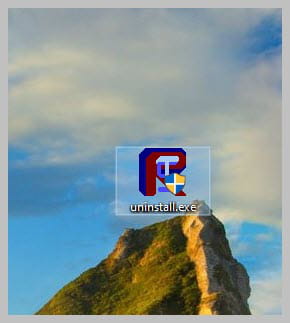
If everything is OK for you, uninstall FRST, rename the FRST file you downloaded to uninstall, then once the file is renamed, open it, and the uninstallation will occur automatically via a restart of the PC.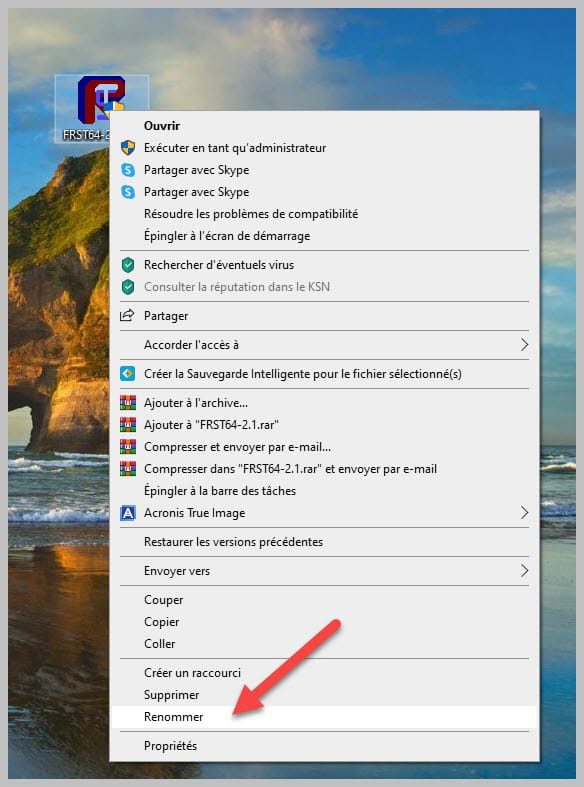
bazfile
Moderator/Security Contributor.
A hello, a response, a thank you are always appreciated. -
Thank you for everything bazfile. I wish you a good weekend.

