
Display issue
Hello, for several months I have had a screen that appears on my computer Windows cannot find epibrowser.exe check that you have entered the correct name and then try again how do I remove it? Thank you for your help Emmanuelle
3 answers
-
Hello,
Epibrowser is a malicious "browser" sometimes installed by downloading it but most often as a "PUA" (installed alongside another software that "offered" this option during installation and which was clicked).
Check if a manual uninstallation resolves the issue; otherwise, renew the question in the Security section for disinfection.
https://howtoremove.guide/fr/supprimer-epibrowser-virus/ -
Moderator
Hello,
You can see it like this:
https://forums.commentcamarche.net/forum/affich-38206831-alors-vous-voulez-supprimer-les-virus-vous-meme-comment
If you have any questions, feel free to ask. -
Moderator
Hello .
This comes from an orphan process; to remove it, please do the following.
Download FRST .
Once downloaded, save FRST on the desktop, then right-click on FRST and select Run as administrator, which will show this:

 Wait for the message the tool is ready to operate to appear, then click on Analyze.
For your information:
 If you receive a Microsoft Defender alert, ignore it, click on More info, then click on Run anyway, see below.

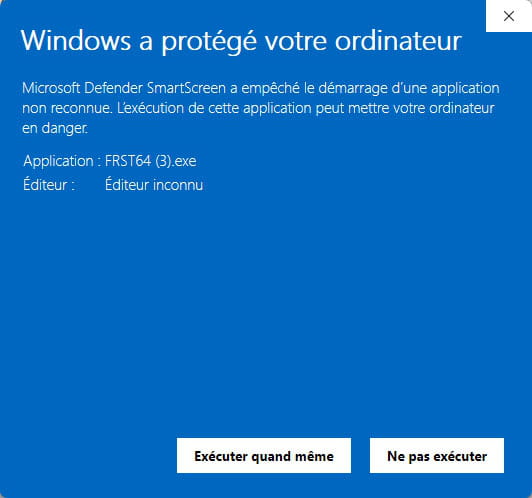
Warning, wait for the messages saying that the scan is complete to appear.


At the end of the scan, the two reports FRST and Addition will be on the desktop.


Send the FRST and ADDITION reports to https://pjjoint.malekal.com/ or https://www.catupload.com/.
Then include the two links generated by https://pjjoint.malekal.com/ or https://www.catupload.com/ in your response.
bazfile
Moderator/Security Contributor.
A hello, a response, a thank you are always appreciated.

