
How to retrieve a slideshow created in LibreOffice
trotte-menu Posted messages 911 Registration date Status Member Last intervention -
Hello,
how can I recover a slideshow made on LibreOffice that tells me

It was on a USB drive. It's the one for my grandson's 20th birthday, and I really wanted to recover it.
Thank you very much.
Best regards.
Nijoma
10 answers
-
Good evening
If it's to retrieve the photos
- Copy the document to the PC
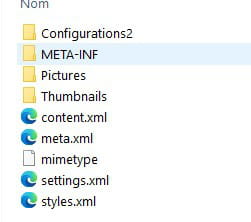
- Select the file > rename the document extension from .odp to .zip; for this, you need to show the extension in File Explorer (see the View tab and check "File name extensions")
- Select the renamed file again
- Right click > Extract All
This creates a folder in which there is a Pictures folder containing the images.
document
-
Good evening and thank you for your response.
But it's not the photos I want to recover, I have those, it's really the slideshow that I spent months creating.
With the path you provided, I will only retrieve the photos without the text I added on them? -
-
Hello,
It was on a USB stick.
1- Is it from this stick that you are trying to recover it or did you transfer it to your machine beforehand?
2- Did you work on it on the USB stick?
I’m adding to what yclik wrote:
Recovering a corrupted ODF file and Tips
MBP + macOS Ventura
OpenOffice, LibreOffice-
Hello,
I tried to open it from the USB stick and then I put it on my external hard drive, but it tells me the same thing.
I worked on it from the external hard drive using my Mac.
I wanted to do what’s in the link, but I don’t have "option":
- Tools Menu > Options > OpenOffice > Security > Macro Security, choose Medium security level
So, what should I do?
Thank you.
Sincerely,
Nijoma
-
-
Hello,
I tried to open it from the USB drive
Very bad idea. One should never work directly from a USB drive, which should only be used for transportation.
After adjusting the macro security settings, you need to download the file TesteurCorruption attached to BM92's message > open it > click on Enable macros > click on the button Analyze the file > navigate to this file and click on Open.
You will get the analysis result. Let us know.
MBP + macOS Ventura
OpenOffice, LibreOffice -
Hello
presumably there should be this access
we would need a screenshot of the display once LO is open
-

And there it is.
Thank you
re
Package because it's on Mac and I'm on Windows and Open Office
see here to configure (pdf doc)
it would be necessary
LibreOffice → Preferences
and page 14
Security options
Use the LibreOffice – Security tab to choose security options when saving
documents or for opening documents that contain macros.Hello,
On macOS, the Security options can be found in the LibreOffice Menu > Preferences > LibreOffice > Security > Macro Security > Security Level Tab > Medium

MBP + macOS Ventura
OpenOffice, LibreOfficeHello,
I did what Trotte-menu said, I set the security level to "medium" for macros, but nothing has changed.
Do you have another solution for me to open this file?
Thank you.
Best regards.Hello,
You probably made at least three mistakes:
- Inserted many large images and maybe multimedia files;
- Worked on a USB stick or external drive;
- Did not make backups.These are crucial elements for the security of your slideshow.
Reminder:
* Inserting numerous images (applicable to Impress and multimedia files)
* Never work on an external device.
* Always make backups and on Mac there is Time Machine which, given the affordable price of an external drive, is worth using.
MBP + macOS Ventura
OpenOffice, LibreOffice
-

