
Connecting headphones to TV via RCA.
baladur13 Posted messages 47419 Registration date Status Moderator Last intervention -
Hello,
My TV has 3 female RCA inputs...
Red...yellow...white
My headphones have 2 male RCA plugs
Red...white
It doesn't work...
So I bought a SCART / RCA adapter
It has 2 female inputs..
Red...white.
It works!!!
Normal????
Not normal????
8 answers
-
Hello,
Please specify what TV you have (brand and model)?
-
Hello,
The exact model of the TV may help answer the question. Because it is not about RCA inputs (sometimes marked IN), it is about outputs (marked OUT).
-
Hello..
A 40-inch TV at a low price..
In...out....nothing marked..
PRINCETON


-
Hello,
RCA inputs on recent televisions are generally inputs (Component). It's not unusual for a headset plugged into these inputs not to work.
If the TV has a Scart connector (in/out), an Audio Scart/RCA adapter will provide sound to a headset, nothing unusual... however, if the TV receives an image from an external device, it's not certain that it will work.
Not finding the manual or a valid description of this Princeton TV model, you should check if there is:
- a 3.5mm headphone jack output (but this usually cuts off the TV speakers),
- a digital audio output (optical or coaxial).A picture of the connectors on the back and side would be appreciated.
What are the references (brand and model) of the headset being used.
Also, please provide the references of any device that might be supplying the image to this television.
It’s very difficult to catch a black cat in a dark room.
Especially when it’s not there... -
Hello Baladur
Yes... I have other ways to connect my headset.
But the fact that the RCA jacks on my TV weren't working worried me.
Your post reassures me... thank you..
My jack socket is occupied by a Bluetooth dongle.
I just ordered an HDMI to Jack adapter..
I think it will be the best solution.
Thanks again...
-
Hello,
I have had this TV for a long time.
No (or no longer) manual or description.
Only a manual for setting it up...
What do you mean by..."that sends the image"?
Sennheiser wireless headset (with stand)
For the HDMI/Jack adapter, I'm receiving it on Friday... I'll keep you updated.
But it should be useful to me afterward because the latest TVs... no SCART or jack plug.
-
The age of the TV has nothing to do with it; it has a reference (label on the back).
For the manual or specifications, I’ll check if it’s available online or not."Who sends the image"? In other words, is there a decoder, a TV box connected to this television?
The headset: Sennheiser OK, but which model?
Recent televisions all have at least some sort of digital audio output, either optical or coaxial, and digital-to-analog audio converters exist.
Moreover, there are also HDMI audio extractors that fit between an external device (decoder, TV box) and the HDMI input of the televisions.
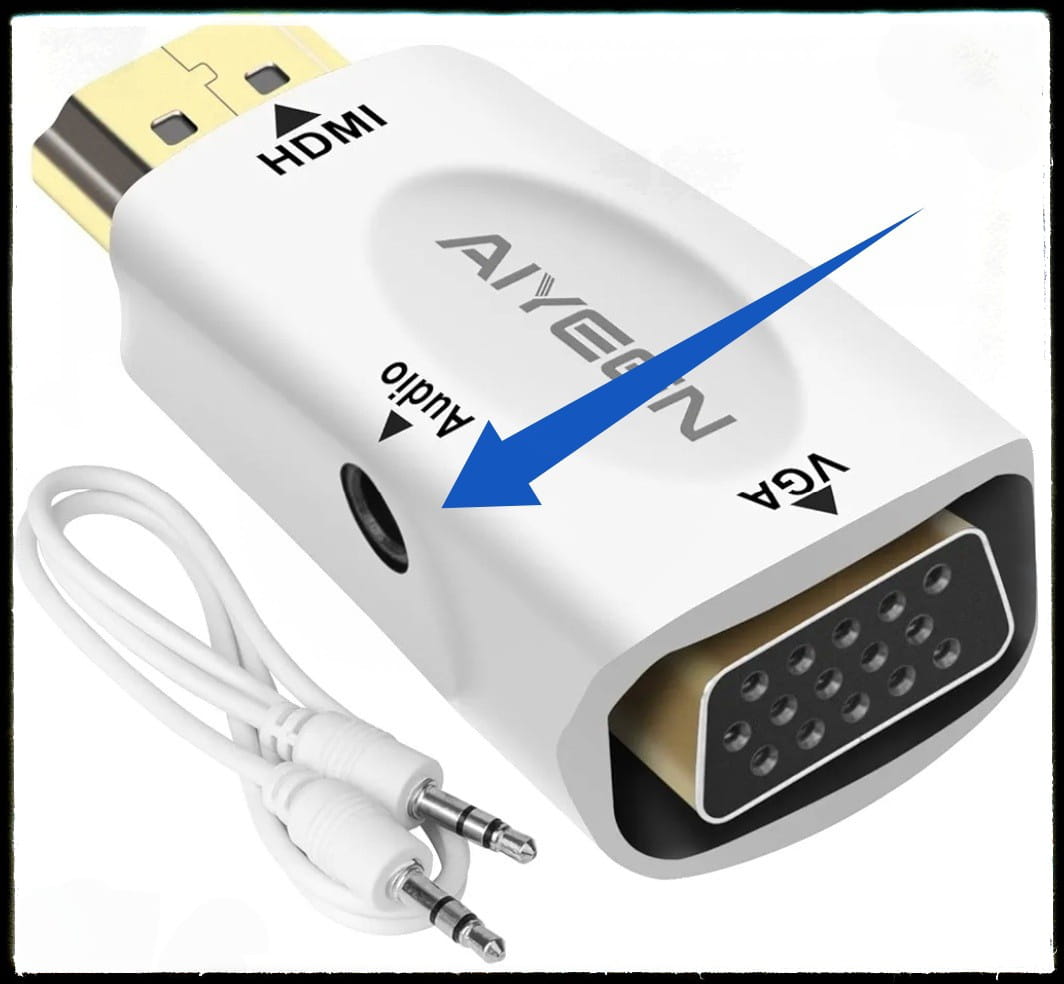
This HDMI to VGA adapter designed to connect an HDMI output from a PC to a VGA screen seems completely unnecessary for use on a television where the HDMI ports are inputs (except for HDMI ARC for sound).
-
-
Hello,
The reference for the TV...you have it on my post from the 17th ...1:37 PM
------------------------
The adapter...did I mess it up???
I see a female jack on the side.
Since it's connected to an HDMI, I won't get sound through this jack?
-
-
Okay for the TV, I had forgotten.. but as already mentioned, nothing online.. so photos of the rear ports would be a plus.
There is indeed a jack output on your adapter, but where are you going to plug the HDMI into the TV? Are you sure it provides sound?
I was suggesting something like this to connect to the digital output (optical or coaxial) of the TV: https://www.amazon.fr/Musou-Convertisseur-Num%C3%A9rique-Analogique-Adaptateur-Amplificateurs/dp/B01CQR21C4
or this type of HDMI audio extractor if you have a decoder or a TV box connected to the TV https://www.amazon.fr/Ozvavzk-Extracteur-Convertisseur-Analogique-Adaptateur/dp/B07KYGVNPW
Furthermore, you say: My jack is occupied by a Bluetooth dongle. But, jack splitters do exist https://www.amazon.fr/Cuteluding-Adaptateur-Compatible-autoradio-Haut-parleurs-Noir/dp/B0C4XQDB6T/
-
-
We no longer know what you are trying to do.
You start with a headset with RCA plug, which works with the Peritel socket with an adapter; isn’t that enough?
This HDMI adapter connects to an HDMI output (you need to understand the concept of output and input on a device). For example, on a PC to connect to a VGA screen with speakers on the Jack plug.
On the TV, most HDMI ports are inputs (except for one HDMI/Arc which is bidirectional), the TV does not send anything to the HDMI; it is waiting for a signal sent by another device.


