Security Health Service using 25% of my CPU
bazfile Posted messages 58537 Registration date Status Moderator Last intervention -
Hello everyone,
I’ve recently been having issues with my computer (Razer Blade advanced - 2019).
I can no longer open Windows Security and the Security Health Center is using 25% of my CPU.
I’m not sure if it’s related, but my CPU is also heating up much more than before, and my PC freezes when it gets too hot.
I ran a scan with Malwarebytes and AdwCleaner, which didn’t find anything unusual...
Any ideas?
Thanks for your help :)
5 answers
-
Hello.
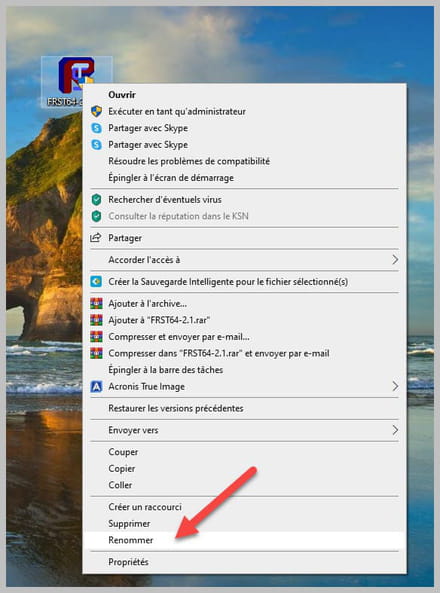
Download FRST once downloaded save it on the desktop then right-click on FRST and choose Run as administrator you will get this:
Click on Analyze

Warning, wait for the messages saying that the analysis is complete to appear.

At the end of the analysis you will have two text files on the desktop FRST and Addition.

Then send the FRST and ADDITION reports to PJJOINT then provide the two links generated by PJJOINT in your response.
bazfile
Moderator/Security Contributor.
a hello, a reply, a thank you are always appreciated. -
Hello,
Could this be replaced by the PC Health Check?
Source: Security Health uses way too much memory.
-
Thank you for your quick responses, here are the files:
FRST: https://pjjoint.malekal.com/files.php?id=FRST_20220926_r11y13m14d11n10
Addition: https://pjjoint.malekal.com/files.php?id=20220926_j11k13w12j14y14
@panth33ra
I'm going to dig into your solution after lunch :)
-
No wonder you're having problems, Windows Defender has warned you several times that you had a potentially infectious file on your desktop, it's a keygen that you used to crack the Native Instruments software.
To stop receiving alerts from Windows Defender, delete the keygen located in:
C:\Users\Martin VDD\Desktop\Musique\Ressources\Native Instruments Synths Bundle 2021.9\Native.Instruments.Absynth.5.v5.3.4.Incl.Patched.and.Keygen-R2R\R2R\NativeInstruments_Keygen.exeAside from that, there is nothing infectious on your PC.
There are errors that have been recorded, they are caused by SecurityHealthService.exe but also by the application Audient USB Audio Driver, but this does not concern an infection and therefore I won't deal with it in the virus/security forum, discuss it with the Windows forum.
There are restrictions and orphaned processes to remove them:
Procedure to follow in the order indicated:
1- Open FRST as an administrator, for that right-click on FRST and choose run as administrator
2 - Copy the entire script that is in the box below:Start:: CreateRestorePoint: CloseProcesses: CustomCLSID: HKU\S-1-5-21-721099943-786999080-816867309-1002_Classes\CLSID\{DF069EDA-D393-4A3B-A796-98796DBB55EF}\InprocServer32 -> C:\Users\Martin VDD\AppData\Local\BraveSoftware\Update\1.3.361.131\psuser_64.dll => No file Startup: C:\ProgramData\Microsoft\Windows\Start Menu\Programs\Startup\SOLIDWORKS Background Download.lnk [2021-08-12] ShortcutTarget: SOLIDWORKS Background Download.lnk -> C:\Program Files (x86)\Common Files\SOLIDWORKS Installation Manager\BackgroundDownloading\sldBgDwld.exe (No file) GroupPolicy: Restriction ? Policies: C:\ProgramData\NTUSER.pol: Restriction EmptyTemp: End::3- Once the script is copied, click on Fix, FRST will automatically take the script from the clipboard.

Allow the fix to complete, once it is done you will be asked to restart your PC, do so as soon as prompted, see below.
Then once your computer has restarted:
4- You will have a Fixlog file on your desktop, then send this fixlog report toPJJOINT then provide the generated link fromPJJOINT in your response.For my part, since there is no infection on the PC, that will be all.
bazfile
Moderator/Contributor Security.
A hello, a response, a thank you are always appreciated. -
Thank you for the feedback, I will check the Windows forum for issues with Audient USB service.
Here is the fixlog: https://pjjoint.malekal.com/files.php?id=20220926_u7z9t8y9c5
Thanks again for the help! :)