
Issue with "rsEngineSvc" running continuously
Solvedbazfile Posted messages 58507 Registration date Status Moderator Last intervention -
Hello,
Junior has played without permission on online servers, installed games... in short, a number of applications have been installed on the computer.
I have done a first round of deletions, but I don't know what should be removed or not? I wouldn't want to delete essential files.
In particular, there is "rsEngineSvc" which can have very high "consumption" in the task manager!
Please, is it an application to remove? If so, how?
There is also RAV Antivirus that has appeared as well as Weather Zero...
Thank you for your help and advice.
14 answers
-
Hello.
Download FRST once downloaded save it on the desktop then right-click on FRST and choose Run as administrator you will have this:
Click on Scan

Warning, wait for the messages saying that the scan is finished to appear.

At the end of the scan you will have two text files on the desktop FRST and Addition.

Then send the FRST and ADDITION reports to CJOINT see THIS TUTORIAL then provide the two links generated by Cjoint in your response.
bazfile
Moderator/Security Contributor.
a hello, a response, a thank you are always appreciated. -
It has now been reinstalled and is called RAV Endpoint Protection. You will need to uninstall RAV with Windows started in safe mode, otherwise it may not work.
Procedure to follow in the indicated order:
Start your PC in safe mode with networking support, see THIS PAGE.
Once your PC has started in safe mode with networking support:
1- Open FRST as an administrator by right-clicking on FRST and selecting run as administrator
2 - Copy the entire script in the box below:Start:: CreateRestorePoint: CloseProcesses: (services.exe ->) (Reason Cybersecurity Inc. -> Reason Software Company Inc.) C:\Program Files\RAVAntivirus\rsClientSvc.exe (services.exe ->) (Reason Cybersecurity Inc. -> Reason Software Company Inc.) C:\Program Files\RAVAntivirus\rsEngineSvc.exe (services.exe ->) (Reason Cybersecurity Inc. -> Reason Software Company Inc.) C:\Program Files\RAVAntivirus\rsWSC.exe (services.exe ->) (Reason Cybersecurity Inc. -> Reason Software Company Inc.) C:\Program Files\RAVAntivirus\x64\rsSyncSvc.exe Task: {CCDFC0B8-01A3-4E74-A820-4F13F51D269E} - System32\Tasks\Microsoft\Windows\Mobile Broadband Accounts\MNO Metadata Parser => C:\WINDOWS\System32\MbaeParserTask.exe (No file) S1 WinSetupMon; system32\DRIVERS\WinSetupMon.sys [X] AlternateDataStreams: C:\ProgramData:err [1420] AlternateDataStreams: C:\Users\All Users:err [1420] AlternateDataStreams: C:\ProgramData\Application Data:err [1420] AlternateDataStreams: C:\Users\Public\Shared Files:VersionCache [10052] FirewallRules: [{C510A49D-84BE-418E-934F-C415CFB5FDE2}] => (Allow) C:\Users\C&C\AppData\Roaming\Zoom\bin\airhost.exe => No file FirewallRules: [{894E7E0A-1B56-4B61-B7D5-657EC6CBDBD2}] => (Allow) C:\Users\C&C\AppData\Roaming\Zoom\bin\airhost.exe => No file C:\WINDOWS\system32\Drivers\ReasonCamFilter.sys R1 ReasonCamFilter; C:\WINDOWS\System32\DRIVERS\ReasonCamFilter.sys [49992 2022-09-06] (Reason CyberSecurity Inc. -> Reason Software Company) R2 rsClientSvc; C:\Program Files\RAVAntivirus\rsClientSvc.exe [728904 2022-09-06] (Reason Cybersecurity Inc. -> Reason Software Company Inc.) R2 rsEngineSvc; C:\Program Files\RAVAntivirus\rsEngineSvc.exe [354632 2022-09-06] (Reason Cybersecurity Inc. -> Reason Software Company Inc.) R2 rsSyncSvc; C:\Program Files\RAVAntivirus\x64\rsSyncSvc.exe [578736 2022-08-29] (Reason Cybersecurity Inc. -> Reason Software Company Inc.) R2 rsWSC; C:\Program Files\RAVAntivirus\rsWSC.exe [204504 2022-09-06] (Reason Cybersecurity Inc. -> Reason Software Company Inc.) (C:\Program Files\RAVAntivirus\rsEngineSvc.exe ->) (Reason Cybersecurity Inc. -> Reason Software Company Inc.) C:\Program Files\RAVAntivirus\rsHelper.exe C:\ProgramData\RAVAntivirusBackup C:\Users\C&C\AppData\Roaming\rav-antivirus-client C:\ProgramData\RAVAntivirus C:\Program Files\RAVAntivirus C:\ProgramData\RAVVPNService C:\ProgramData\RAVVPNBackup EmptyTemp: End::3- Once the script is copied, click on Fix, FRST will automatically take the script from the clipboard.

Let the fix run; once it's done, you will be asked to restart your PC. Do so as soon as you're prompted, see below.
Then once your computer has restarted:
4- You will have a Fixlog file on your desktop; then send these reports to https://www.cjoint.com/, see this tutorial, then give the link generated by Cjoint in your next message.5- CHECK AND TELL ME IF YOUR PROBLEM IS STILL PRESENT
bazfile
Moderator/Security Contributor.
A hello, a response, a thank you are always appreciated. -
It's starting off badly, I can't even run FRST as an administrator.
It tells me that it contains a virus.
Blocked by Microsoft Defender and RAV antivirus even though I try to force it by allowing it anyway.
Now when I click as an administrator I get the message "The operation cannot be completed because the file contains a virus or potentially unwanted software."
And if I want to delete the FRST file (to download it again) it says "Action interrupted, an unexpected error prevents you from deleting the file. Error 0x800700E1: cannot complete the operation because the file contains a virus or potentially unwanted software."
-
Finally, I managed to do it by temporarily disabling RAV antivirus, which then tried to block me again.
I had to force the authorization of Microsoft Defender.
I don't know where RAV antivirus comes from, but I think it would be better to remove it if you could also help me with that, please?
PS: I thought I had removed Startallblack, but it still appears in the txt files...
FRST report https://www.cjoint.com/c/LIgjbdsnKEg
FRST Addition report https://www.cjoint.com/c/LIgjcHkY0xg
Thank you very much.
-
You have a PC that originally had Windows 10, which was not compatible with Windows 11, so you followed the procedure from Team AveYo, and the upgrade to Windows 11 went well.
As for rsEngineSvc, it is a process that comes from the RAV antivirus. Windows 11 already has its own antivirus, which is effective and sufficient; it activates automatically as soon as no other antivirus is installed or activated on the PC.
Since you say you want to remove RAV antivirus, to do so and simultaneously remove rsEngineSvc, uninstall it using Revo Uninstaller in advanced scan mode (see the detailed tutorial at the end of the message).
Also uninstall the following software with Revo Uninstaller:
Safer Web and VPN by RAV are add-on modules of RAV that installed at the same time; if you don't use them, uninstall them.
Since you say you want to do it, uninstall WeatherZero, it's probably adware.
WebAdvisor by McAfee is unnecessary adware.
If you don't wish to keep anything related to games, you can uninstall:
Epic Games Launcher
Epic Online Services
Steam
That's a first list; it's up to you to decide what to uninstall based on whether you use these programs or not.
Once you have uninstalled the software you do not wish to keep, perform a new FRST scan and provide the links to both reports.
FOR UNINSTALLATION:
Revo Uninstaller Tutorial to read carefully.
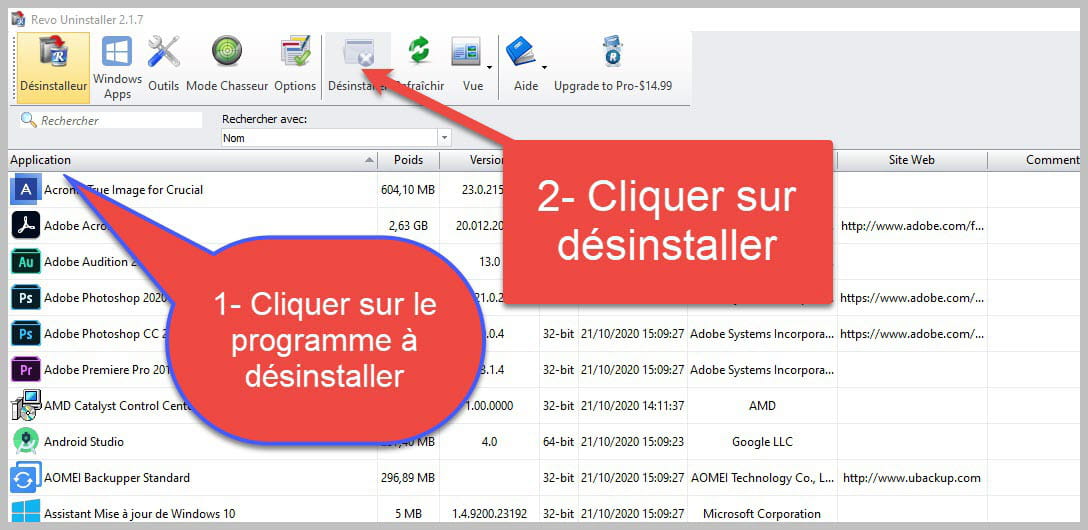

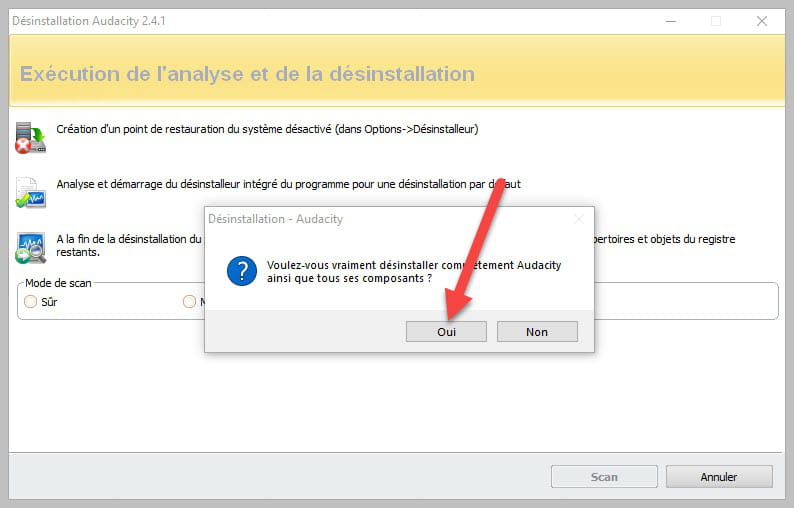
Accept the uninstallation of the program you want to uninstall, and if there is an error message stating that uninstallation is impossible, close the error message and continue the procedure.

Check "Advanced Scan" and then click on "Scan".

Click on "Select All" then on "Delete"; if a second list appears, do the same, and once everything is deleted, click on "Finish"; a restart may be required.
-
-
Thank you, it's a visiting friend who changed the SSD capacity and reinstalled Windows 11.
I have deleted the software related to Rav, Opera, Weather Zero, Webadviser, as well as Startallblack and Lord of the Rings.
I'm keeping Junior's games.
I performed the restart.
This time I'm completely stuck trying to run FRST. I can't delete it. I have to reinstall it and relaunch it in administrator mode to see the message to force the passage.
“additional information” then on “run anyway”. I'm doing this correctly, a window opens, I click yes to authorize anyway and then nothing happens except the error message “Action interrupted, an unexpected error is preventing you from deleting the file. Error 0x800700E1: unable to complete the operation because the file contains a virus or potentially unwanted software.”
What should I do, please?
Otherwise, this friend had configured the taskbar and startup screen like the older versions, and all of that is gone.
-
Put FRST in the Windows Defender exclusions.
Otherwise, this friend had set up the taskbar and start screen like the older versions, and all of that has disappeared.
It's normal since you uninstalled startallblack.
-
-
It still doesn't work.
I had a hard time finding it and in the end, surprise, Windows Defender remains disabled and I can't activate it.
Reason Cyber Security is still there! and I can't disable it. That's what's blocking me.
I took a screenshot

-
I restarted Revo Uninstaller, these files no longer appear.
I checked the task manager, there is still "rsEngineSvc"...

-
Yes, I uninstalled RAV antivirus first.
Software related to RAV: I uninstalled it carefully following the procedure (advanced mode, scan, select all then delete for both windows, done), I did this successively for RAV antivirus, then Safer Web, then VPN by RAV.
RAV has just reinstalled/reappeared in the software via the up arrow located in the taskbar on the right. I was able to make an exclusion again to launch FRST.
I am attaching both reports below as well as a screenshot
-
Thank you very much!
I am impressed by the script!!!
I did everything as instructed.
At the time of the reboot, I received this error message


then I was able to access the blue screens to restart in safe mode with networking.
I performed the indicated manipulations and restarted immediately as soon as the requesting message appeared.
Fixlog Report: https://www.cjoint.com/c/LIgnPpJZzVg
(NB: I have never been able to access the cjoint tutorial)
For now, the RAV Antivirus problem seems to be resolved as it has not reappeared.
- Is it possible to be certain of that?
- Could you please tell me how to restore the startallblack toolbar? I thought it was a malicious adware related to rugby...
(I remembered that speedfan was used to monitor the hard drive temperatures (the previous one was overheating before changing and it was an original 100GB SSD that was struggling to run Windows and its updates... but I hadn't paid attention to startallblack)
- Do you see anything else that needs cleaning or anything to do to optimize the computer?
Thank you very much for your help, I could never have done this alone (even the first steps)
-
For startallblack, you just need to install it, but be careful it is free during a trial period, after which you will need to purchase it to continue using it. Also, check out this page for more information; you need to be cautious with these tweakers as they can sometimes cause bugs.
The FRST fixlog is OK, RAV is no longer active on your PC.
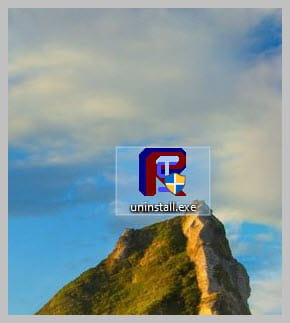
If everything is also OK on your side, you can uninstall FRST. Rename the FRST file you downloaded to uninstall, then once the file is renamed, open it, and the uninstallation will occur automatically via a restart of the PC.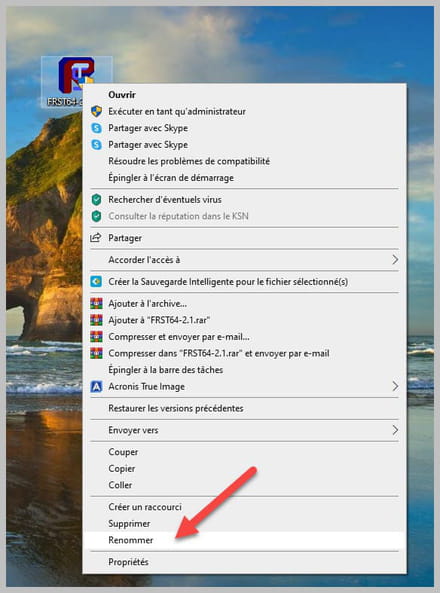
-
-
Thank you very much,
I believe it was a final version of startallblack that was installed, given your opinion I will not take any risks and will first try to get familiar with the new Windows 11 layout.
The manipulation for FRST worked well.
I still received the same error message as before.
What can I do please?

-
No, it's not resolved.
It's still there, RAV still appears, I just took a screenshot.

-
Great, phew!!!
Thank you very much, I deleted the entry as indicated.
Should I be worried about the MEMORY_MANAGEMENT error code?
-
I got it again when I restarted the computer to uninstall FRST and rebooted the computer.
-
Since this happened before uninstalling RAV via the FRST script, I thought it was RAV that caused this occasional bug during startup in safe mode, which is common with antivirus software like RAV.
The causes of this BSOD can be multiple, it's hard to tell you exactly what the problem is; it could come from a driver, a faulty RAM stick, etc., etc....
Check out this page.
You can also check if all the drivers on your PC are up to date; I advise you to ask the question in the Windows 11 forum because this goes beyond the scope of the virus/security forum.
To update your drivers, since you apparently have a Dell Inspiron 5680, if that's the case, do an automatic search on DELL's website.
-
-

