How to remove a line in grub?
Solved
Gerard.isa
Posted messages
108
Status
Member
-
Gerard.isa Posted messages 108 Status Member -
Gerard.isa Posted messages 108 Status Member -
Hello,
On an old PC, I installed Windows 7 and Lubuntu.
I have 2 lines in the grub for launching Windows.
One works, the other does not.
I would like to delete this line, but I don't know how to do it.
Thank you for guiding me on how to proceed. Hello,
On an old PC, I installed Windows 7 and Lubuntu.
I have 2 lines in the grub for launching Windows.
One works, the other does not.
I would like to delete this line, but I don't know how to do it.
Thank you for guiding me on how to proceed. Hello,
5 answers
-
Hello,
You need to tellos-prober
to ignore certain partitions (specifically, the one associated with the invalid Windows entry) by using theGRUB_OS_PROBER_SKIP_LIST
option (see this discussion). In your case, you need to filter out the device that contains the "invalid" Windows.
Another, more radical solution: delete the said partition if you don’t need it, and then runsudo update-grub
.
Good luck. -
Thank you, mamiemando.
But the first solution you proposed is too technical for me.
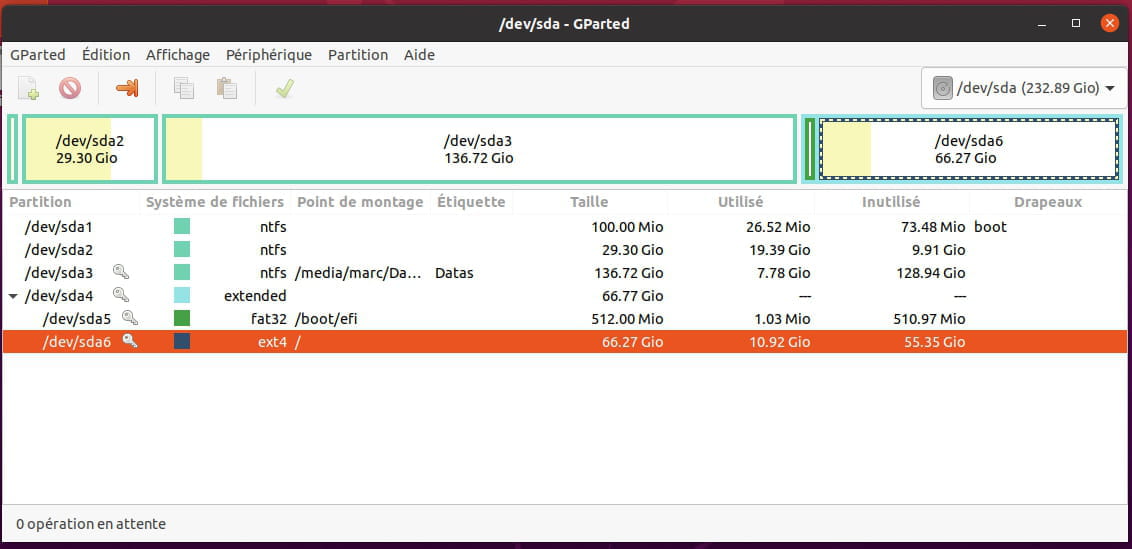
For the second one, how do we delete a partition and how do we know which one?
Here's a screenshot of Gparted, I don't see any partition to delete.

-
Good evening,
I have the solution, just install GrubCustomizer. -
Very simple, just install it.
Once launched, it displays all the lines of the grub.
You can delete, move...
Really very simple -
Thanks for your feedback, but I'm afraid you'll have to do it again at the next update of your kernel (which leads to a regeneration of grub).
I didn't know that. But as mentioned earlier, it's really easy to do.