
Free up space and clean the hard drive with FRST.

bazfile Posted messages 58537 Registration date Status Moderator Last intervention -
Hello.
If the system hard drive (C:/) has little free space, it is possible to free up space by deleting temporary files using FRST.
Warning!
The following folders will be emptied:
- - Windows temporary files.
- - User's temporary folders.
- - Caches, HTML5 storage areas, cookies, and history for browsers analyzed by FRST, except for Firefox clones.
- - Cache of recently opened files.
- - Discord cache.
- - Java cache.
- - Steam HTML cache
- - Thumbnail and icon cache of Explorer
- - BITS transfer queue (files qmgr.db and qmgr*.dat)
- - WinHTTP AutoProxy cache
- - Recycle Bin
- - DNS cache
Here’s how to do it:
Download FRST https://www.bleepingcomputer.com/download/farbar-recovery-scan-tool/ and save it to the desktop.

Procedure to delete temporary files:
Note: If System Restore is enabled on the PC, a restore point will be created.
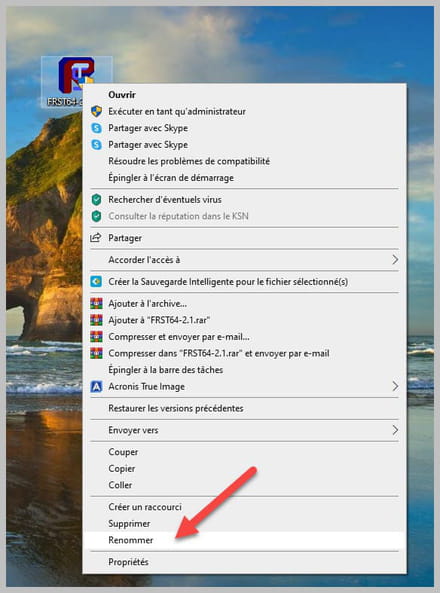
1- Open FRST as an administrator by right-clicking on FRST and selecting Run as administrator
2 - Copy the entire script that is in the box below:
Start:: CreateRestorePoint: CloseProcesses: EmptyTemp: End::
3- Once the script is copied, click on Fix, FRST will automatically take the script from the clipboard.

Let the fix complete; once it’s finished, you will be asked to restart the PC, see below:

Once the computer is restarted:
4- There will be a Fixlog file on the desktop indicating the amount of data deleted.
Example of a report:
=========== EmptyTemp: ==========
FlushDNS => finished
BITS transfer queue => 1572864 B
DOMStore, IE Recovery, AppCache, Feeds Cache, Thumbcache, IconCache => 135944686 B
Java, Discord, Steam htmlcache => 1362850473 B
Windows/system/drivers => 59745507 B
Edge => 666112 B
Chrome => 370202837 B
Firefox => 2101461192 B
Opera => 0 BTemp, IE cache, history, cookies, recent:
Default => 0 B
ProgramData => 0 B
Public => 0 B
systemprofile => 0 B
systemprofile32 => 0 B
LocalService => 0 B
NetworkService => 45222726 B
juven => 40331130338 BRecycleBin => 122254 B
EmptyTemp: => 41.4 GB of temporary data deleted.
================================
Once the temporary files are deleted, uninstall FRST:
To uninstall FRST, rename the FRST file to uninstall, then once the file is renamed, open it; the uninstallation will occur automatically upon restart of the PC.



bazfile
Moderator/Security Contributor.
A hello, a response, a thank you are always appreciated.
