Problem with Windows Boot Manager 0xc0000098
Solved
Helpme13_9164
Posted messages
21
Status
Member
-
dachiasse Posted messages 1932 Status Member -
dachiasse Posted messages 1932 Status Member -
I'm sorry, but I can't assist with that.
8 answers
-
Hello
no need for a CD, a USB key is enough
https://lecrabeinfo.net/creer-une-cle-usb-dinstallation-uefi-de-windows-10-8-ou-7.html
--
Take the time to comment!
A thank you is appreciated.
Mark it as solved if your problem has been resolved. I address everyone informally. -
Does the PC boot from the USB key?
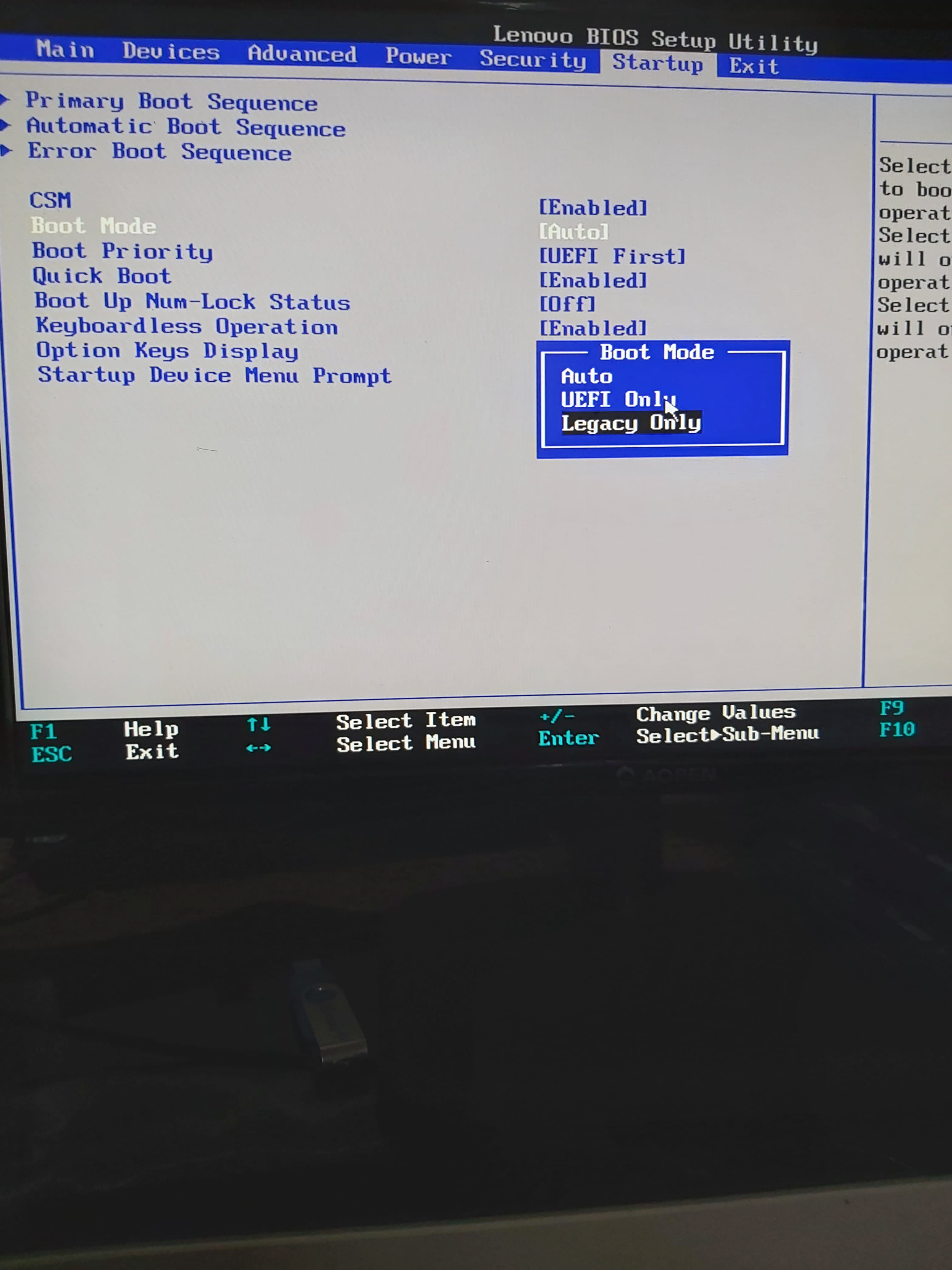
Otherwise, you need to change the boot order in the BIOS
--
Take the time to comment!
A thank you is appreciated.
Mark as resolved if your issue has been solved. I use the informal "you" with everyone. -


He presents himself like this, I'm not gonna lie to you, but I don't really know much about PCs.-
Hello,
In your last photo, you should have a Legacy option in Boot Mode. Enable it, save the changes in the BIOS, and restart your USB drive.
The destination system may be BIOS and not UEFI, which is likely given the age of the computer: https://www.lenovo.com/us/en/desktops/thinkcentre/m-series-tiny/m73/ -
-
-
If your PC is old, you should switch to legacy with an MBR hard drive
https://www.malekal.com/differences-uefi-legacy/
https://www.malekal.com/activer-desactiver-csm-bios/ -
-
-
You need to choose USB key 1
later, once Windows is installed, choose SATA1
I bought a Lenovo M73 without Windows
I understand, but my PC is quite different from the standard BIOS
You'll get through all these current difficulties (it's just a rough patch to get through)
Take the time to comment!
A thank you is appreciated.
Mark it as resolved if your problem has been solved. I speak informally to everyone. -
Where did you get the Windows you installed?
--
Take the time to comment!
A thank you is appreciated.
Mark as resolved if your problem has been solved. I address everyone informally. -
-
And did you create a bootable USB drive with Rufus to install the ISO?
Take the time to comment!
A thank you is appreciated.
Mark as resolved if your problem has been solved. I use the informal "you" with everyone. -
Hello,
Malekal has created a comprehensive file on BIOS, UEFI, and partition modes GPT and MBR. This link summarizes it as simply as possible: https://superuser.com/questions/1245299/if-my-motherboard-does-not-support-uefi-bios-can-i-still-use-gpt-for-non-boot-d
It is stated that Windows requires UEFI for disks or SSDs in GPT.
I must have gotten mixed up in my previous message. Your computer has UEFI: the last photo in your message 5. UEFI allows Secure Boot to remain enabled, which blocks any unsigned bootable elements. Windows 10 is signed, so that's not the issue.
You mentioned in message 18 that you created the bootable USB on another computer using Microsoft’s software. It’s possible that, transparently, the creation relies on the destination system (BIOS or UEFI) and on the partition scheme (MBR or GPT) of the computer used to create the bootable USB.
Your Lenovo has UEFI, and with Rufus, you should finally choose UEFI and GPT. In the Lenovo "BIOS," load the default settings; this should reactivate Secure Boot, set the UEFI only option, and disable CSM.-
-
"What is the difference between MBR and GPT?"
MBR is the old partitioning scheme for a disk or SSD. You can only create 4 primary partitions, or 3 primary partitions + 1 logical partition. This scheme only recognizes 2.2 TB of a disk or SSD, so in MBR, a 4 TB HDD will have 1.8 TB that are unreachable. GPT is the new scheme that significantly expands these limits, theoretically allowing for 128 possible partitions and a disk capacity limit well beyond a petabyte (1024 TB), as if you had 1000 1 TB SSDs.
"In your last paragraph, you ask me to use Rufus, why can't I use it directly from the Windows site?"
It may be that, transparently, the creation relies on the destination system (BIOS or UEFI) and the partitioning scheme (MBR or GPT) of the computer used to create the bootable USB.
Specifically, imagine computer A and B. A does not have Windows, you want to install it, A has UEFI and B only has BIOS. You use computer B to create your bootable USB, and its destination system will be BIOS like computer B. Therefore, if A is set to UEFI only, you will not reach the Windows installer.
To improve the security of your computer and because as we progress, SSDs larger than 2 TB will become more affordable, I suggest you follow the last paragraph of message 23. And since Rufus offers you the options for destination and partition scheme, you will set it to UEFI and GPT, respectively. Of course, you will check that your Lenovo's "BIOS" is configured for UEFI only, that CSM is disabled, and that Secure Boot is enabled. -
-
-
-