External hard drive recognized as elements 25A2
Solved
Hello, I booted my 2TB Western Digital hard drive to install Windows on another PC. Once that was done, I wanted to unboot it, so I deleted everything on it, but I saw that it was recognized with a capacity of 31GB. I then went into "Create and format hard disk partitions" and I clicked the wrong button: I hit "Delete Volume."
Now the problem is my hard drive is no longer usable. It is now named Elements 25A2.
Device information:
Manufacturer: not available
Model: Elements 25A2
Model Number: Not available
Categories: Storage device
Description: Not available
I tried to fix the problem by deleting the device and clicking on populate... nothing works.
Can someone tell me how to reset everything to normal?
Thank you in advance.
Now the problem is my hard drive is no longer usable. It is now named Elements 25A2.
Device information:
Manufacturer: not available
Model: Elements 25A2
Model Number: Not available
Categories: Storage device
Description: Not available
I tried to fix the problem by deleting the device and clicking on populate... nothing works.
Can someone tell me how to reset everything to normal?
Thank you in advance.
1 answer
-
For your information, the hard drive is no longer displayed in "Disk Management" or in the Windows library.
-
-
-
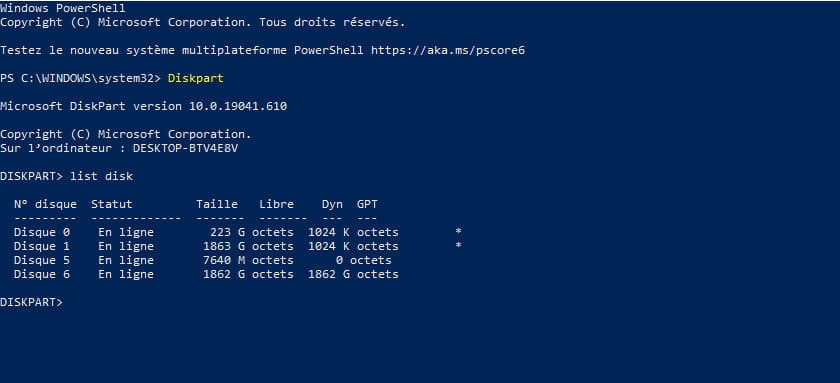
Contributor@Clement95290you have two disks of the same capacity (2TB)
disk 1 and 6
to avoid disk error, unplug the disk in question
return to Diskpart, check the disk numbers
and tell me which number is the disk in question (1 or 6) -
@jfmimiIt's good the 6, the 1 is internal.
-
Contributor@Clement95290type select disk 6
then type " clean "
next type " create partition primary "
give a screenshot
-