FRST64 in French cordially
Hello, I am looking for the FRST64 software in French in order to have my HijackThis log analyzed. Best regards
13 answers
-
Moderator
Hello,
FRST and HijackThis are very different things.
FRST is efficient and still relevant while HiJackThis is an ancestor, a dinosaur that no one uses anymore.
If you want something more intuitive (visual interface with clicks) with a performance level that depends on the person between the chair and the screen, for me it’s enough:
https://forums.commentcamarche.net/forum/affich-38206831-alors-vous-voulez-supprimer-les-virus-vous-meme-comment
The FRST downloads are found here:
-
Moderator
.
Regarding updating Windows 11, I told you in my previous message that you should post the question in the Windows 11 forum, because here it is the security forum and I only handle matters related to the FRST procedure; and your initial question concerning FRST, the advice given at the start of my previous messages was only indicative (updates and RAM). For more details, post the question(s) in the appropriate forum.
-
Moderator
Re-bonjour
Copy this bold text into a text file (.txt)Windows Registry Editor Version 5.00
[HKEY_LOCAL_MACHINE\SYSTEM\Setup\MoSetup]
"AllowUpgradesWithUnsupportedTPMOrCPU"=dword:00000001
Then do with Notepad: Save as >
Type: choose: All Files
And File name: end the name with .reg rather than .txt and save
Then run the .reg file
Then proceed to upgrade by forcing with the Windows 11 ISO fileWhen you have the ISO file, right-click > Open with > Windows Explorer
Then click the setup.exe file
Follow the instructions to "install" without erasing everything, making sure the checkboxes indicating that you keep everything are indeed Okay.
-
ModeratorHello again,
The USB key must be reliable; it always serves as a backup, but I would prefer the method directly from Explorer using the .ISO 26H2 file.
Does your .reg file have the same icon as my image?
No matter the name of the .reg file, as long as it ends with .reg if you enable file extensions in Windows Explorer Options, but without displaying them, you can recognize a .reg file by its icon. If that side is OK, merging or double-clicking it and accepting the risks should add what needs to be added.
You can read here for information if my method doesn’t help:
https://www.malekal.com/forcer-mise-a-jour-windows-11-25h2-pc-non-compatible/ -
ModeratorHello,
We don’t analyze a HijackThis log with FRST.
FRST is multilingual, including French. You can download it from this page:
https://www.bleepingcomputer.com/download/farbar-recovery-scan-tool/
If you want, I can analyze your FRST reports. Here is what to do:
- Download FRST.
- After downloading, save FRST to the desktop, then right-click FRST and choose Run as administrator, which gives this:
[image sequence showing FRST analyzer steps]
- Wait for the message that the tool is ready to run, then click Analyze.
- Important: wait for the messages saying that the analysis is finished.
- At the end of the analysis, the two reports FRST and Addition will be on the desktop.
- Send the FRST and ADDITION reports to https://pjjoint.malekal.com/ and paste the two links generated by that site in your reply.
For information:
If opening FRST triggers a Microsoft Defender alert, do not worry—click on Additional information, then Run anyway.
End of guide.
bazfile
Moderator/Security Contributor.
A hello, a reply, a thank you are always appreciated. -
Good evening Bazfile, thank you for all the details provided. After downloading FRST and following the advised procedure, I am sending you the two FRST and Addition reports.
https://pjjoint.malekal.com/files.php?read=FRST_20261012_8ccc4e97bc0e9bbe
https://pjjoint.malekal.com/files.php?read=20261012_a6c60c7e94df35d5
Sincerely
Sincerely
-
Moderator
.
Your Windows 11 version is not up to date; you are on version 22H2, which dates from 4 years ago. This version has not received updates from Microsoft since 08/10/2024 .
Having Windows not up to date is normal since your PC is not compatible with Windows 11; on this type of PC, upgrades do not happen automatically and must be done manually see this page. For more details, ask a question in the Windows 11 forum.
Your PC is an ASUS X705UA; you only have 4 GB of RAM, which is not enough to give it any extra breathing room. It would need 4 GB more RAM. For more details, ask a question in the Motherboard/ RAM Forum.
Regarding the security forum, you have Adware and orphan/obsolete processes. To remove all of that, do the following in this order:
1- uninstall Web Companion as it is adware.
2- FRST correction.
1- Open FRST as administrator by right-clicking FRST and choosing run as administrator
2 - Copy the entire script contained in the box below:Start:: CreateRestorePoint: CloseProcesses: HKLM\SOFTWARE\Microsoft\Windows Defender: [DisableAntiSpyware] Restriction HKLM\SOFTWARE\Microsoft\Windows Defender: [DisableAntiVirus] Restriction HKU\S-1-5-21-1018027196-1470103251-1920072918-1001\...\Run: [Web Companion] => C:\Program Files (x86)\Lavasoft\Web Companion\Application\WebCompanion.exe [3557520 2025-11-21] (7270356 Canada Inc. -> Lavasoft) GroupPolicy: Restriction ? GroupPolicy-Firefox: Restriction Policies: C:\ProgramData\NTUSER.pol: Restriction HKLM\SOFTWARE\Policies\Mozilla\Firefox: Restriction Task: {E0FDDD3D-2704-4F71-B815-2F5CBE856E85} - System32\Tasks\GoogleUpdateTaskUserS-1-5-21-1018027196-1470103251-1920072918-1001Core{4CA0C01B-E56A-4C10-A7A5-E329543D0322} => C:\Users\Gérard\AppData\Local\Google\Update\GoogleUpdate.exe /c (No file) Task: {B8CDEC79-F5B0-49A4-918B-2693563EDCFB} - System32\Tasks\GoogleUpdateTaskUserS-1-5-21-1018027196-1470103251-1920072918-1001UA{0BC59074-0890-417B-89F7-6CD2D8686BC1} => C:\Users\Gérard\AppData\Local\Google\Update\GoogleUpdate.exe /ua /installsource scheduler (No file) Task: {E0F10DCF-44AD-40E8-9370-FB5DA59F93FB} - System32\Tasks\Microsoft\Windows\UpdateOrchestrator\USO_UxBroker => %systemroot%\system32\MusNotification.exe (No file) Task: {6A4EEC41-99A2-4003-9173-D85ECC790EFF} - System32\Tasks\MyASUS Update Messenger => C:\Users\Gérard\AppData\Local\MyASUS Update Messenger\UpdateMessenger.exe [16185424 2026-05-13] (SweetLabs Inc -> SweetLabs, Inc) S2 DCIService; C:\Program Files (x86)\Lavasoft\Web Companion\Service\x64\DCIService.exe [3420376 2025-11-21] (Lavasoft Software Canada Inc. -> ) R4 WCAssistantService; C:\Program Files (x86)\Lavasoft\Web Companion\Application\Lavasoft.WCAssistant.WinService.exe [27792 2025-11-21] (7270356 Canada Inc. -> ) IE trusted site: HKU\.DEFAULT\...\webcompanion.com -> hxxp://webcompanion.com IE trusted site: HKU\S-1-5-21-1018027196-1470103251-1920072918-1001\...\webcompanion.com -> hxxp://webcompanion.com C:\Program Files (x86)\Lavasoft cmd: netsh advfirewall reset End::3- Once the script is copied, click Fix; FRST will automatically take the script from the clipboard.
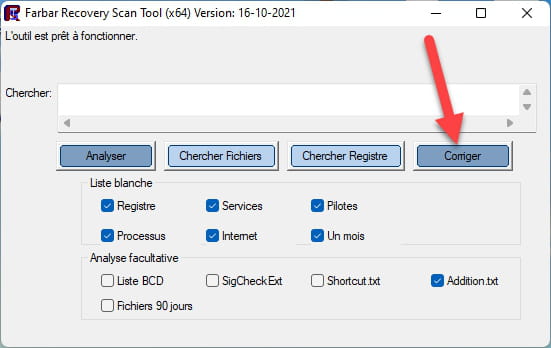

Let the correction run; once it finishes you will be prompted to restart your PC, do it as soon as asked, see below.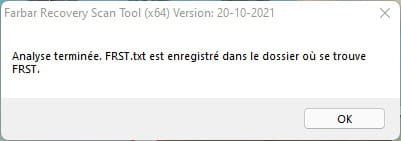
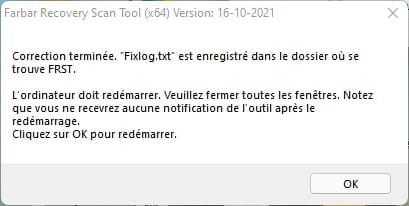

Then once your computer restarts:
4- You will have a Fixlog file on your desktop; then send this report fixlog to or .Then give the link generated by or in your reply.
bazfile
Moderator/Security Contributor.
a hello, a reply, a thank you always pleases. -
Hello Bazfile, Oops, I downloaded Windows 11 and wanted to transfer it to the USB key. Message after starting the process: Your processor is not compatible with Windows 11. So I tried to download Windows 10 but it refuses because Windows 11 is in installation???
I’m struggling, I’m struggling (grandpa at 78)
Best regards
-
Good evening Fabul, I am terribly anxious at the thought of making a fatal mistake...
Windows Registry Editor Version 5.00
[HKEY_LOCAL_MACHINE\SYSTEM\Setup\MoSetup]
"AllowUpgradesWithUnsupportedTPMOrCPU"=dword:00000001
this is exactly what’s in my notepad.
When I type "run" at the bottom left "search" it tells me "cmd Modifregirtre.reg
Should I answer yes to the question; would you like to allow changes to your computer?
Feel free to tell me if my level is pitiful and that I should rather contact a professional; I would not be offended and I would understand easily!.
Best regards -
Moderator
Good evening,
Yes, this is indeed the text to copy, with the same syntax.
The .reg file saved on your desktop should look like this:
You can right-click the Merge option, but I’m used to double-clicking as if it were a simple program, and yes, we answer Yes to modify the registry.
To add to the registry subkeys if non-existent, a value, and a data for the value, which is automatically done with this maneuver.
----------------------------------------------------------------------------------------------------------------------------------
To explain in more detail (Optional), if you’re interested and want details on registry modification)
Subkeys Setup and MoSetup are added if they do not exist at the location HKEY_LOCAL_MACHINE\SYSTEM
A 32-bit DWORD value parameter is added under the MoSetup key which Windows would understand, translating from English to French for fun (for the example) of:
AllowUpgradesWithUnsupportedTPMOrCPU
to
AutoriserLesMisesÀJourMajeuresAvecCPUOuTPMNonSupportés
And the 1 at the end is a data often positive (Yes) that we add to the value, compared to a 0 which is often used as negative (No)
The registry can also be viewed or modified by running Regedit in Windows, but it’s simpler and less risky to create a .reg file and run it, and of course, by accepting the risks each time.
Good luck. -
Hello fabul, I don't know if I'm making progress, but for now I have Windows 11 on a USB drive. I just checked the registry editor to see if the command line was there; In HKEY_LOCAL_MACHINE\SYSTEM\sétup\Mosetup
I can't find anything that resembles my line:
AllowUpgradesWithUnsupportedTPMOrCPU"=dword:00000001
-
Sorry, I hadn't finished
It was while trying to launch the Windows 11 installation that the message about my processor's lack of compatibility appeared ... which I looked up in the registry.
Many thanks again for the team's patience.
Sincerely
-
Hello again fabulous, this time it’s complete saturation, I thank you infinitely for all the help provided which would certainly have had success with someone a bit younger and more familiar with the computer tool. Therefore, I give up!
My machine will stay in its “as is”
Thanks again to everyone, have a good day
Gérard