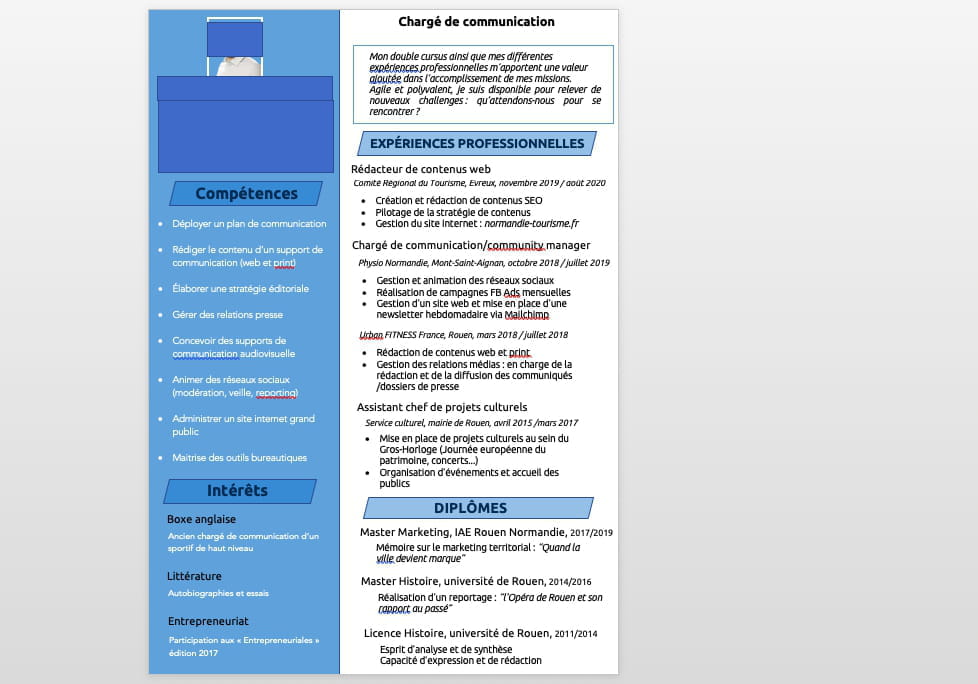
Shift when exporting from Word to PDF
Cl_6800
Posted messages
2
Status
Member
-
Aliboron Martin Posted messages 3664 Registration date Status Contributor Last intervention -
Aliboron Martin Posted messages 3664 Registration date Status Contributor Last intervention -
Hello everyone,
Since yesterday, all my resumes created with Word are misaligned when exporting to PDF (it definitely
didn't do this before).
I am currently job hunting and would like to resolve this problem that is hindering the submission of my applications.
I have already looked into the provided solutions BUT I don’t understand much.
Note: I am on a Mac Air.
A thousand thanks to the kind soul who will respond to this post in simple and accessible language.
Clément
Since yesterday, all my resumes created with Word are misaligned when exporting to PDF (it definitely
didn't do this before).
I am currently job hunting and would like to resolve this problem that is hindering the submission of my applications.
I have already looked into the provided solutions BUT I don’t understand much.
Note: I am on a Mac Air.
A thousand thanks to the kind soul who will respond to this post in simple and accessible language.
Clément
7 answers
-
Hello,
Resolved method on the CCM Forum... https://forums.commentcamarche.net/forum/affich-31543801-decalage-entre-word-et-pdf-sous-mac
--
ASUS ROG G752 VSK | QuadCore Intel i7 7700HQ | 32 GB-DDR4 | 2 SSD M.2 500 GB | 2 Seagate 2TB HDD | GeForce GTX 1070M 8 GB | 17.3" screen (120 Hz) | DirectX 12 | Windows 10 (x64) -
-
Which version of Word is being referred to? Which update level? On which version of macOS? What is the default printer selected on your Mac? What is meant by "are offset" (feel free to include a screenshot, it can be very illustrative)? For creating PDFs, do you go through the print dialog or "Save as..."?
Hello at your place!
Bernard -
Word 2016
MAC OS Big Sur
version 11.0.1 (20B29)
You will find my CV in Word format and CV in PDF format. The left column misalignment is obvious. (do not take into account the blue rectangles, they are to hide personal data)


-
Due to a lack of precise data, it's not easy to diagnose. There isn't much difference between the two, if I'm not mistaken, there are essentially three cases of words that are no longer wrapped to the next line when creating the PDF. I believe it’s probably a font rendering issue, with the system’s font being slightly different from the one used in Word.
What are the fonts being used? What is the default printer model selected on your Mac? Is the printer driver up to date? Are you observing the same issue in both methods of creating a PDF (print dialog and "Save As...")?
Note: You should currently be on version 16.16.27 for Word (the "final" version for Word 2016) and version 11.1 for Big Sur.
Hello at home!
Bernardhttps://forums.commentcamarche.net/forum/affich-37039744-decalage-lors-de-l-exportation-de-word-vers-pdf -
Hello,
(sorry for my late message). The shift is significant in the "skills" section, I cannot apply with this formatting.
Here is the information you were looking for.
Fonts used in the CV:
UBUNTU
CALIBRI BODY
AVENIR
Default printer: Brother MFC - 9330CDW
Driver up to date
I convert to PDF using "save as"
dialog box... I don't know what that is. (it needs to be more explicit..)
Update completed MAC OS Big Sur
For Word: version 16 16 4.
I would like to point out that it didn't happen before, regardless of the fonts used and the formatting.
Thank you in advance for your feedback. -
CL_6800 :
for Word: version 16 16 4.
Uh, you know that the "final" version from October 2020 is version 16.16.27, you are never "only" two years behind in updates, it's not necessarily impossible that there are discrepancies in features (in November 2018 we were just at the time of Mojave's release).
If needed, you can download version 16.16.27 from this page. Still, version 2016 is now classified as obsolete and its compatibility with Big Sur is not guaranteed.
CL_6800 :
fonts used CV:
UBUNTU
CALIBRI BODY
AVENIR
Default printer: Brother MFC - 933OCDW
Avenir and Calibri shouldn't pose any particular problems, it seems to me. However, it's less clear for Ubuntu, which I don't know but is neither installed by Office nor in the system. Nonetheless, what I see is essentially an issue with font rendering, that's where we need to dig deeper...
CL_6800 :
dialog box... I don't know what that is. (it needs to be more specific..)
How to say? When you go through the "File" menu > "Print...", you open the print dialog (a bit like Monsieur Jourdain doing prose). And there, at the very bottom left, you have a PDF dropdown menu (all versions of macOS for many years) that offers to save the document as a PDF...
For my part, I can't reproduce the mentioned issue (Calibri font) or I haven't really understood what it's about (an option not to be ruled out). For me, it seems compliant:
Hello to you!
Bernard