Balabolka does not read in French.
Mabuse_4610
-
spiralio Posted messages 5113 Registration date Status Member Last intervention -
spiralio Posted messages 5113 Registration date Status Member Last intervention -
Hello..
I installed the Balaboka software.
It reads well but it comes out in English.
I can't figure out how to set French as the language.
Please help me.
Thank you.
Mabuse
I installed the Balaboka software.
It reads well but it comes out in English.
I can't figure out how to set French as the language.
Please help me.
Thank you.
Mabuse
5 answers
-
Hello,
Where was Balabolka downloaded from? Normally, there is no need to insert a language file if you are in France.
To check:

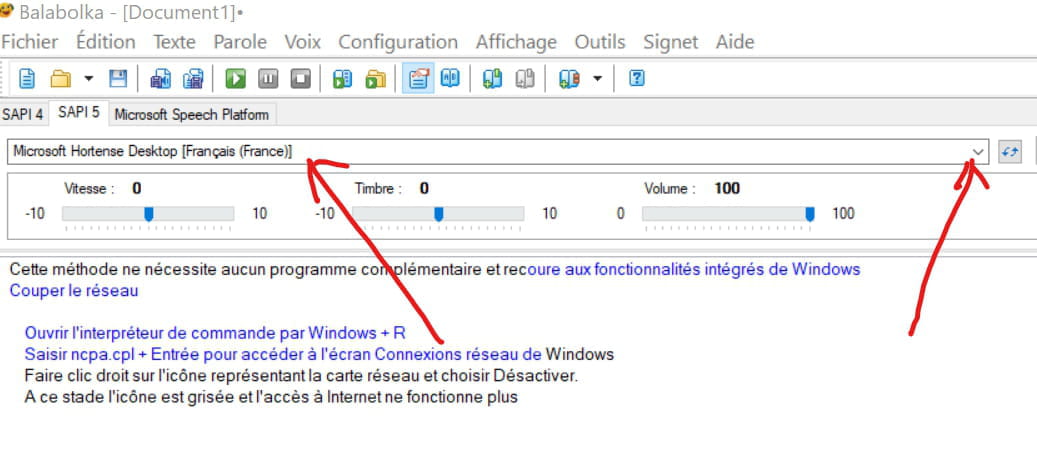
The tiny "arrow" to the right may have been "clicked", it allows for the selection of reading languages.
--
Nothing ventured, nothing gained. -
Hello,
Thank you for your response and your help.
I downloaded the software by typing its name into Google.
I was instructed on how to proceed.
When I look at the image you sent me, I realize that the red arrow on the left that you drew indicates rather "Microsoft Zira Desktop (English - United States)" than the small arrow on the right that cannot be changed. -
Click on the indicated spot below

In the menu that appears, click again on Voice, at the bottom, and choose:
"Microsoft Hortense [French (France)]"
It should work!
Otherwise, to download software, do it from a safe site to avoid viruses, malware, and other "junk", like CCM for example ;-)
Best regards -
Hello,
Problem solved?
--
Nothing ventured, nothing gained.-
Not yet.
I am looking for the appropriate software version because I am not in France but in Burkina Faso
Thank you- Hello,
If possible, uninstall your version of Balabolka (*)
Download it here:
https://www.commentcamarche.net/telecharger/audio-musique/4493-balabolka/
( For Windows XP Windows Vista Windows 7 Windows 8 Windows 10 )
It comes with about ten languages including French, the official language of Burkina Faso, which should set it as the default. Otherwise, it can be done "manually."
(*) What is your version of Windows?
-
-
Hello
I did indeed disable the version of Balabolka that was on the machine and reinstalled the software using the link you provided.
The reading is done in French with:
- a pronunciation of words with an English accent and intonation
(United States)
- numbers are read in English
It's Windows 10 that is installed
Thank you
Mabuse_4610