Reinstalling Windows after Chromebook transformation
jujuasm
-
Anonymous user -
Anonymous user -
I have a PC that runs on Windows 7
I wanted to try switching to Chrome OS
after a few months of use, I'm getting tired of this OS and I want to get back to my previous Windows, but it's impossible!!
how to do it
Brand of your device: Packard Bell PC
Version of Chrome OS: CloudReady
Thank you
I wanted to try switching to Chrome OS
after a few months of use, I'm getting tired of this OS and I want to get back to my previous Windows, but it's impossible!!
how to do it
Brand of your device: Packard Bell PC
Version of Chrome OS: CloudReady
Thank you
18 answers
-
Hello
I assume that originally sold with Windows 7, your PC has the license sticker stuck on it (underneath ;-)
You just need to download an official ISO file of the Windows corresponding to your license (Home, Pro, etc...), and then either burn that ISO to DVD or place it on a USB stick using the Microsoft tool...
Boot from it and reinstall and activate with your key!!
You should take into account that Windows 7 is no longer supported by Microsoft but the Upgrade to Windows 10 is still possible ;-)
Cya
--
If the answer helped you: a little thank you is nice. If it’s resolved: the green button at the top is better ;-)
Let he who has never opened a user manual throw me the first mouse. -
Hello
Generally, BIOS have a "Boot Menu"...
Try F9 or F10 or any other Fx key after powering on the computer...
-> Turn off, insert the USB drive, power on and press the corresponding Fx key (do not hold the key down, but rather make several quick taps until the Menu or the BIOS appears, to choose the boot order)
See you
--
If the answer helped you: a little thank you is nice. If it's resolved: the green button at the top is better ;-)
Let he who has never opened a user manual throw the first mouse. -
Hello
Either your key is not bootable, or it's poorly made ;-(
Did you use the MS tool to generate it properly?
At worst, use a tool like Rufus, but it's silly to use third-party tools when the intended tools are available...
See you later
--
If the answer helped you: a little thank you is nice. If it's resolved: the green button at the top is better ;-)
Let him who has never opened a user manual throw the first mouse. -
but I believe I can't use Rufus because with ChromeOS, .exe files or Windows software are not supported by this operating system
and what is an MS tool ^^ ?? -
Hello
It's true that the majority of users either use Windows or MacOS to manipulate ISO or IMG files to create system installation media.
And since you posted on a Windows forum...
I don't know about ChromeOS!!
You should post on a ChromeOS forum ;-)
But maybe a contributor here can help you...
See you later
--
If this answer helped you: a little thank you is nice. If it's resolved: the green button at the top is better ;-)
Let whoever has never opened a user manual throw the first mouse. -
Hello Macintosh
I'm reaching out to you because I managed to do everything up to Rufus
but when I want to restart with the key, it shows me a box with lots of partitions but I can't install on it
I've done some digging online
is it the Secure Boot that's blocking everything or not?
if so, I can't find the Secure Boot in the BIOS settings
what should I do??
I'm starting to lose hope but it still seems possible to reinstall Windows -
Hello
Could you please upload a photo here? www.cjoint.com
But if you want to start from scratch, delete all the partitions proposed by the Windows installer and confirm on the "empty" disk without any partition, Windows will recreate everything it needs by itself.
Otherwise, if it doesn't find an empty partition for itself, it will get stuck!! Makes sense...
See you later
--
If the answer helped you: a little thank you is nice. If it's resolved: the green button at the top is better ;-)
Let anyone who has never opened a user manual throw the first mouse at me. -
Hello
You should see this display.
Click on Refresh to check if the partitions are successfully deleted..
You can optionally click on New if you don't want to erase the whole disk but just a part..
But clicking Next should be enough.
See you later
--
If the answer helped you: a little thank you is nice. If it's resolved: the green button at the top is better ;-)
Let he who has never opened a user manual throw the first mouse. -
Hello
Have you restarted the PC and tried again? That's also IT for you ;-)
See you soon
--
If the answer helped you: a little thank you is nice. If it's resolved: the green button at the top is better ;-)
Let whoever has never opened a user manual throw the first mouse at me.-
Hello
I finally managed to do it thanks to your help, thank you very much
But now I have another problem
When I try to connect my external hard drive (where I had backed up all my photos and files)
I can't find it, it doesn't show up even though the computer recognizes it without any problem!!
What should I do
Once again, I'm losing hope :(
-
-
Hello
You can say you're piling it up ;-)
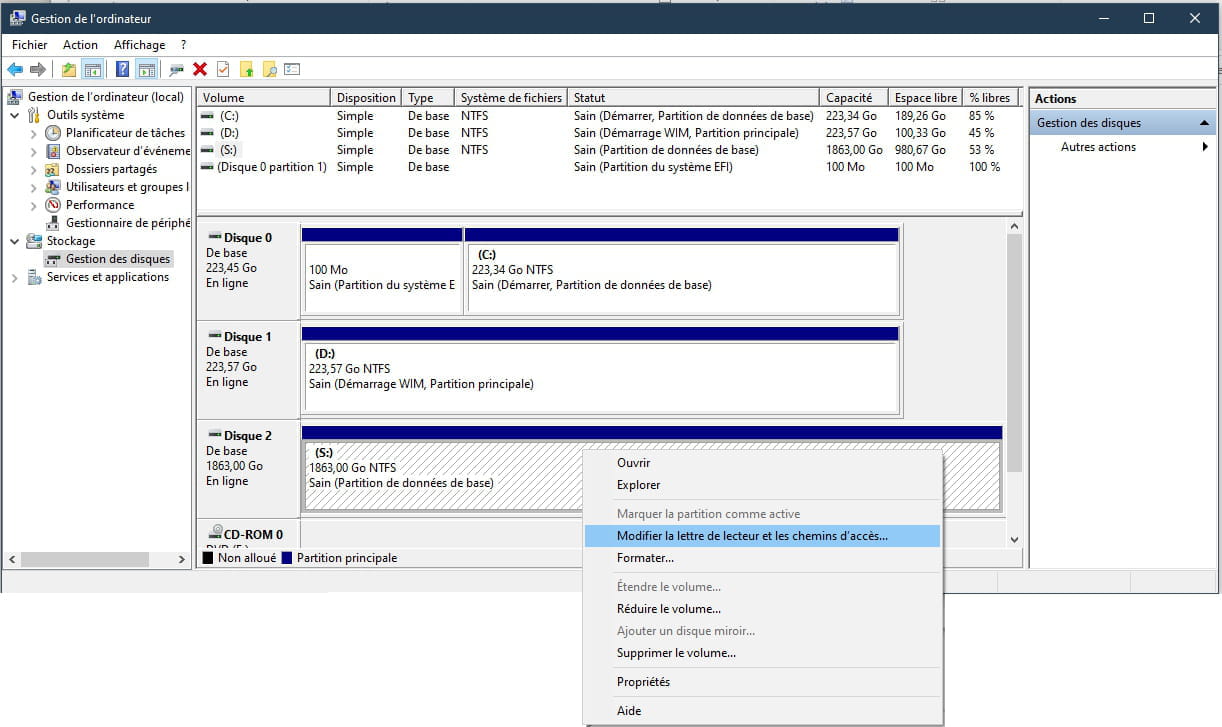
Go check in Disk Management if it appears and if its "letter" isn't already occupied!! This happens when the drive was "forced" previously to a letter... No worries. A right-click on it allows you to change the letter...
The beep means the USB is detected, but not necessarily that it's working; if it doesn't appear, check Device Manager for a faulty driver, try deleting it and restart
See you later
--
If the answer helped you: a little thank you is nice. If it's resolved: the green button at the top is better ;-)
Let he who has never opened a user manual throw the first mouse at me. -
Hello
Changing it is only useful if it conflicts with another volume with the same letter!!
You can also change the letter of the other volume just in case.
You need to show some initiative ;-)
See you later
--
If the answer helped you: a little thank you is nice. If it's resolved: the green button at the top is better ;-)
Let him who has never opened a user manual throw the first mouse at me. -
Hello
Is it the driver for a USB external hard drive?
How is the USB enclosure powered?
See you later
--
If the answer helped you: a small thank you is nice. If it's resolved: the green button at the top is better ;-)
Let him who has never opened a user manual throw the first mouse at me. -
Hello
It is possible that the USB port does not provide enough power to power the case...
You would need a dual cable to supply more power.
Have you tested it on another port of the PC
See you!
--
If the answer helped you: a little thank you is nice. If resolved: the green button at the top is better ;-)
Let he who has never opened a user manual throw the first mouse. -
Hello
No, it has nothing to do with the amount of data in it ;-)
Try it on another machine.
See you later
--
If this answer helped you: a small thank you is nice. If it’s resolved: the green button at the top is better ;-)
Let he who has never opened a user manual throw me the first mouse. -
Hello
Tough luck, really...
Bad karma :-(
See you soon
--
If the answer helped you: a small thank you is nice. If it's resolved: the green button at the top is better ;-)
Let he who has never opened a user manual throw me the first mouse. -
I looked a bit
in Device Manager
under Disk Drives
my external hard drive appears
I right click on it
Properties
and in Events
it shows me
11/12/2020 09:31:34 Device not migrated
and in Information it shows me:
The device USBSTOR\Disk&Ven_WD&Prod_2500BEV_External&Rev_1.75\57442D575848593038363831383931&0 was not migrated due to a partial or ambiguous match. -
Hello,
can you provide a screenshot of the disk manager with your disk plugged in, of course? Thanks.
See you later! -
Hello
If other machines are also having issues with this external drive, it's either the drive :-( or the enclosure :-)
An enclosure can be replaced (10/15€), which is not much considering the importance of the data that could be on it and that no amount will make up for if the drive is dead!!
See you later
--
If my answer helped you: a little thank you is nice. If it’s resolved: the green button at the top is better ;-)
Let him who has never opened a user manual throw the first mouse.