Directory transfer from one handset to another
Solved
Appa_1951
Posted messages
2
Status
Member
-
Appa_1951 Posted messages 2 Status Member -
Appa_1951 Posted messages 2 Status Member -
Hello!
How to transfer the directory from the Gigaset A400 to a Gigaset E290H.
Thank you.
How to transfer the directory from the Gigaset A400 to a Gigaset E290H.
Thank you.
Related links:
- How to transfer a call from one Gigaset handset to another
- transfer of a Gigaset landline phone directory to another one
- Gigaset duo A 605 H directory transfer between handsets
- Transfer directory from Gigaset C620 to Gigaset CL660A
- Directory transfer from a landline phone
- transfer directory from an AS 405 to an AS 690 combination
2 answers
-
Hello! Thank you very much. I managed to copy the directory completely without any difficulty. Your explanations are simple, clear, and effective.
Thanks again.
Appa_1951 -
Hello,
The first thing to do is to register the A400 handset on the E290 base
To do this:
Unplug the A400 base and turn on the E290 base
On the A400 handset (extracted from the A400 manual, page 11)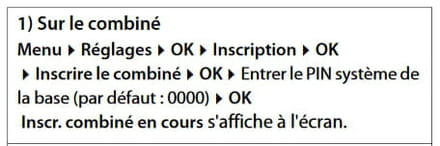
On the E290 base (extracted from the E290 manual, page 44)
Within 60 seconds, press and hold the Registration/Paging button for at least 3 seconds.
At this point, the A400 handset has become an additional handset for the E290 (it can serve as a second handset. Its base (not connected to the telephone line) serves only as a charger.
To transfer the directory from the A400 to the E290 handset
On the A400 handset, perform the following procedure: (extracted from the A400 manual, page 9)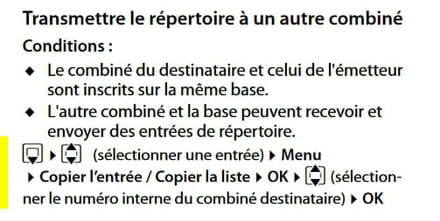
Attention: do not do the opposite, do not try to transfer the directory from the E290, which is empty... you would lose the directory from the A400.
A400 manual: https://gse.gigaset.com/fileadmin/legacy-assets/A31008-M2201-R101-3-UZ19_fr_MEA_20-06-2012.pdf
E290 manual: https://fc.darty.com/notices/DOCUMENTATION/2019/51/4706285_NOTCOMP.pdf
--
It's very difficult to catch a black cat in a dark room.
Especially when it isn't there...