Davinci Resolve 16: video not recognized, only audio.
Yetonlaw
-
Yetonlaw -
Yetonlaw -
Hello,
In a editing perspective, I'm trying to import footage into DaVinci Resolve 16, however it only recognizes the audio of the footage but not the video.
I have a sufficiently powerful Nvidia graphics card for video editing. Moreover, the formats of the videos correspond to those of DaVinci Resolve 16. The video rushes in mp4 and Mov are not recognized.
Thank you in advance for your help.
In a editing perspective, I'm trying to import footage into DaVinci Resolve 16, however it only recognizes the audio of the footage but not the video.
I have a sufficiently powerful Nvidia graphics card for video editing. Moreover, the formats of the videos correspond to those of DaVinci Resolve 16. The video rushes in mp4 and Mov are not recognized.
Thank you in advance for your help.
5 answers
-
Thank you for your reply!
The mp4 and .mov files are indeed encoded in H264.
PS:
For .mov formats, do I need to convert them to mp4 before importing them? -
Hello,
See the "formats and codecs" supported by Resolve 16: https://documents.blackmagicdesign.com/SupportNotes/DaVinci_Resolve_16_Supported_Codec_List.pdf
Compare the information of your files with what is supported using MediaInfo, and convert if necessary for example...
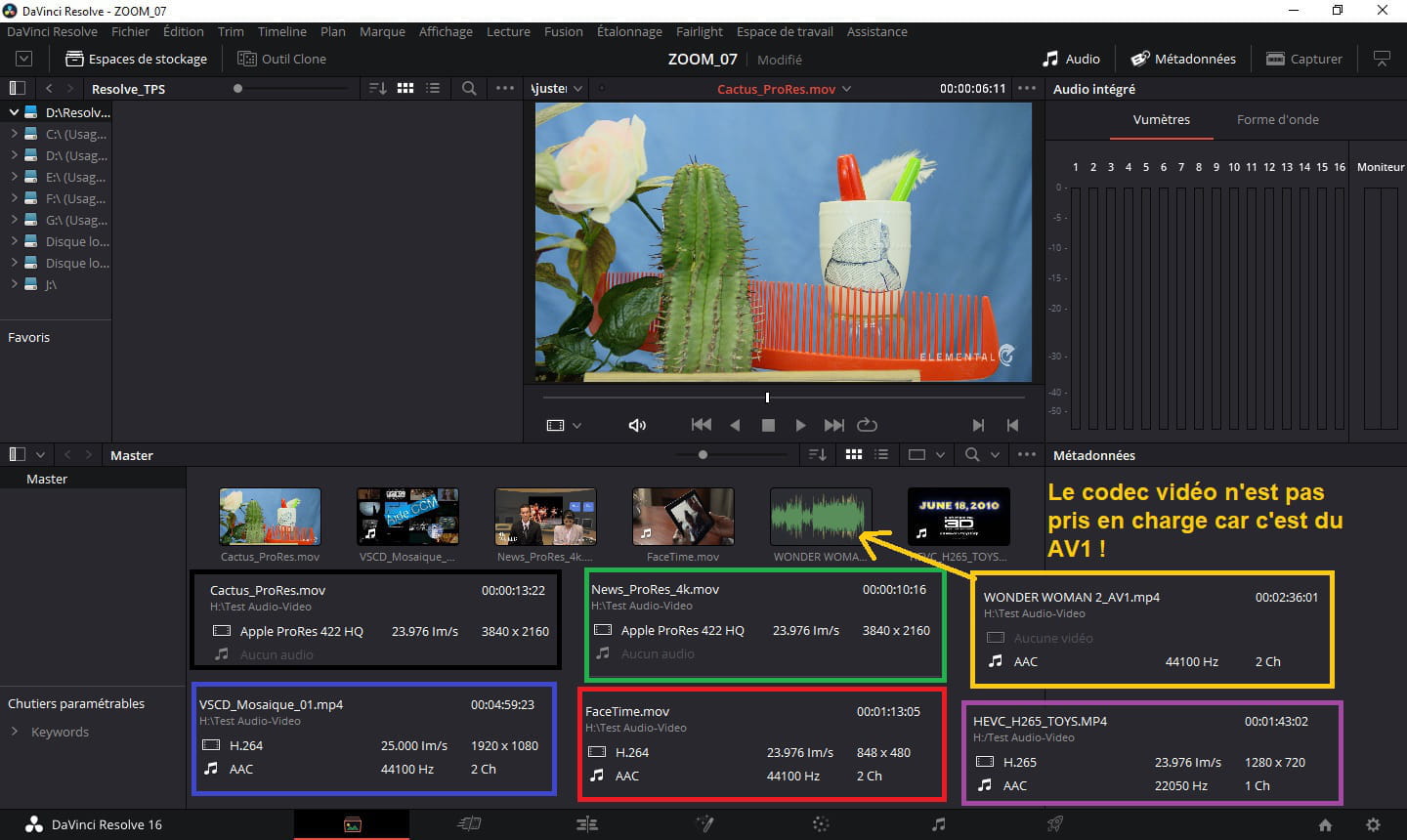
In theory, the containers (formats) MOV or MP4 are accepted by DaVinci Resolve 16, personal example:
I've added other files to illustrate my point and one is not supported (just audio stream) but as you can see, HEVC or Apple ProRes is supported:
Best regards
-
I checked all the formats, they are supported by Resolve.
However, I noticed that the timecodes of my rushes are negative. Could this be the cause of my problem?
Thank you for your help!-
I do not have a camcorder/camera, so I cannot inform you about the timecodes of your footage and whether the fact that they are in negative (which doesn't make sense, right?) has any impact or not.
Try, if you want, by converting one of your rushes to MP4 using Shutter Encoder preferably or another software: https://www.shutterencoder.com/fr/
Finally, make sure that your machine is up to date.
-
-
Thank you for your help!
Yes, it doesn't make sense for them to be negative, I don't understand why! -
Hello,
Check if your MP4 rushes are encoded in H264 format?
For those in .mov, it's the Apple format.
--
ASUS ROG G752 VSK | QuadCore Intel i7 7700HQ | 32 GB-DDR4 | 2 SSD M.2 500 GB | 2 HDD Seagate 2TB | GeForce GTX 1070M 8 GB | Screen 17.3" (120 Hz) | DirectX 12 | Windows 10 (x64)