
Repairing a camera that won't turn on.
Leg2027
Posted messages
118
Status
Member
-
contrariness Posted messages 17905 Registration date Status Member Last intervention -
contrariness Posted messages 17905 Registration date Status Member Last intervention -
Hello,
I own a Panasonic DMC-TZ5 Lumix camera.
The camera is completely non-functional, with a black screen and nothing works. At first, the camera started showing blurry bands on the screen. After a while, it totally stopped working.
Can this camera be repaired?
How can I check the contacts, the On-Off button, and what else should I check?
I have a bit of electronics knowledge and I have a multimeter and a mini soldering iron.
I opened the camera to see if there were any visible problems, but some connections became detached (see the red lines in the photo). I wonder if this is normal and reversible and how do you reconnect them?

The problem does not seem to come from the battery, it is at 3.1 volts instead of 3.7.
Thank you in advance for your replies.
Best regards.
I own a Panasonic DMC-TZ5 Lumix camera.
The camera is completely non-functional, with a black screen and nothing works. At first, the camera started showing blurry bands on the screen. After a while, it totally stopped working.
Can this camera be repaired?
How can I check the contacts, the On-Off button, and what else should I check?
I have a bit of electronics knowledge and I have a multimeter and a mini soldering iron.
I opened the camera to see if there were any visible problems, but some connections became detached (see the red lines in the photo). I wonder if this is normal and reversible and how do you reconnect them?
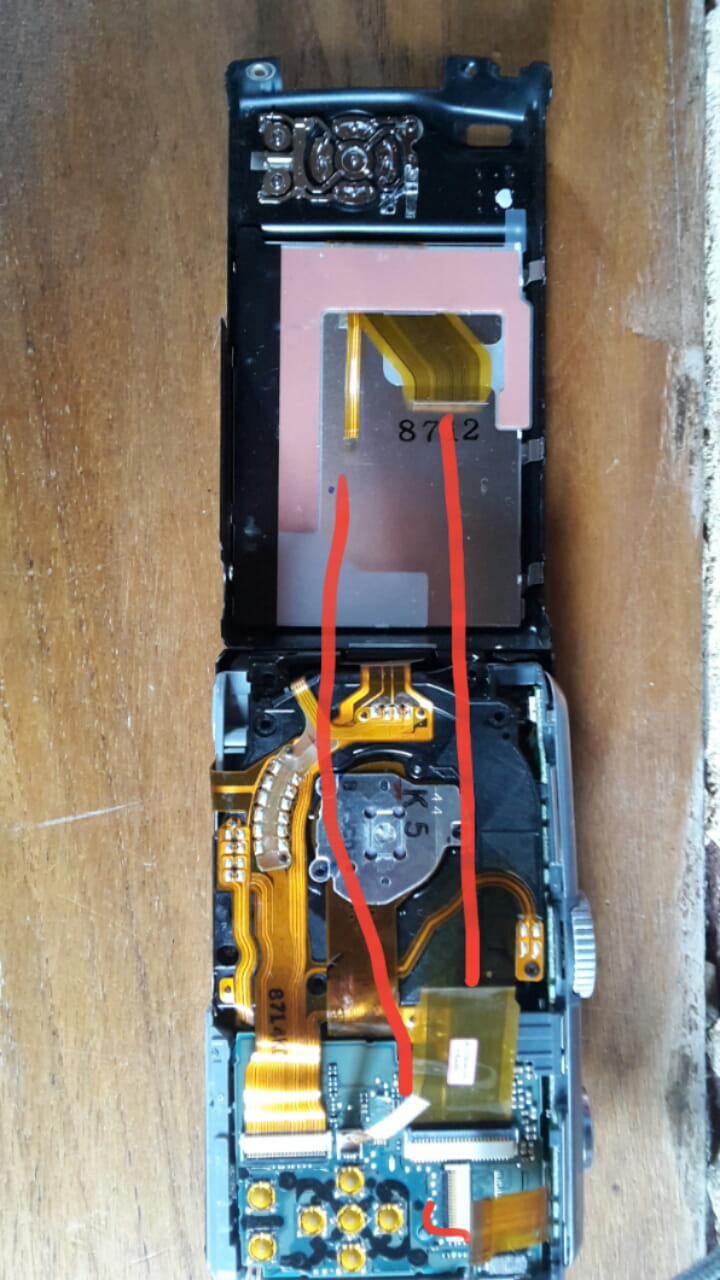
The problem does not seem to come from the battery, it is at 3.1 volts instead of 3.7.
Thank you in advance for your replies.
Best regards.
5 answers
-
It looks like a battery problem.. voltage is one thing but you need current to power the motors..
If you have a battery voltage of 3.1V and everything collapses when you try to turn on your device, it means it's dead and needs to be replaced..
The ribbon cable may be in two parts if you have a connector to connect them during reassembly..
Be careful, it's quite fragile and you need to put them back in parallel to avoid an angled insertion. -
Hello,
Thank you for your reply.
It is possible that the problem is coming from the battery. But I would like to check before buying one. Can we make a setup and check with a multimeter?
I don't have connectors to link them. So how do we proceed?
Sorry for the late reply, the email indicating that I had received a response was in spam. Luckily, I checked the website. -
Maybe this device has a connector or an adapter for an external power supply?
If not, you need to test (or solder 2 small wires on the board in parallel) at the battery input level...
On this type of battery, you have the + and the - and one or two other wires for the temperature sensor that monitors the charge and its control... by checking if you have a voltage drop when starting, you will know if the battery has a problem or not.
You need to do this with the device properly assembled or at least all the connectors put back in place. -
Thank you for your quick response.
To test with a connector and by connecting to a computer, the cables need to be linked.
I have connected 1/3, but I don't see how to connect the other two (the large one and the very thin one). It's a bit like the plastic has broken/detached, and how can we connect them?
For the test, I didn't quite understand your explanation; could you provide more details?
By the way, I forgot to mention that before it stopped working, when the camera was exposed to relatively bright light, the photos/videos would become washed out, and in direct sunlight, the screen was 100% white.
Thank you again for your help.-
At this address, you can download the maintenance manual..
https://elektrotanya.com/panasonic_dmc-tz5_tz15_sm.pdf/download.html
But check if you can find replacement ribbons because if they are not available, there's no point in going further with the troubleshooting...
-
-
Thank you again for your reply and sorry for responding so late.
I did not find replacement tablecloths. So there is no other way?-
I've repaired devices before, but never this model..
In the repair manual, it clearly shows that the ribbon cable is in two parts.. the connection between the two may require special components (conductive glue) and not just a simple connector, I don't know..
In any case, if there's no display, it could well be a connector issue since it links the display and the case.
-
