Touchpad frozen on Lenovo S145
Solved
Dylan
-
gugu01 Posted messages 15669 Registration date Status Contributor Last intervention -
gugu01 Posted messages 15669 Registration date Status Contributor Last intervention -
Hello, I have a problem with the touchpad on my PC. It's a Lenovo (IdeaPad S145). Can I get some help please?
Configuration: Android / Chrome 64.0.3282.137
Configuration: Android / Chrome 64.0.3282.137
5 answers
-
Hello,
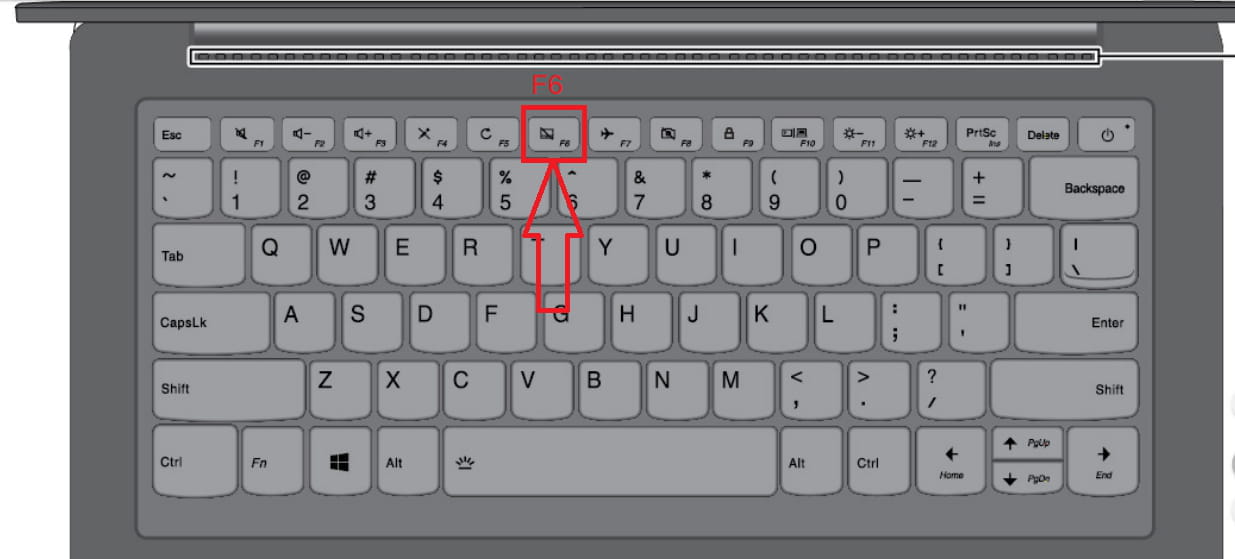
In line with F ... you should have the following key:

It activates or deactivates the touchpad.
(may need to be combined with Fn)
Auto message
Without regular feedback from you... you can always refer to article 22 ;-)
Mini Concerning the volunteers who assist you: Reply, Respect, Politeness,... -
Yes, there are some. But it doesn't lead to anything. I even have the combination with the other F1s...
-
Let's try to reinstall the driver:
https://download.lenovo.com/consumer/mobiles/6yst09af09mc.exe
A restart after installation is always a good idea to ensure the result.
Auto message
Without regular feedback from you... you can always refer to article 22 ;-)
Mini Regarding the volunteers who are helping you: Respond, Respect, Politeness,... -
Good evening,
Has there been a Windows update... recently?
If so, it's possible that your keyboard driver has disappeared.
This happened with my Asus laptop. I had to reinstall it to have all the combinations... Fn + F* (1 to 12)
-