Error 0X8007065E with Windows Store
Rocky92
Posted messages
186
Status
Member
-
Rocky92 Posted messages 186 Status Member -
Rocky92 Posted messages 186 Status Member -
Hello,
I am trying to install a game through the Microsoft Store, and a few seconds after starting the download, it stops with an error 0x8007065E.
I did some research, and it turns out that this error is related to Windows Update, as mentioned in several discussions on this forum. As for me, Windows Update is working fine, everything is up to date, and in the history, I have no updates that failed.
On the other hand, I have seen other forums and have been in contact with Microsoft support, see https://answers.microsoft.com/en-us/windows/forum/windows_10-windows_install/windows-storewindows-update-and-sfc/8d99f7cf-7635-4ce9-ae4a-453ced1bf397, a discussion that shows everything I tried: SFC, DISM, wsreset, updating store via PowerShell, ...
Nothing works, the problem persists. Today, any suggestion is welcome as I would like to avoid completely reinstalling Windows 10. Not only do I have a lot of specific apps and drivers, but also my Windows came pre-installed on this machine, so I do not have the key (the seller assured me that the PC was registered in Microsoft's databases, so no key is needed, but I'm having a hard time believing that...)
Thank you for your help.
Eric
Configuration: Windows / Chrome 81.0.4044.113
I am trying to install a game through the Microsoft Store, and a few seconds after starting the download, it stops with an error 0x8007065E.
I did some research, and it turns out that this error is related to Windows Update, as mentioned in several discussions on this forum. As for me, Windows Update is working fine, everything is up to date, and in the history, I have no updates that failed.
On the other hand, I have seen other forums and have been in contact with Microsoft support, see https://answers.microsoft.com/en-us/windows/forum/windows_10-windows_install/windows-storewindows-update-and-sfc/8d99f7cf-7635-4ce9-ae4a-453ced1bf397, a discussion that shows everything I tried: SFC, DISM, wsreset, updating store via PowerShell, ...
Nothing works, the problem persists. Today, any suggestion is welcome as I would like to avoid completely reinstalling Windows 10. Not only do I have a lot of specific apps and drivers, but also my Windows came pre-installed on this machine, so I do not have the key (the seller assured me that the PC was registered in Microsoft's databases, so no key is needed, but I'm having a hard time believing that...)
Thank you for your help.
Eric
Configuration: Windows / Chrome 81.0.4044.113
13 answers
-
Hello,
Do other downloads work?
To check your computer for possible infections and to get an overall status of the system:
Follow the FRST tutorial by clicking on this blue link. ( take the time to read carefully - everything is well explained ).
Download and run the FRST scan,
Wait for the scan to finish, a message will indicate that the analysis is complete.
Three FRST reports will be generated:- FRST.txt
- Shortcut.
- Additional.txt
Send these 3 reports to the site https://pjjoint.malekal.com/ and in return provide the 3 pjjoint links leading to the reports here in a new reply so we can review them.
(The blue links lead to step-by-step explanatory tutorials, click on them for more precise instructions to follow).
--
Please press a key to continue the disinfection... -
I'll look into all that.
In the meantime, I'll answer your question: YES, other downloads are working. To test, I downloaded a small free game, it downloads and installs perfectly in the Windows Store.
Eric -
I launched an analysis FRST and uploaded the report on PJJoint, the links are here, respectively for FRST.txt, Addition.txt, and Shortcut.txt:
https://pjjoint.malekal.com/files.php?id=FRST_20200426_t5x10x7e14e9
https://pjjoint.malekal.com/files.php?id=20200426_e11m5c12j13x7
https://pjjoint.malekal.com/files.php?id=20200426_p11n14v15g8q13
You will see the trace of programs that start automatically at Windows startup. To be sure they have nothing to do with my error, I created a new user "test" that does not start ANYTHING at Windows startup. The result is the same, still the same error.
If anyone has an idea, I would gladly take it :)
Thanks,
Eric -
The publisher is Microsoft, I have already contacted them as stated in my initial post, without any result. I also contacted the team responsible for the game, they redirected me to Microsoft...
-
I should add that it must come from my PC because I started to install the game on a clean virtual machine with a fresh Windows 10, and it worked. The first module of the game loads fine, but when I launch it, it fails because it can't find a graphics card that supports DirectX 11. But I go further than on my PC, where nothing loads.
-
Well, it seems you've done everything that is here: https://www.malekal.com/windows-10-reparer-windows-store/
So I don't really see what to add :/
Except for:
- try with another user account
- repair Windows 10 (see the end of the tutorial)
-
-
Yes, I have indeed done all that. I also tested with another brand new user account on the same PC, and it fails just the same.
I think the last option is to repair Windows 10, but I would like to find a way to do it without breaking all my app installations, drivers, configurations, ...
I am not concerned about data loss because my C drive is reserved for the system and all my data is on another drive.
Is there a way to restore Windows without losing all the app installations and configurations?-
The repair does not affect the existing setup.
So you don't lose anything that is installed.
=> https://www.malekal.com/reparer-windows10-sans-perte-donnees/
-
-
Thank you for this clarification, because when we say "without data loss", it can imply that the data files are not lost but it doesn't specify that the application installations are preserved. Basically, the registry needs to remain intact.
Moreover, in the case of a complete re-installation, I wonder if a restoration of the registry is possible if we took care to back it up before the installation. -
Latest news:
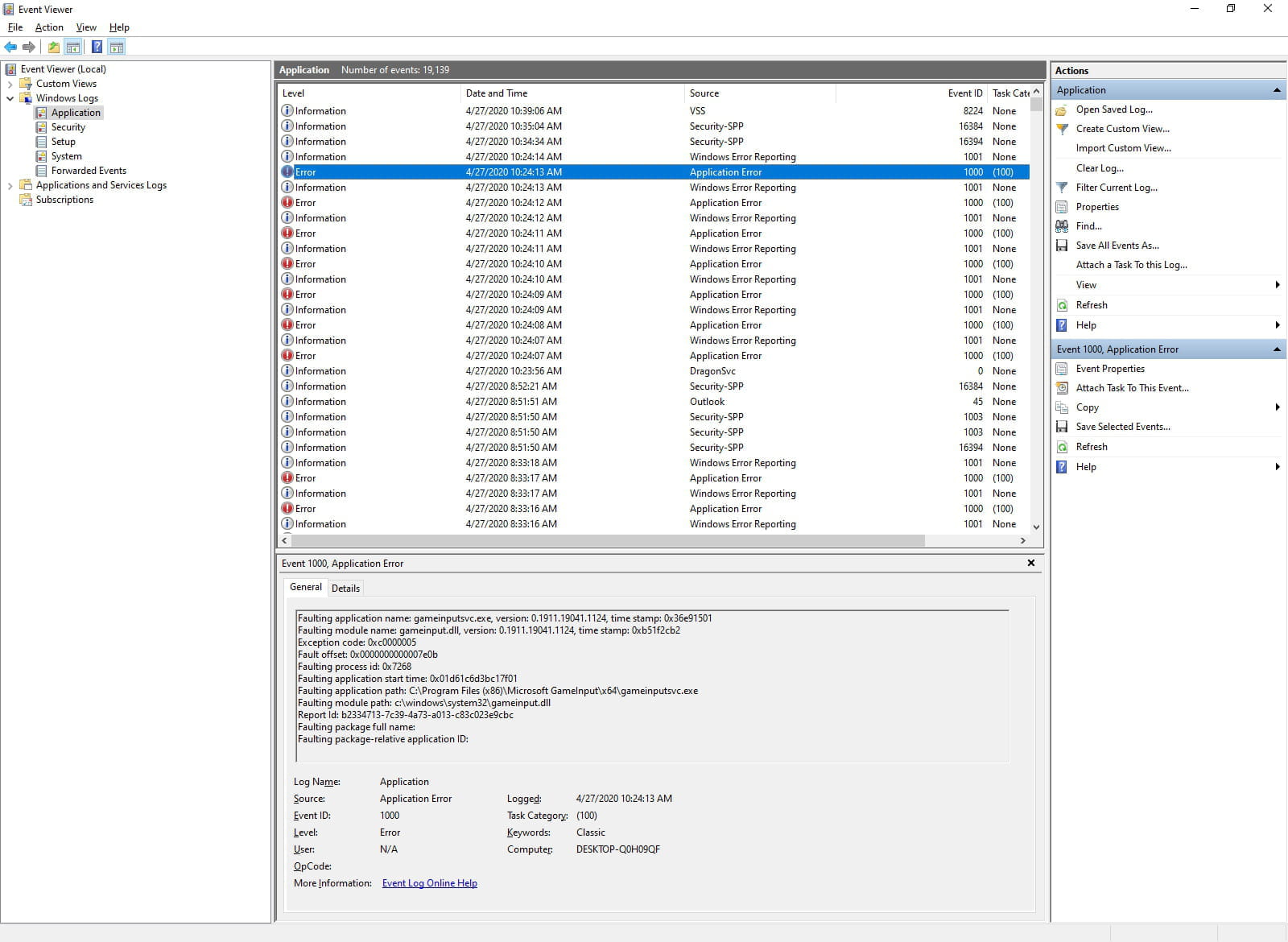
I thought to check the event viewer and I found a recurring error on "Microsoft GameInput," likely used by the game I'm trying to install. To be clear, this is the Alpha version of Microsoft's new Flight Simulator 2020, which I am supposed to access as a developer.
Anyway, the attached image shows the error message each time I start or wake up my PC:
I am restating the error message here for clarity:
Faulting application name: gameinputsvc.exe, version: 0.1911.19041.1124, time stamp: 0x36e91501
Faulting module name: gameinput.dll, version: 0.1911.19041.1124, time stamp: 0xb51f2cb2
Exception code: 0xc0000005
Fault offset: 0x0000000000007e0b
Faulting process id: 0x7268
Faulting application start time: 0x01d61c6d3bc17f01
Faulting application path: C:\Program Files (x86)\Microsoft GameInput\x64\gameinputsvc.exe
Faulting module path: c:\windows\system32\gameinput.dll
Report Id: b2334713-7c39-4a73-a013-c83c023e9cbc
Faulting package full name:
Faulting package-relative application ID:
Since my installation worked on a VM, I compared the files "c:\windows\system32\gameinput.dll" and "C:\Program Files (x86)\Microsoft GameInput\x64\gameinputsvc.exe" using a SHA-256 algorithm, and I confirm that they are the same on my PC and on the VM, so no file corruption.
I Googled and found no one having the same problem...
If you can explain this error to me, it might be the key to the mystery :)
Thank you
Eric -
Well, I've come to the same conclusion. Thanks for your help anyway. Just in case, I'm going to wait for the 2004 update; maybe a "big" update will set everything straight.
I find it unfortunate to have to reinstall Windows 10, this Windows that was presented as the ultimate version that gets updated and is never replaced.
I like and respect Microsoft, but I find that this doesn't play in their favor... -
Well guys, I spent the whole afternoon on that damn "an error occurred on our side," I thought I was going crazy.
So to make a long story short, I ended up finding: uninstall ZoneAlarm => that did the trick for me!
I hope it will be the same for you.
Good luck... -
I would have liked that to be the case, but I don't have ZoneAlarm so it can't be that. The problem remains for me. I try again every time Windows does an update, always without success...
-
Afterwards, I performed a second action at the same time as uninstalling ZoneAlarm, so I don't know which action was decisive:
- Go to "Privacy settings"
- In the left menu: select "Account information"
- In the section "Choose which apps can access your account information," you need to check "On" for "Microsoft content"
Let me know if that improves the situation. -
I don't know why I'm only seeing your response now, sorry.
Indeed, that option wasn't enabled for me, I've turned it on but it doesn't change anything :(
Thank you anyway...