File system error (-1073741515)
PaulBtd
-
Noah -
Noah -
Hello,
I am writing to you because I am facing a problem, and after many hours of research, I cannot find a solution.
To provide context: I have a Windows 10 account that is activated, and an ASUS S550C PC.
Currently, I am experiencing the following issues:
- I can no longer open .exe files [error message: File system error (-1073741515)]
- I cannot open the command prompt as an admin or the task manager, with the error message: This file does not have an application associated to perform this action. Install an application or, if it's already installed, create an association in the Default Apps settings page.
- I cannot type anything in the Windows command panels, whether it's the one on the desktop or in settings; my keyboard seems inactive.
- I cannot uninstall programs from my PC. [error message: File system error (-1073741515)]
For the advice found online, applications are recommended, but I cannot open them as they are .exe files / I cannot access the command prompt as an admin.
I really don’t know what to do; I would like to take advantage of the lockdown to uninstall a number of software programs that I have not used in years and that are bothering me today: ExpressScribe/AcePlayer/Stremio/utorrent/CCleaner, among others.
Thank you in advance for a response that will finally help me understand how to resolve this frustrating situation.
Respectfully
I am writing to you because I am facing a problem, and after many hours of research, I cannot find a solution.
To provide context: I have a Windows 10 account that is activated, and an ASUS S550C PC.
Currently, I am experiencing the following issues:
- I can no longer open .exe files [error message: File system error (-1073741515)]
- I cannot open the command prompt as an admin or the task manager, with the error message: This file does not have an application associated to perform this action. Install an application or, if it's already installed, create an association in the Default Apps settings page.
- I cannot type anything in the Windows command panels, whether it's the one on the desktop or in settings; my keyboard seems inactive.
- I cannot uninstall programs from my PC. [error message: File system error (-1073741515)]
For the advice found online, applications are recommended, but I cannot open them as they are .exe files / I cannot access the command prompt as an admin.
I really don’t know what to do; I would like to take advantage of the lockdown to uninstall a number of software programs that I have not used in years and that are bothering me today: ExpressScribe/AcePlayer/Stremio/utorrent/CCleaner, among others.
Thank you in advance for a response that will finally help me understand how to resolve this frustrating situation.
Respectfully
4 answers
-
Hello,
Have you tried Safe Mode to see if you still have the problem?
Method 1 VIA settings => https://lecrabeinfo.net/demarrer-windows-10-en-mode-sans-echec.html#methode-ndeg1-directement-depuis-windows-10 -
Hello,
Start with the advanced system recovery options using method 1 from this page: Windows advanced recovery options.
The idea is to restart on the page where it asks for the password, with the icon in the lower right corner while holding the shift key.
If you CANNOT reach the window where Windows asks for the passwords, due to a blockage or crash beforehand...
Turn off the computer twice during the Windows loading.
It will enter repair mode which will also give access to the advanced system recovery options.
(If booting to the advanced recovery options is impossible, you need to create a USB drive to boot from it, there’s a link on the previous page for that).
More help:- This tutorial that provides all the methods: Boot to the troubleshooting and recovery options in Windows 10
- And also this video: https://www.youtube.com/watch?v=2Z34STeNSCs
Once you’re there, go to Troubleshoot and you can try:
From the settings menu, restart Windows and go into safe mode WITH NETWORKING, from there you can uninstall a problematic application like your antivirus.
Create a new administrator user, see: How to create a new administrator user on Windows
See if it behaves the same way there.
If not better, try uninstalling the latest update if a recent one has been installed that could be causing the problem, see: Uninstall Windows updates
Lastly, go back to the troubleshooting options then:- run a system restore to return to a previous configuration of Windows. This is the Reset this PC option.
- Reset Windows 10 (this keeps the data but removes the applications).
--
Please press a key to continue the disinfection...-
Hello,
First of all, thank you for your thorough response; I sincerely appreciate it.
To answer you, when I wanted to restart before logging in, I saw the message "If you restart the PC now, you and others using this PC risk losing unsaved work."
This caught my attention, making me wonder if I had been hacked after all.
Then, when I restarted in safe mode with networking support: once I got to the point of entering my password, it was apparently incorrect. (Even though I had checked it by logging into my Windows web account and it works fine)
So, I can't access my PC and continue with creating an administrator account...
As for the updates, I had tried, but when I initiate an uninstallation, nothing happens.
As a result, I backed up my data to an external hard drive, and I am considering resetting Windows 10.
My question would be: if I am being hacked, will resetting Windows change anything?
Thank you in advance for your concern.- Hello,
In the end, I can't do it either. When I try to restore:
I click on my account and enter my password, but it says the password is incorrect.
When I go to manage my Microsoft account in my settings: nothing opens.
When I go to the web version, I can log in with my password and sign in normally. The activity on my PC appears normal, except for BitLocker data protection, which is disabled. When I try to enable it, a loading occurs, but no window opens.
How can I get out of this?
Thank you again for your help.
-
It's going to be annoying if you don't know your password,
Another solution, reinstall Windows 10:
Reinstall Windows 10 without formatting:
The idea is to create a Windows 10 installation USB drive and boot the computer from it to reinstall Windows without formatting to keep the data.
Since the computer is frozen, you need to create this from another functional computer.
To create the USB drive:
You need a USB drive with at least 8 GB.- Create a USB drive with Media Creation Tool: Download and create a Windows 10 USB drive with Media Creation Tool
- Boot from it by modifying the boot sequence and indicating the USB drive or DVD: How to boot the computer from USB drive
If the USB drive doesn't work, try making another one with Rufus: how to download Rufus.- Download the ISO file using direct links or from Rufus: Download Windows ISO
- Launch Rufus and specify the path of the ISO file
- In the partition scheme, choose GPT.
- For more details, refer to this tutorial for specifics: how to create a Windows installation USB drive
The Windows 10 installer should then start:
Follow these tutorials that explain how to install Windows 10:
All steps are provided from A to Z with advice at the end to secure Windows 10.- Follow the prompts to install Windows 10.
- Choose customize (not upgrade)
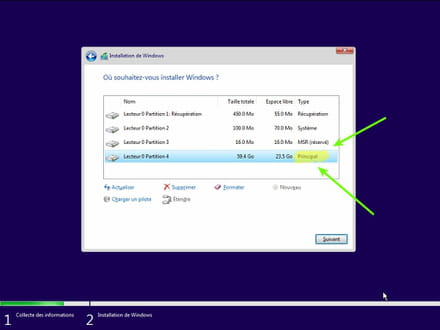
- During the partition phase, select the main partition and click next.
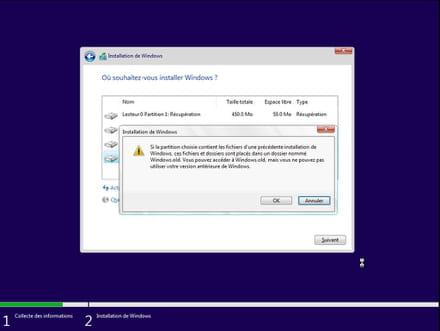
- The installer will tell you that Windows is already present and offer to move it.
- Follow the Windows installation procedure using the tutorial above.
Just don't format.
Your user data will be copied to the Windows.old folder.
You can then recover bookmarks, passwords from web browsers, etc.
Read this tutorial: Recover deleted applications during the reset of your PC to Windows 10
Once Windows is installed, I advise you to follow these tips for properly configuring and using Windows: Tips after reinstalling Windows.
--
Please press a key to continue the disinfection... -
Hello,
To respond to you, I know my Microsoft account password.
I changed it last night to be sure that it is correct and I can perfectly log in on the Microsoft web page.
However, as I explained, I am stuck on my PC with the Microsoft applications. I cannot type in the search console, I can't open the task manager, etc.
Since the password works on the web page, is the password required for safe mode or for resetting different?
Otherwise, my PC works fine when I go online and many existing applications, which doesn’t prevent me from a "normal" use, but it's really my relationship with Windows that is problematic.