System32/logfiles/srt/srttrail.txt is empty
Solved
Blasprey
Posted messages
6
Status
Member
-
Malekal_morte- Posted messages 178136 Registration date Status Moderator, Security Contributor Last intervention -
Malekal_morte- Posted messages 178136 Registration date Status Moderator, Security Contributor Last intervention -
Hello,
For a few days my computer has been restarting in a loop. I've followed a lot of tutorials online, especially one that says to copy the content of the srttrail.txt file, but mine is empty... (I'm not sure that's the solution)
I always have to reset my PC to access Windows, but as soon as I restart it, I can't access Windows 10 normally... Even Safe Mode doesn't work, I start Safe Mode but instead, the useless automatic repair launches...
Please, help me...
For a few days my computer has been restarting in a loop. I've followed a lot of tutorials online, especially one that says to copy the content of the srttrail.txt file, but mine is empty... (I'm not sure that's the solution)
I always have to reset my PC to access Windows, but as soon as I restart it, I can't access Windows 10 normally... Even Safe Mode doesn't work, I start Safe Mode but instead, the useless automatic repair launches...
Please, help me...
2 answers
-
It's all good =)
I recommend following these tips to properly configure and use Windows: Tips after reinstalling Windows.
--
Please press any key to continue the disinfection... -
Hello,
Reinstall Windows 10 without formatting:
The idea is to create a Windows 10 installation USB drive and boot the computer from it to reinstall Windows without formatting in order to keep your data.
Since the computer is crashed, you need to create this from another functional computer.
To create the USB drive:
You need a USB drive of at least 8 GB.- Create a USB drive with Media Creation Tool: Download and create a Windows 10 USB drive with Media Creation Tool
- Boot from it by modifying the boot sequence and indicating the USB drive or DVD: How to boot the computer from USB drive
If the USB drive doesn't work, try making another one with Rufus: how to download Rufus.- Download the ISO file using direct links or from Rufus: Download Windows ISO
- Launch Rufus and specify the path to the ISO file
- In partition scheme, choose GPT.
- For more details, refer to this tutorial for details: how to create a bootable Windows installation USB drive
The Windows 10 installer should then start:
Follow these tutorials that explain how to install Windows 10:
All steps are provided from A to Z with tips at the end to secure Windows 10.- Let yourself be guided to install Windows 10.
- Choose customize (not upgrade)
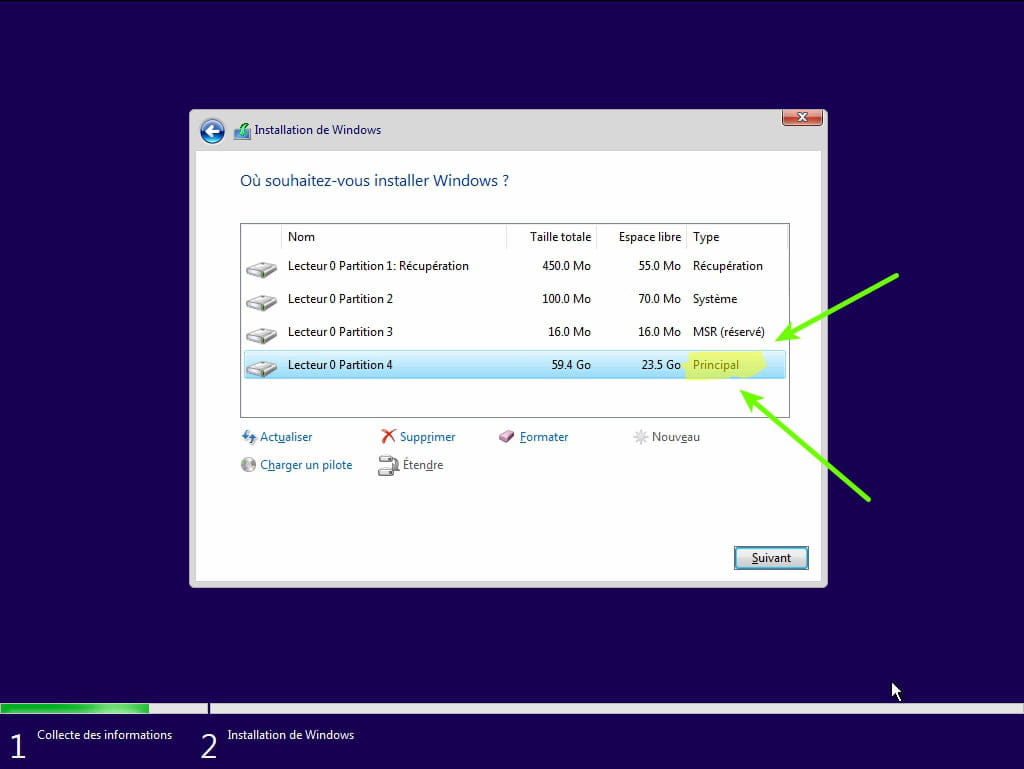
- During the partition phase, select the main partition and click next.
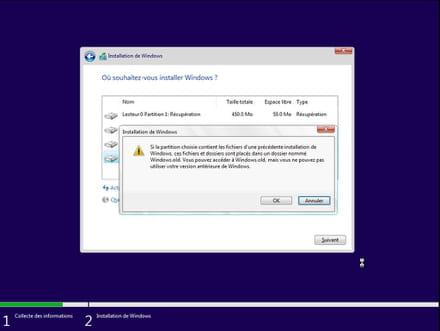
- The installer will tell you that Windows is already present and offer to move it.
- Follow the Windows installation procedure using the tutorial above.
Just don't format.
Your user data will be copied to the Windows.old folder.
Once Windows is installed, I recommend following these tips to properly configure and use Windows: Tips after reinstalling Windows.
--
Please press any key to continue the disinfection process...-
-
-
I installed some drivers (that's what I read on a website) and my PC then asked to restart, and upon restarting, it kept going into automatic repair in a loop... It's a PC that I built myself:
Asus Prime X570-P motherboard
AMD Ryzen 5 3600 processor
Sapphire Radeon RX560 graphics card
24GB of DDR4 RAM (2x8GB Corsair + 2x4GB Ballistix)
1TB Seagate Barracuda HDD -
-