Sorting multiple data in a single cell (Google Sheets)

Nemesiais
Posted messages
11
Status
Member
-
Nemesiais Posted messages 11 Status Member -
Nemesiais Posted messages 11 Status Member -
Hello everyone,
I’m trying to keep myself busy at the moment by creating a database of online series. :)
I wanted to use Google Sheets for all its built-in filters, but I realized that filters don’t work on the inside of a cell...
Example:
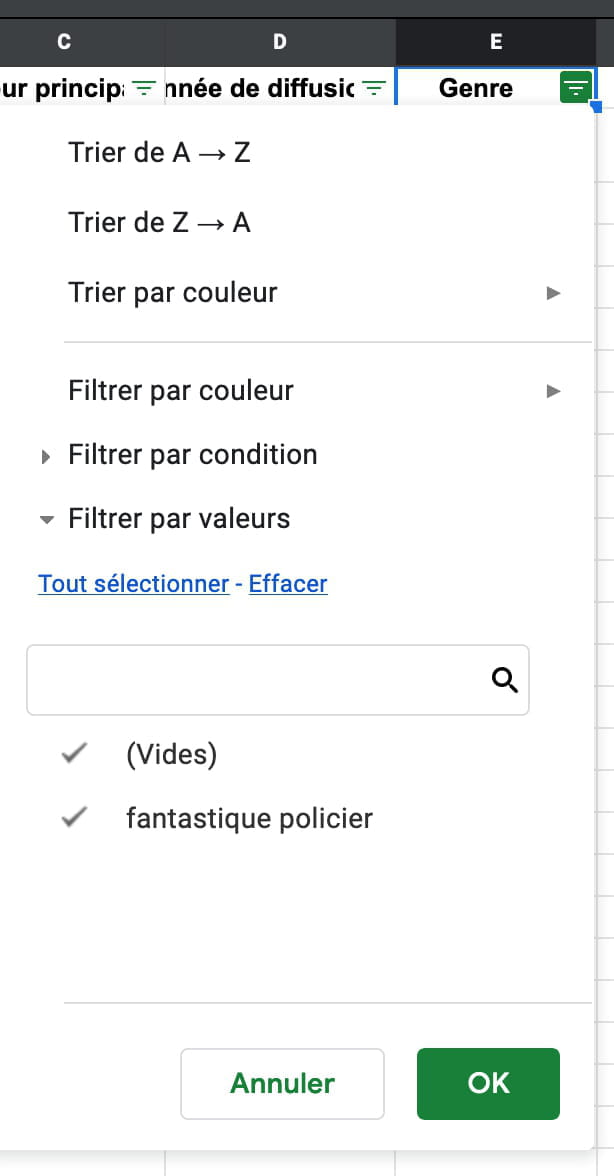
A series can have multiple genres, so I list them in the same cell separated by a line break:

The problem is that the filter then considers the cell as a single genre instead of 2...

Any ideas on how to separate them?
Thanks in advance!
Nemesia
Configuration: Macintosh / Firefox 74.0
I’m trying to keep myself busy at the moment by creating a database of online series. :)
I wanted to use Google Sheets for all its built-in filters, but I realized that filters don’t work on the inside of a cell...
Example:
A series can have multiple genres, so I list them in the same cell separated by a line break:

The problem is that the filter then considers the cell as a single genre instead of 2...
Any ideas on how to separate them?
Thanks in advance!
Nemesia
Configuration: Macintosh / Firefox 74.0
Related links:
- Sheets: Color a cell with multiple colors based on different conditions
- Google Sheet: Prevent cell deletion without verification
- Sorting in Google Sheets with JavaScript macro across multiple columns
- Google Sheets IF cell... starts with... then Function ...
- Google Sheets: Last Non-Empty Cell - First Non-Empty Cell
- Retrieve a date in Google Sheets
2 answers
-
"The problem is that the filter then considers the cell as a single item instead of 2"
No, incorrect analysis: You need to select Filter/Text Filters/Contains
--
Retirement is great! Especially in the Caribbean...
Raymond (INSA, AFPA)-
Thank you very much, it is indeed getting closer to what I'm looking for! I wasn't aware of this feature.
It works, but it's not very intuitive. For example, it assumes that the user knows the exact term they are looking for - instead of seeing the entire available list like in the value filter.
Is it possible to achieve the same result with a slightly nicer interface? For example, I created a sort of search engine using formulas (https://docs.google.com/spreadsheets/u/0/d/1VHtYBdrRpZ3WE1Qk7bsXj6-2my9yCCM61H_b_l551dg/edit), only to realize that it doesn't work for multiple users at the same time: when one of them performs a search, it also modifies the file for all the others...
Is it possible to fix this, or to replicate the functioning of the filtered view using formulas?
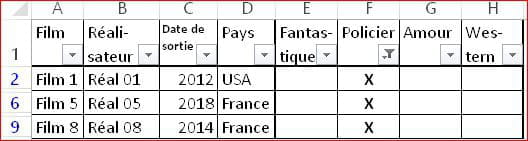
Thank you!- Therefore, there is only one solution: replace your single column E with as many columns as there are genres:
Fantasy in E, Crime in F, Romance in G, Western in H, Humor in I, etc.
This is, in fact, the principle of a Database.
Moreover, you will be able to add and use Pivot Tables... - Thank you, I will try it out!
I was thinking about pivot tables, but they can't be used by multiple people at the same time either... I might just have to think of something other than Excel. :) - "I had thought about pivot tables, but they cannot be used by multiple people at the same time"
Where does this falsehood come from?
In the same file, and from the same table, you can create as many pivot tables as you want.
And multiple people can view the same pivot table...
In any case, it's a very bad idea to put an online database that anyone can modify.
Either you upload a protected file that others can only view; or you send copies of your database that everyone can modify on their computer. - I may have expressed myself poorly: I was referring to the problem described in my previous message. "When one of the users performs a search, it also modifies the file for everyone else." It seems to me that it's the same principle for Pivot Tables.
This is exactly why I initially thought of using a filtered view: to allow people to use the database without modifying it. Unfortunately, as soon as I use formulas to allow them to sort, it assumes they have write access.
-
-
Hello.
Whatever software you use, sorting is done by column (consecutive cells) and possibly by row.
A cell is an entity that does not allow sorting, filtering, or searching.
You need to go back to your table and split the content of each cell using the tool
DATA / Convert / Delimited / Space
--
Retirement is great! Especially in the West Indies...
Raymond (INSA, AFPA)-
Hello Raymond,
Do you mean splitting the content of my cell across several columns? I thought about it, but that would make filtering by genre impossible: if I assign a series the value "genreA" in column A and "genreB" in column B, then this series wouldn’t show up when searching for "genreB" in column A...
I also considered creating multiple rows for each series, each time with a different value in the Genre column; but in that case, the series appears multiple times in the results if we search across several genres. Any idea to get rid of duplicates?
Thanks again for your help!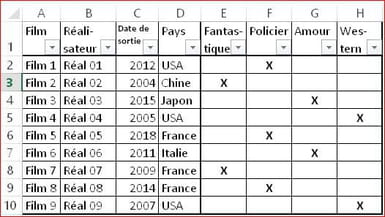
You don't seem to know what a database is and how to use it.
All you have to do is put a tick in the relevant column
When you filter in column A (criteria "genreA"), all the rows with "X" in A will show, the others are hidden.
When you filter in column B (criteria "genreB"), all the rows with "X" in B will show, the others are hidden.
You're not going to filter to find "genre B" in column A!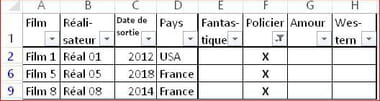
- Or, it’s simply a communication problem.
When I wrote this message (two days ago), I was talking about having several columns titled "Genre" to fill in for each series with a different value ("fantasy", "crime", ...). The idea of creating as many columns as there are genres came later.
-