
Webcam does not appear in Device Manager
Chew__
Posted messages
1
Status
Member
-
RED -
RED -
Hello,
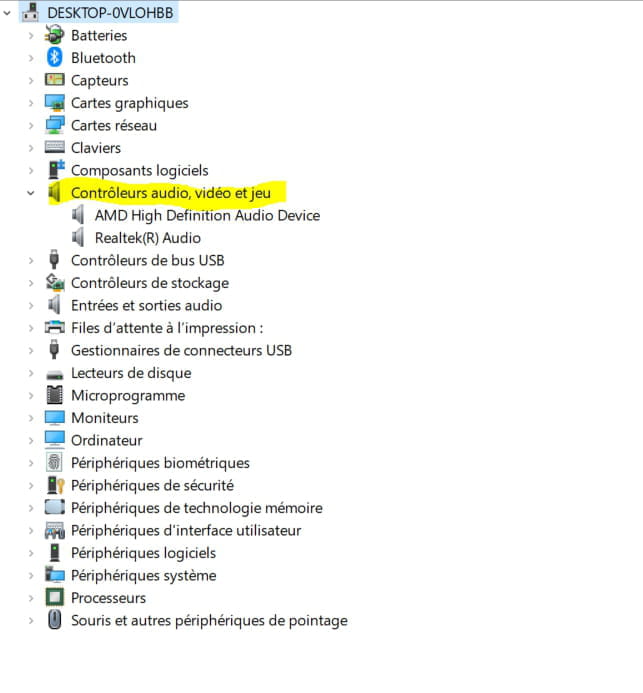
I have a problem, the built-in webcam of my laptop running Windows 10 is not working anymore. When I launch the "Camera" app or any application using the webcam, I see the message <nocamerasareattached>. I followed the Windows tutorial to resolve this issue and attempted the first solution "Allow access to the camera on this device" (see screenshot), but the problem persists. When trying the next solution, which is to search for a driver in the device manager, my webcam does not appear anywhere. The "Imaging devices" and "Camera" fields do not exist, and the "Audio, video and game controllers" field does not contain the webcam. Does anyone have any idea how to fix the issue?
Thank you in advance for your time

 </nocamerasareattached>
I have a problem, the built-in webcam of my laptop running Windows 10 is not working anymore. When I launch the "Camera" app or any application using the webcam, I see the message <nocamerasareattached>. I followed the Windows tutorial to resolve this issue and attempted the first solution "Allow access to the camera on this device" (see screenshot), but the problem persists. When trying the next solution, which is to search for a driver in the device manager, my webcam does not appear anywhere. The "Imaging devices" and "Camera" fields do not exist, and the "Audio, video and game controllers" field does not contain the webcam. Does anyone have any idea how to fix the issue?
Thank you in advance for your time


 </nocamerasareattached>