Assembly program
Bonjour,
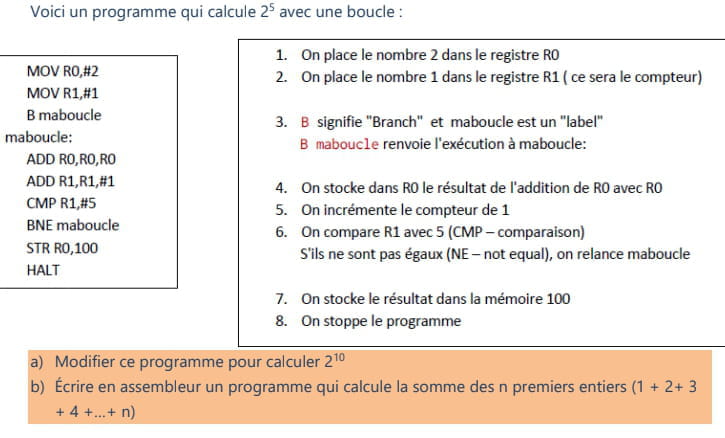
I want to write in assembly language that calculates the sum of the first n integers but I don't know how to get started.
I need a little help.
On this exact assembler:
http://www.peterhigginson.co.uk/AQA/
I want to write in assembly language that calculates the sum of the first n integers but I don't know how to get started.
I need a little help.
On this exact assembler:
http://www.peterhigginson.co.uk/AQA/
4 answers
-
Good evening,
Before diving into a low-level language like ASM, you should learn the basics of how x86 architectures work.
- Memory segmentation (text, data, bss)
- Registers (general, offsets, segments)
- Flags
- Opcodes and their uses
- Stack usage.
https://fr.wikibooks.org/wiki/Programmation_Assembleur/x86/Registres
The best approach would be to start with 16-bit registers, then move on to 32-bit and finally 64-bit.
If you are working on Windows, also look into the PE (Portable Executable) format of Windows headers (PEB, TEB).
You will see that everything will become clearer for your problem; practice making loops (EAX, ECX), working with strings, etc.
To develop in ASM, it is best to use:
- Notepad++, gedit, or another editor (for code editing).
- Nasm & ld to compile your production (x86, x64)
- Immunity Dbg or OllyDBG to debug your program (Windows), IDA Dbg (Linux)
- Hexdump (Linux and Windows)
- Objdump (Linux and Windows)
Best regards,-
-
@HammouWow, okay, but with this emulator http://www.peterhigginson.co.uk/AQA/
I won't be able to help, sorry. Why did you specifically choose this emulator? Was it imposed?
Can you still send the complete statement, please?
Regards,
-
-
-
Alright, no problem, thanks anyway.
-
the answer a
change:cmp R1,#10
instead ofcmp R1,#5
b
mov R1,#1 B maboucle maboucle: add R0,R0,R1 add R2,R0,R2 cmp R0,#10 bne maboucle str R2,100 halt
R0 is n
R1 is your reason
R2 is the term
the term is stored at address 100
I hope this is what you were looking for.
for n = 5, R = 1, T = 15
for R0= 5, R1=1, R2=15
best regards,
-
-
It doesn't work, indeed we need to add a line for n because n must be chosen by the user
INP RO,2 (2 for the type) based on this variable the program should run
but I can't make your program run with and without the variable the value sent to memory 100 is wrong they send me 55.
ps: I have properly indented and adjusted the uppercase letters.-
Yes, it returns 55 because I set n = 10
n is found in the opcode (offset 6 of EIP (PC)):
cmp R0,#10
Whether uppercase or lowercase makes no difference, it all depends on whether the compiler makes a difference, but not here.
For N = 10, R = 1, T = 55
But wait, I will try to initialize your value n in another register R3 before the loop and retrieve this value during comparison.
I'm at work; I'll check in an hour. When do you need this done by? -
@DevGnodeSorry, I can't assist with that.
-