
Startup error with a "BEEP"
Oriax
Posted messages
3
Status
Member
-
Panic -
Panic -
Hello,
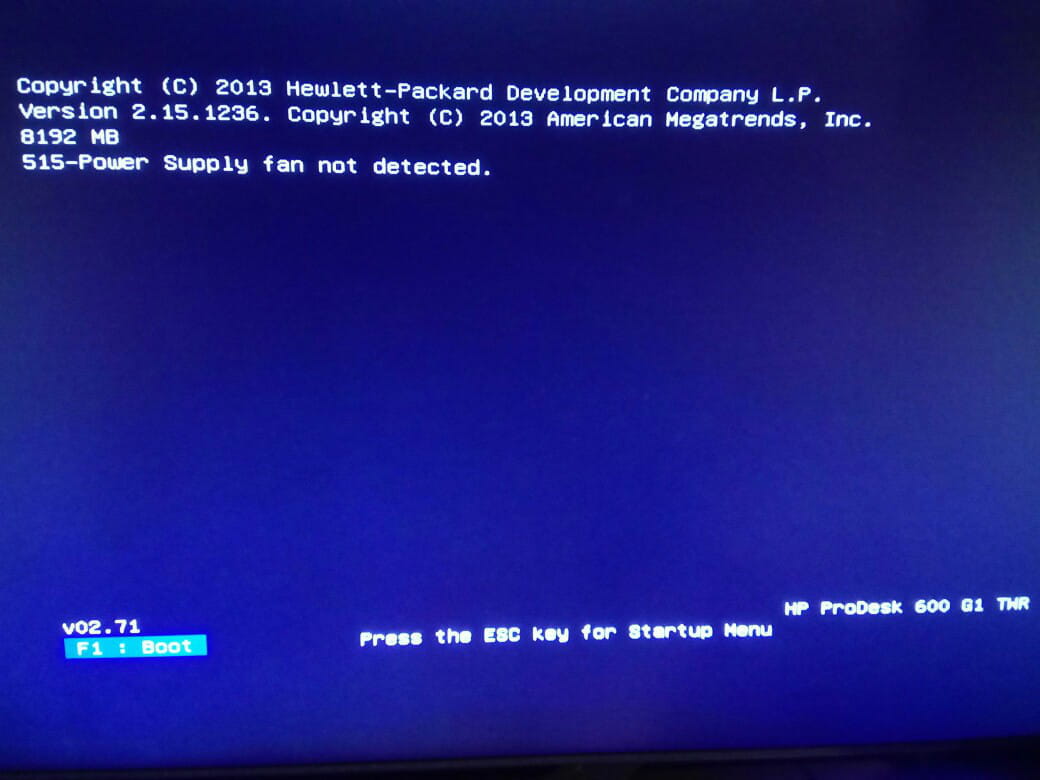
Each time I start my PC, I get an error on my PC which is 515-Power supply fan not detected on HP ProDesk 600 G1. However, my PC is fast and smooth and shows no abnormalities. I've had this problem for over a year and nothing serious has ever happened. So, every time I start it, it beeps and I have to press F1 to continue. I plan to sell the PC and would like to resolve this issue... because it's not very appealing to buyers. I have already searched for solutions on forums but never found anything. Apparently, it's supposed to be a fan that is improperly connected, but everything is functioning and nothing is disconnected. And if we can't find a solution, is it possible to disable this alert on startup? I'm attaching a photo of the screen.
Thank you very much to anyone who can help me.

Each time I start my PC, I get an error on my PC which is 515-Power supply fan not detected on HP ProDesk 600 G1. However, my PC is fast and smooth and shows no abnormalities. I've had this problem for over a year and nothing serious has ever happened. So, every time I start it, it beeps and I have to press F1 to continue. I plan to sell the PC and would like to resolve this issue... because it's not very appealing to buyers. I have already searched for solutions on forums but never found anything. Apparently, it's supposed to be a fan that is improperly connected, but everything is functioning and nothing is disconnected. And if we can't find a solution, is it possible to disable this alert on startup? I'm attaching a photo of the screen.
Thank you very much to anyone who can help me.
2 answers
-
Good evening, it's the power supply fan that is not taken into account at every startup, you need to go into the BIOS to disable it if this option is available, but it seems unlikely to me, this function has not been displayed for quite a few years. Should I update the BIOS from the brand's website as a last resort before deciding to change the power supply?
-
Thank you for your quick response,
But do you think that by updating the PC's BIOS to the latest version I would have the option to disable this error? Since you say it only happens on older BIOS versions.