
Restore original color settings of my W10 screen
Solved
LoulouSophie
-
pistouri Posted messages 19008 Registration date Status Contributeur Last intervention -
pistouri Posted messages 19008 Registration date Status Contributeur Last intervention -
Hello,
I accidentally messed up the colors on my screen, taskbar, tabs, and despite my attempts, I can't find the original setting.
I am on Windows 10 with an ACER laptop.
Can someone help me?
Thank you in advance, best regards.
I accidentally messed up the colors on my screen, taskbar, tabs, and despite my attempts, I can't find the original setting.
I am on Windows 10 with an ACER laptop.
Can someone help me?
Thank you in advance, best regards.
2 réponses

pistouri
Posted messages
19008
Registration date
Status
Contributeur
Last intervention
Ambassadeur
8 719
No problem, we'll do our best.
You can take inspiration from these settings to get started.
Taskbar:

The suite at the bottom of the page

Colors:

The suite at the bottom of the page

Colors suite → line to the right → High contrast settings


A+
You can take inspiration from these settings to get started.
Taskbar:

The suite at the bottom of the page
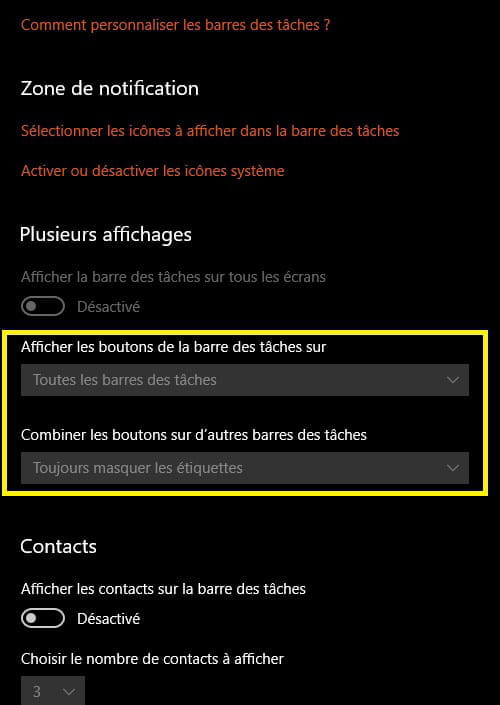
Colors:

The suite at the bottom of the page

Colors suite → line to the right → High contrast settings


A+
I shouldn't have checked the right boxes simultaneously between "contrast settings" and "colors," that's why it wasn't working.
A big thank you to you anyway!
It’s great that you managed to get there.
You can create a restore point to avoid any mishaps.
Look here
Start by enabling system protection if it’s not already done.
Make sure to check after the major Windows Update updates, sometimes you need to do it again.
→ I must not have checked the right boxes
Make sure to check the right boxes in the future :-)
You can mark the discussion as resolved like this
Have a great end of the day.
Good evening to you too and thanks again for the time dedicated!
You've made progress by coming to the Forum, that's what matters most.
I prefer the trifecta as a game, there are fewer numbers and I always play my birth date; sometimes it works, sometimes it doesn't.
@pistouri.