Greater/Less Than or Equal To Sign

cr2712 Posted messages 17 Registration date   Status Member Last intervention   -  
PapyLuc51 Posted messages 4569 Registration date   Status Member Last intervention   -
Hello everyone,

I have a Qwerty/Arabic keyboard (see attached) that I switched to Azerty.

I want to make the less than/greater than or equal sign in Excel, but I can't find the greater than and less than signs...

Does anyone have an idea?

Thank you

4 answers

  1. eriiic Posted messages 24581 Registration date   Status Contributor Last intervention   7 281
     
    Hello,

    and the keys under K and L? You have < and >
    eric

    By continuously trying, we eventually succeed.
    So the more it fails, the more chances we have that it works. (the Shadoks)
    In addition to thank you (yes, it happens!!!), remember to set it to resolved. Thank you
    0
    1. cr2712 Posted messages 17 Registration date   Status Member Last intervention  
       
      If it had been that simple,... but no, neither with Ctrl, nor with Alt, nor with Fn, nothing...
      0
    2. eriiic Posted messages 24581 Registration date   Status Contributor Last intervention   7 281
       
      You said you couldn't find them, not anything else...
      Given where the symbol is placed on the key, I will try with Shift.
      eric
      0
    3. cr2712 Posted messages 17 Registration date   Status Member Last intervention  
       
      Not anymore....
      0
    4. PapyLuc51 Posted messages 4569 Registration date   Status Member Last intervention   1 512
       
      Greetings everyone,

      cr2712, do you have the manual for your machine?

      Fn doesn't seem necessary since it's the blue characters that appear to be managed by that key

      A trial with Ctrl + Shift or Alt. ???

      Regards
      0
    5. cr2712 Posted messages 17 Registration date   Status Member Last intervention   > PapyLuc51 Posted messages 4569 Registration date   Status Member Last intervention  
       
      Thank you, but... unfortunately no more.
      0
  2. Mike-31 Posted messages 18405 Registration date   Status Contributor Last intervention   5 147
     
    Hello,

    have you tried
    Alt and 060 for <
    Alt 061 for = and Alt 062 for >
    --
    A+
    Mike-31

    I am responsible for what I say, not for what you understand...
    0
    1. cr2712 Posted messages 17 Registration date   Status Member Last intervention  
       
      thank you but… no better… I’ve tried just about everything, for now, I’m using the virtual keyboard
      0
    2. tontong Posted messages 2575 Registration date   Status Member Last intervention   1 064
       
      Hello,
      Be careful with a keyboard without a numeric keypad; you shouldn't type the numbers on the top row but use the numbers obtained in the letter zone (with the fn key).
      0
      1. cr2712 Posted messages 17 Registration date   Status Member Last intervention   > tontong Posted messages 2575 Registration date   Status Member Last intervention  
         
        Thank you Tontong but no more.
        0
    3. cr2712 Posted messages 17 Registration date   Status Member Last intervention  
       
      Thank you Mike but no.
      0
  3. eriiic Posted messages 24581 Registration date   Status Contributor Last intervention   7 281
     
    Hello,

    a question comes to mind that has nothing to do with it.
    In Arabic, a < b is read as a is less than b like us, or b is greater than a?
    Reading from right to left would reverse the meaning of the sign, it feels weird to me...
    eric

    --
    By continuously trying, one eventually succeeds.
    So the more it fails, the more chances we have that it works. (the Shadoks)
    In addition to the thanks (yes indeed, it does happen!!!), remember to mark it as resolved. Thank you.
    0
    1. cr2712 Posted messages 17 Registration date   Status Member Last intervention  
       
      good question
      0
  4. PapyLuc51 Posted messages 4569 Registration date   Status Member Last intervention   1 512
     
    Have you tried what I included in my response n°13

    I know it looks like what Mike-31 put (greetings) but it's without the 0; I would like to know if it's good or not, thanks ;)

    Best regards
    0
    1. cr2712 Posted messages 17 Registration date   Status Member Last intervention  
       
      Yes Luc, I’ve tried everything!

      I didn’t think this keyboard would be so annoying! it's actually the only thing I can't find!
      0
    2. PapyLuc51 Posted messages 4569 Registration date   Status Member Last intervention   1 512
       
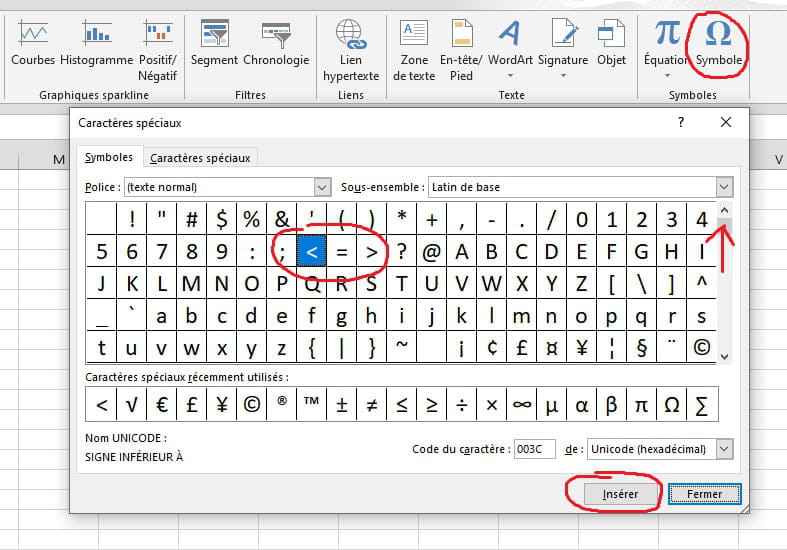
      I have no other ideas left, except for the insertion of symbols


      Best regards
      1
    3. cr2712 Posted messages 17 Registration date   Status Member Last intervention  
       
      Thank you, Luc, for looking into the matter!

      I use the virtual keyboard, which allows me to do this, in addition to the standard keyboard.

      Thanks again

      Claude
      0
    4. PapyLuc51 Posted messages 4569 Registration date   Status Member Last intervention   1 512
       
      I just thought of something else:

      On your keyboard, does the Alt key to the right of the space bar have the same function as the one on the left?

      Which key do you use to type the characters located at the bottom right? Try the same key while adding shift

      See this image

      Best regards
      0