
Greater/Less Than or Equal To Sign
cr2712
Posted messages
17
Registration date
Status
Membre
Last intervention
-
PapyLuc51 Posted messages 4566 Registration date Status Membre Last intervention -
PapyLuc51 Posted messages 4566 Registration date Status Membre Last intervention -
Hello everyone,
I have a Qwerty/Arabic keyboard (see attached) that I switched to Azerty.
I want to make the less than/greater than or equal sign in Excel, but I can't find the greater than and less than signs...
Does anyone have an idea?
Thank you
I have a Qwerty/Arabic keyboard (see attached) that I switched to Azerty.
I want to make the less than/greater than or equal sign in Excel, but I can't find the greater than and less than signs...
Does anyone have an idea?
Thank you
4 réponses

Hello,
have you tried
Alt and 060 for <
Alt 061 for = and Alt 062 for >
--
A+
Mike-31
I am responsible for what I say, not for what you understand...
have you tried
Alt and 060 for <
Alt 061 for = and Alt 062 for >
--
A+
Mike-31
I am responsible for what I say, not for what you understand...

Hello,
a question comes to mind that has nothing to do with it.
In Arabic, a < b is read as a is less than b like us, or b is greater than a?
Reading from right to left would reverse the meaning of the sign, it feels weird to me...
eric
--
By continuously trying, one eventually succeeds.
So the more it fails, the more chances we have that it works. (the Shadoks)
In addition to the thanks (yes indeed, it does happen!!!), remember to mark it as resolved. Thank you.
a question comes to mind that has nothing to do with it.
In Arabic, a < b is read as a is less than b like us, or b is greater than a?
Reading from right to left would reverse the meaning of the sign, it feels weird to me...
eric
--
By continuously trying, one eventually succeeds.
So the more it fails, the more chances we have that it works. (the Shadoks)
In addition to the thanks (yes indeed, it does happen!!!), remember to mark it as resolved. Thank you.

Have you tried what I included in my response n°13
I know it looks like what Mike-31 put (greetings) but it's without the 0; I would like to know if it's good or not, thanks ;)
Best regards
I know it looks like what Mike-31 put (greetings) but it's without the 0; I would like to know if it's good or not, thanks ;)
Best regards
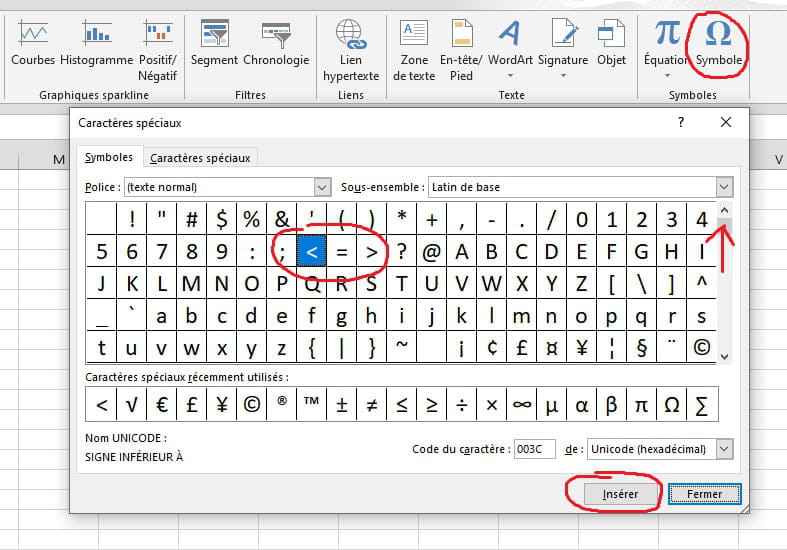
I just thought of something else:
On your keyboard, does the Alt key to the right of the space bar have the same function as the one on the left?
Which key do you use to type the characters located at the bottom right? Try the same key while adding shift
See this image
Best regards
On your keyboard, does the Alt key to the right of the space bar have the same function as the one on the left?
Which key do you use to type the characters located at the bottom right? Try the same key while adding shift
See this image
Best regards
Given where the symbol is placed on the key, I will try with Shift.
eric
cr2712, do you have the manual for your machine?
Fn doesn't seem necessary since it's the blue characters that appear to be managed by that key
A trial with Ctrl + Shift or Alt. ???
Regards