
Conversion of data from hundredths to minutes for graph
Solved
alice_9189
Posted messages
4
Registration date
Status
Member
Last intervention
-
Raymond PENTIER Posted messages 58230 Registration date Status Contributor Last intervention -
Raymond PENTIER Posted messages 58230 Registration date Status Contributor Last intervention -
Hello everyone,
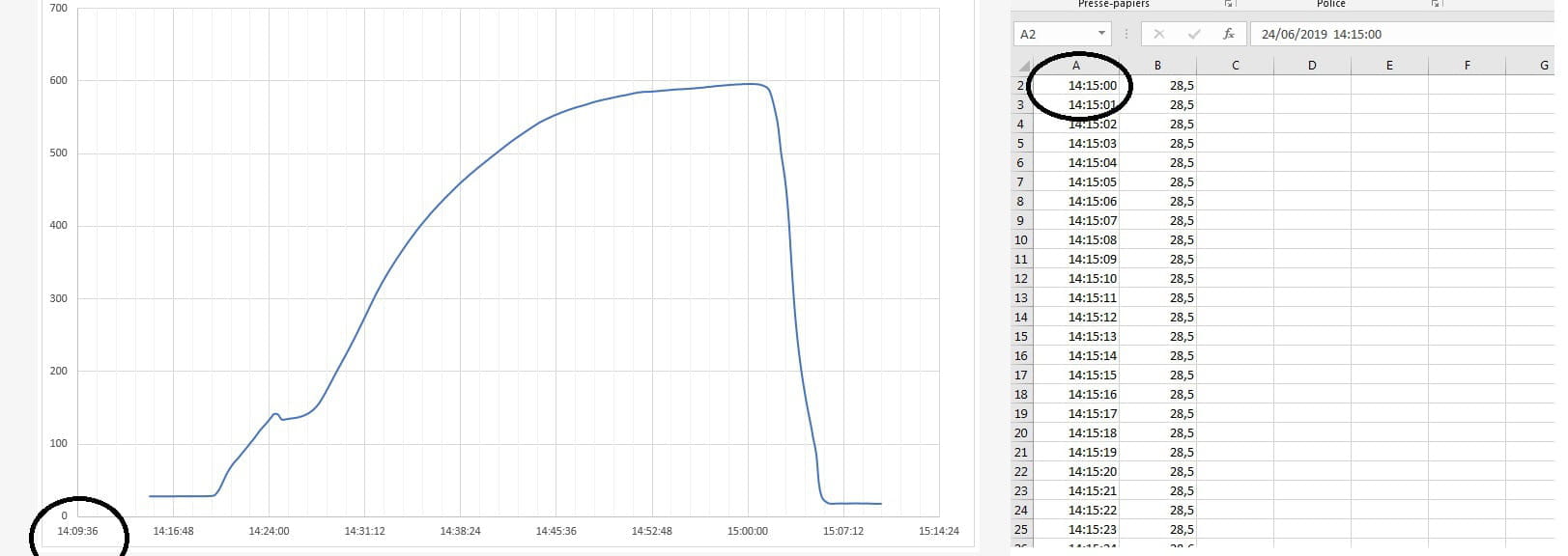
here is my problem, I want to create a classic curve chart from a data sheet obtained from a temperature recorder.
the data is in "hundredth" format here 14:15:00 and when I edit my chart I realize that my x-axis is in minutes 14:09:36.
Do you have any tips to make the data match?
Knowing that the extraction of source data cannot be done in another format than: date hh:mm:ss.
thank you!

here is my problem, I want to create a classic curve chart from a data sheet obtained from a temperature recorder.
the data is in "hundredth" format here 14:15:00 and when I edit my chart I realize that my x-axis is in minutes 14:09:36.
Do you have any tips to make the data match?
Knowing that the extraction of source data cannot be done in another format than: date hh:mm:ss.
thank you!
2 answers
-
Hello and welcome.
I don't know how to work with images: I need an Excel file to examine, test, and propose a solution.1) Go to https://www.cjoint.com/
But at first glance, your graph is correct, and all the data is indeed in the hh:mm:ss format...
2) Click on [Browse] to select your file (maximum 15 MB)
3) Scroll down to click on the blue button [Create the Cjoint link]
4) After a few seconds, the second page will display, with the link in bold; right-click on it and choose "Copy link"
5) Return to your discussion on CCM, and in your message, click "Paste".
=> See the guide https://www.commentcamarche.net/faq/29493-utiliser-cjoint-pour-heberger-des-fichiers
There are also:
1) https://mon-partage.fr/
2) https://www.transfernow.net/
Simply, the first tick mark is not the x-coordinate of the first point of your curve!
Retirement is great! Especially in the Caribbean...
Raymond (INSA, AFPA)-
-
-
 You didn't read (or understand) my explanation well: In no case does 14:15 equal 14:09, and there is nowhere a format with hundredths.
If you want your curve to start at the abscissa 14:15:00, simply replace the minimum graduation 43640.59 (standard format which corresponds in time format to 14:09:36) with the value 43640.593749 (which corresponds in time format to 14:15:00)
-
-
Hello,
You need to set column A to text format, then in A1, enter the first time "14:15:00" and drag down for an incremental copy of 1.
Best regards
