
[MacOS] Downloading an HTML file as soon as I click on a link
Solved
Juption
Posted messages
7
Status
Member
-
pistouri Posted messages 19010 Registration date Status Contributor Last intervention -
pistouri Posted messages 19010 Registration date Status Contributor Last intervention -
Hello,
I've had a little problem for a while now, I can't access a webpage anymore. I'm on a Mac and using Chrome.
As soon as I click on a page, a download starts with the name of the page followed by ".html" and the page doesn't open... I've tried uninstalling/reinstalling Chrome but nothing has changed...
Does anyone have a solution?
Thanks in advance,
Juption
I've had a little problem for a while now, I can't access a webpage anymore. I'm on a Mac and using Chrome.
As soon as I click on a page, a download starts with the name of the page followed by ".html" and the page doesn't open... I've tried uninstalling/reinstalling Chrome but nothing has changed...
Does anyone have a solution?
Thanks in advance,
Juption
4 answers
-
pistouri Posted messages 19010 Registration date Status Contributor Last intervention Ambassador 8 732
Hello,
Probably an infection that causes redirections.
Check here
Start with Malwarebytes for Mac
Disable the premium trial.
Run a scan and remove from quarantine.
Reset your browser(s).
Ps: I had made a tutorial but it was for Windows, and I didn’t validate it since you’re using a Mac and I’m not very familiar with it; I included Malwarebytes at the end.
Cheers
--
pistouri -
Good evening, what is this page without being indiscreet?
--
Independent developer -
pistouri Posted messages 19010 Registration date Status Contributor Last intervention Ambassador 8 732
Hello,
Go to the Finder app in the dock
Click on "Applications"
In the left pane of Finder, click on "Applications".
Search for and delete the malware application, check the date if it is recent.
Example of a malware application → Search Protect
Right-click on the trash icon and select "Empty Trash"
For Google Chrome
Reset it
Tutorial here
Go to Extensions and remove them if you don't recognize them.
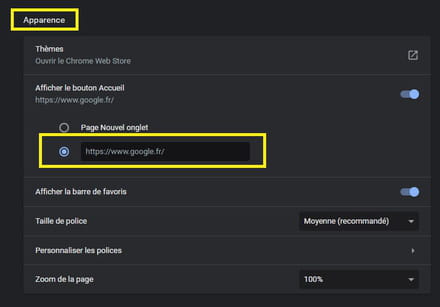
Check the homepage.
On Startup → Open a specific page or set of pages
You can set Google
Select Google as the default search engine.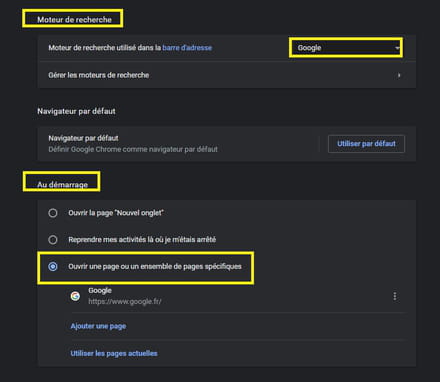
Install uBlock for Mac here
See you later
--
pistouri -
pistouri Posted messages 19010 Registration date Status Contributor Last intervention Ambassador 8 732
You're welcome.
Good luck.
--
pistouri



