[VB.Excel] incrémenter, copier et coller le résulta
Résolu
Bonjour à tous,
j'ai un fichier <Classeur1.xlsm>, mon but est de parcourir tous les fichiers (.xlsx) de mon dossier qui se trouve quelque part sur mon PC.
la macro va faire les actions suivantes (la description suivante concerne par exemple la ligne 2 et 10) :
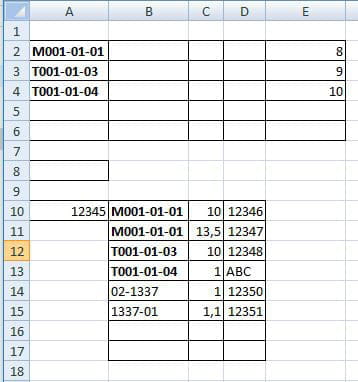
1- en boucle sur la plage "B10:B15" pour vérifier si la chaîne de texte commence par M ou T
2- si oui F1=OK, G1=A10, H1= OK ou NOK, I1=D10, J1=C10
3- en boucle sur la plage "A2:A5" pour vérifier si B10=A2
4- si oui K1=E2 et L1=OK
5-si non, sur la plage "B10:B15" la chaîne de texte ne commence par M ou T
6-F1=OK, G1=A10 et L1=NOK
7-copier le résultat "F1:L1" sur mon classeur (.xlsm)
8-même procédure pour les autres lignes (incrémentation du résultat); a ce stade j’arrive pas à le faire par le code VB.
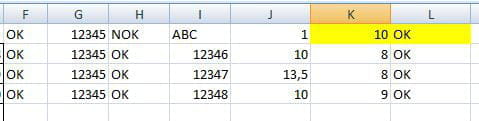
ci-dessous la capture d'un exemple de fichier (.xlsx), du résultât souhaité et du code VB.
pour le résultât de mon code VB, la valeur du K1 doit être 10 et L1 doit être OK, je ne sais pas pourquoi le résultât égal à NOK sur K1 et L1. !!!
merci d'avance pour vos aides.
j'ai un fichier <Classeur1.xlsm>, mon but est de parcourir tous les fichiers (.xlsx) de mon dossier qui se trouve quelque part sur mon PC.
la macro va faire les actions suivantes (la description suivante concerne par exemple la ligne 2 et 10) :
1- en boucle sur la plage "B10:B15" pour vérifier si la chaîne de texte commence par M ou T
2- si oui F1=OK, G1=A10, H1= OK ou NOK, I1=D10, J1=C10
3- en boucle sur la plage "A2:A5" pour vérifier si B10=A2
4- si oui K1=E2 et L1=OK
5-si non, sur la plage "B10:B15" la chaîne de texte ne commence par M ou T
6-F1=OK, G1=A10 et L1=NOK
7-copier le résultat "F1:L1" sur mon classeur (.xlsm)
8-même procédure pour les autres lignes (incrémentation du résultat); a ce stade j’arrive pas à le faire par le code VB.
ci-dessous la capture d'un exemple de fichier (.xlsx), du résultât souhaité et du code VB.
pour le résultât de mon code VB, la valeur du K1 doit être 10 et L1 doit être OK, je ne sais pas pourquoi le résultât égal à NOK sur K1 et L1. !!!
merci d'avance pour vos aides.
3 réponses
-
Option Explicit Dim NomClasseur As String Dim MonChemin As String Dim WB As Workbook Dim x As Long Dim y As Long Dim lig1 As Long, lig2 As Long Dim Val1 As String Dim Val2 As String Dim DernierLigne As Integer Sub Consolider() MonChemin = InputBox("Merci de coller le chemin de vos fichiers sur la zone de texte: ") & "\" NomClasseur = Dir(MonChemin & "\*.xlsx*") Do While NomClasseur <> "" Application.DisplayAlerts = False Set WB = Workbooks.Open(MonChemin & NomClasseur) WB.Activate For lig1 = 10 To 15 'boucle sur la plage "B10:B15" x = 0 If InStr(1, Cells(lig1, 2), "M") = 1 Or InStr(1, Cells(lig1, 2), "T") = 1 Then 'si la chaine de texte commence par M ou T Range("F1").Value = "OK" 'F1= OK, F2 = OK, F3 = OK ... tant que Cells(lig1, 2)= M ou T Range("G1").Value = Range("A10").Value 'G1= OK, G2 = OK, G3 = OK ... tant que Cells(lig1, 2)= M ou T Val1 = Cells(lig1, 4).Value If IsNumeric(Val1) Then 'verifier si la Cells(lig1, 4) est numerique Range("H1").Value = "OK" 'si oui H1= OK, H2 = OK, H3 = OK ... tant que Cells(lig1, 2)= M ou T + Cells(lig1, 4) est numerique Else Range("H1").Value = "NOK" 'si non H1= NOK, H2 = NOK, H3 = NOK ... tant que Cells(lig1, 2)= M ou T + Cells(lig1, 4) est non numerique End If Range("I1").Value = Cells(lig1, 4).Value 'I1, I2, I3... = Cells(lig1, 4).Value tant que Cells(lig1, 2)= M ou T Range("J1").Value = Cells(lig1, 3) 'J1, J2, J3... = Cells(lig1, 3).Value tant que Cells(lig1, 2)= M ou T Val2 = Cells(lig1, 2).Value For lig2 = 2 To 5 'boucle sur la plage "A2:A5" y = 0 If Cells(lig2, 1).Value = Val2 Then 'verifier si la Cells(lig2, 1)= à Val2 Range("K1").Value = Cells(lig2, 5).Value 'si oui K1, K2, K3... =Cells(lig2, 5) tant que Cells(lig1, 2)= Val2 Else Range("K1").Value = "NOK" 'si non J1, J2, J3... =Cells(lig2, 5) tant que Cells(lig1, 2)= NOK End If Next lig2 Else Range("F1").Value = "OK" 'F1= OK, si la chaine de texte ne commence pas par M ou T Range("G1").Value = Range("A10").Value 'G1= A10, si la chaine de texte ne commence pas par M ou T Range("L1").Value = "NOK" 'L1= NOK, si la chaine de texte ne commence pas par M ou T x = x + 1 End If Next lig1 Range("F1:L1").Copy Workbooks("Classeur1.xlsm").Activate DernierLigne = ActiveSheet.UsedRange.Rows.Count + 1 Range("A" & DernierLigne).Select ActiveSheet.Paste Workbooks(NomClasseur).Close Application.DisplayAlerts = True NomClasseur = Dir Loop MsgBox "Le traitement est terminer." End Sub -
merci beaucoup :)
-
Problème résolu, je tiens à remercier "f894009" trait fort.