Batch file does not execute correctly

devilhacker
Posted messages
625
Status
Member
-
devilhacker Posted messages 625 Status Member -
devilhacker Posted messages 625 Status Member -
Hello,
I made a small batch file to launch an executable. I create a scheduled task, but when it runs it doesn’t execute completely—in other words, I do get a Command Prompt process that starts, but not the actual exe. My code is:
@echo offI should note that if I double-click the bat, it works fine... anything special to put in the scheduled task? I had tested this:
set "workdir=%~dp0"
pushd "%workdir%"
xmr-stak.exe
exit
@echo offBut with double-click it leaves a DOS window open... and still didn’t run in the scheduled task either. I’m stuck... any ideas? thanks
START xmr-stak.exe
exit
6 answers
-
Hi,
With no guarantee that it will work for you,
The only trick I found for my account is to place the .bat file in c:\windows\system32 with the executable in question, but in your case I think you should place the .bat file in the folder that hosts xmr-stak.exe
To test.
Best regards-
Hello, thank you for your reply. Exactly, the .bat file is located in the folder of xmr-stak.exe... that's what I don't understand. I haven't tested putting it in System32. then I don't know if it matters but this .exe file needs a config text file to work... so is that the problem? I don't think so but oh well...
-
-
hello
try with the full path\chemin\xmr-stak.exe
-
Hi,
If this may help, I had been inspired by this tutorial whose link is
https://sospc.name/creer-tache-planifiee-didpoy/
Best regards -
well so i found out why... basically i had to specify in the file where to start the script... the test is ok when i tell it to start at session startup. i converted it to .exe and it works too.
i run a test by putting in the parameters to start at pc startup... it doesn’t start...
i change the condition again and i set that it must start when the pc is idle... it doesn’t work... i reset the parameter to start at session startup and it works...
aaaaaaaaaaaaaaaaaaaaaaahhhhhhhhhh....


plus dans le récap des taches j’ai une erreur 0x1....
any ideas? -
Hi,
It might be a Windows 10 security issue; in your case, the control must be total for everyone for the considered directory or directories.
To try to see.
Best regards.-
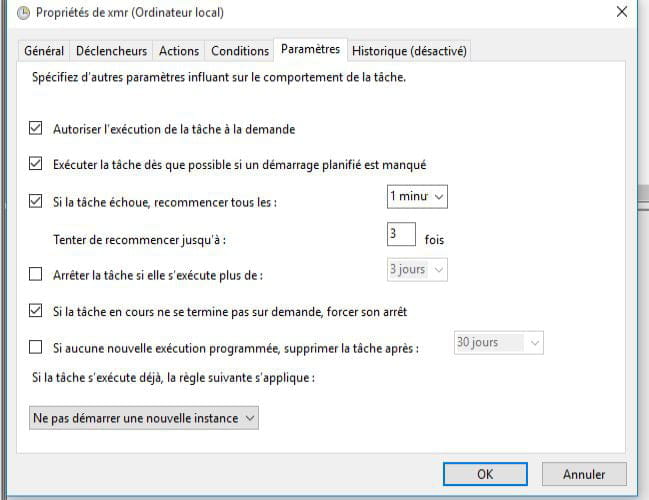
I put in the first tab "run with maximum permissions" and its function works when asked to open at logon. but as soon as you change the conditions it stops working... basically my goal is for it to run when the PC is idle. but it doesn't work. the same for the startup option also doesn't work... whereas at logon it does... I don't understand anything anymore.
-
-
Hi,
Is it by any chance that in the scheduled task properties, the tab "only allow if the user is connected" hasn't remained checked?
After that I'm stuck.
Best regards