Lower CPU frequency
Hello,
I just bought an HP Spectre PC with an Intel I7-8705G processor. The processor speed is normally 3.10GHz.
However, the speed regularly goes up to 3.8 or even 4.1GHz, even for simple tasks. My computer then starts to overheat and ventilate, which is not very pleasant and surely not good for my PC.
I went into the BIOS and I can't change the frequency, what should I do?
Thank you
I just bought an HP Spectre PC with an Intel I7-8705G processor. The processor speed is normally 3.10GHz.
However, the speed regularly goes up to 3.8 or even 4.1GHz, even for simple tasks. My computer then starts to overheat and ventilate, which is not very pleasant and surely not good for my PC.
I went into the BIOS and I can't change the frequency, what should I do?
Thank you
3 answers
-
Hello, on Windows there is a technique to lower the frequency without touching the BIOS.
Right-click on the desktop, then "display settings", then "power and sleep".
Then go to "additional power settings" and click "change plan settings".
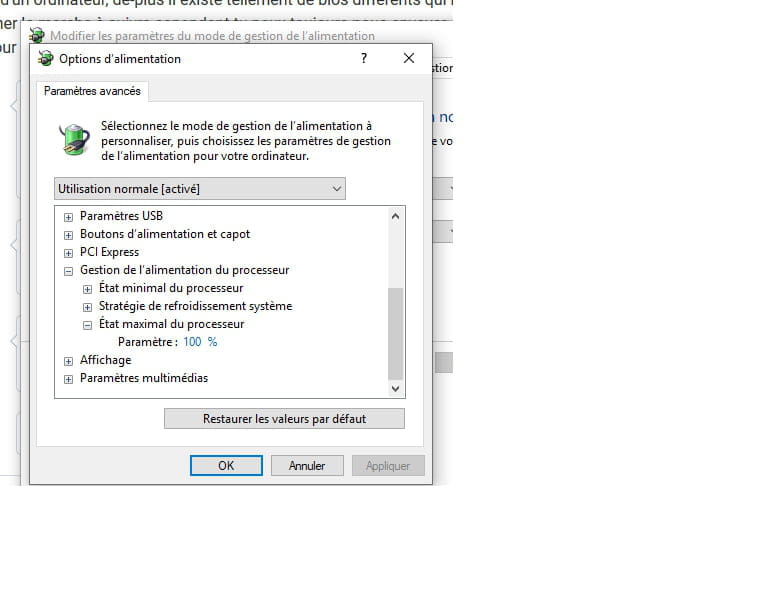
In the advanced settings, you need to modify the maximum processor state.
For example, for me, an i5 2430m runs at 2.8 GHz at 100%, 2.4 GHz at 99%, and 2 GHz at 98%, and the temperature decreases.