Sound issue with Discord

Pseudo -
So, when I'm on Discord in a channel, all sounds cut out except for the one from the channel.
This is a problem for me, especially for multiplayer games or listening to music at the same time.
--
Best regards,
Me
2 answers
-
Hello.
I may have a solution for you. (It works on Windows)
At the bottom of your screen, you have the logo of a speaker, right-click on it and then click on "Sound".

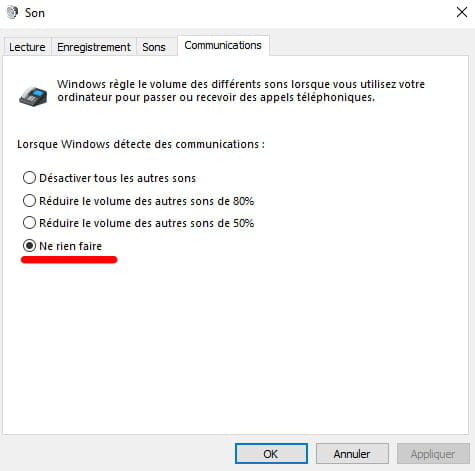
A window will appear, then click on "Communications"

You will have 4 options to check, you will need to click on "Do nothing"

Once that is done, click on "Apply" and "OK" and normally your sound should stop lowering when you are in a Discord voice channel.
I am sorry if this solution did not work for you, but it is the only one that comes to mind to help you.
I hope to have helped you, have a great day.
-
Hello, I think I have the solution even if I’m responding 3 years later, this might help others...
In the Discord settings, go to "Voice & Video" then scroll down until you reach "Attenuation." It's a mode that lowers the volume of other applications when someone is speaking. It’s probably set to 100% in your case.
Hoping to have helped someone
-
Hello, I'm also replying for others, as these techniques didn't work for me. I have a JBL Bluetooth headset, and actually, when I was listening to music on Spotify and went into a voice chat on Discord, for example, the sound became muffled.
What I think is happening is that the headset goes into noise-cancelling mode or something similar. So, I set the audio input device to my computer's option (not the default option, as that could select my Bluetooth headset; on my PC, it's called Realtek), and for the output device, I chose my headset. And it worked.
Maybe trying to install the JBL app (JBL Headphones) or the app for your headset could also help in managing the headset and its sound better...
-