I reset my PC to zero but now it's asking for a password.
Ned-38
Posted messages
2
Status
Member
-
Malekal_morte- Posted messages 178136 Registration date Status Moderator, Security Contributor Last intervention -
Malekal_morte- Posted messages 178136 Registration date Status Moderator, Security Contributor Last intervention -
Hello, I am asking you how to solve my problem actually
I reset my PC when I was in my office and my PC reset, then it asks me for a password although it has been reset to zero. What should I do?
Thank you, best regards
I reset my PC when I was in my office and my PC reset, then it asks me for a password although it has been reset to zero. What should I do?
Thank you, best regards
1 answer
-
Hello,
If you've kept the data, it's the same as before.
If you can't open Windows 10, you'll need to reinstall it.
Before that, recover your important data by following these links:
https://www.malekal.com/comment-recuperer-ses-donnees-lorsque-windows-pc-est-plante-en-panne/
https://forums.commentcamarche.net/forum/affich-37585760-recuperer-les-donnees-de-son-disque
If you can't open Windows, you'll likely need to use a Live CD.
Next, to reinstall Windows 10 from an installation media:
The principle is to create a Windows 10 installation USB drive and boot the computer from it to reinstall Windows without formatting.
Since the computer is down, you need to create it from another functioning computer.
To create the USB drive:- Create a USB drive using Media Creation Tool: https://www.malekal.com/windows-10-media-creation-tool/
- Boot from it by modifying the boot sequence and indicating the USB drive or DVD: How to boot the computer from USB drive
If the drive doesn't work, try making one again with Rufus: how to download Rufus.
Download the ISO file, for example, with Adguard: Download Windows ISO
Launch Rufus and then specify the ISO file
In the partition type, choose GPT.
For more details, refer to this tutorial for details: how to create a bootable USB drive for Windows installation
The Windows 10 installation program should then start:
Follow this tutorial that explains how to install Windows 10: how to install Windows 10.
All steps are provided from A to Z with tips at the end to secure Windows 10.- Let yourself be guided to install Windows 10.
- Choose customize (not upgrade)
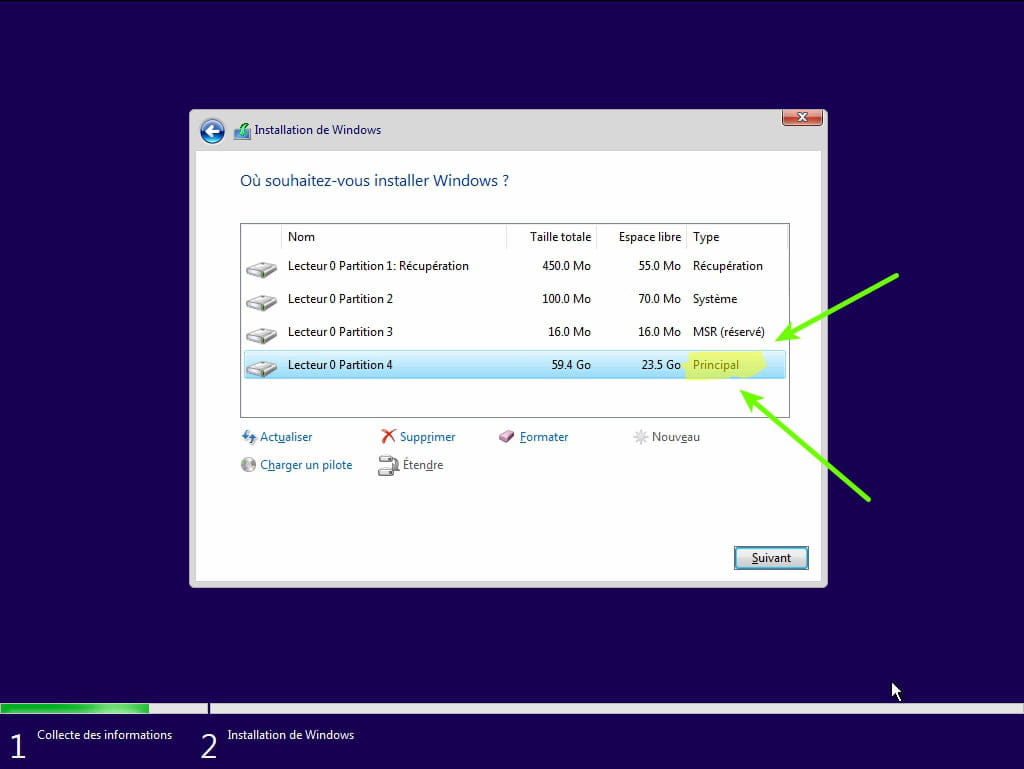
- During the partition phase, select the main partition and click next.
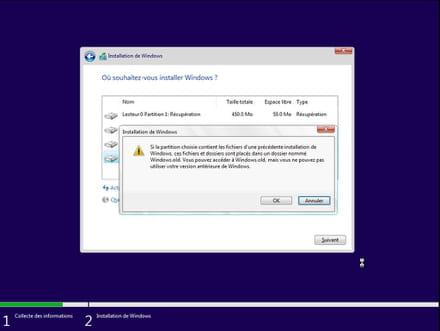
- The installer will tell you that Windows is already present and offer to move it.
- Follow the Windows installation procedure using the tutorial above.
Just don't format.
Your user data will be copied to the Windows.old folder.
Once Windows is installed, I recommend following these tips to properly configure and use Windows: Tips after reinstalling Windows.
--
Please press a key to continue the disinfection...-
Yes, thank you, but I can't find the boot system. I looked at the keys for HP; is the boot manager the same?
Thank you.- see here for the keys to access the BIOS or boot menu: https://www.malekal.com/liste-touches-acces-bios-boot-menu-constructeur/
F9, ESC or F10 for HP in general.