
DHCP configuration issue (Windows Server) for client machines
-
Hello everyone,
Please, I urgently need help. I’ll explain the situation clearly.
1- I am using the VMWare virtual machine, and I am using the NAT connection mode based on the VMNET8 network card. (I do not want to use Bridge mode because in that case my virtual machines will get an IP address assigned by the router, and I cannot disable the DHCP of the router because I am in an environment that requires it).
2- I have installed the DHCP role in Windows Server 2012, and I have configured my address pool. (I have set my server's IP address to: 192.168.201.100)
3- My Windows 7 client machine is obtaining an IP address dynamically
(example:
IP address : 192.168.201.140
subnet mask : 255.255.255.0
default gateway : 192.168.201.2 : this is given by default in VMnet 8
and the DHCP server is :192.168.201.254
4- I unchecked a box in VMNET8 to prevent it from distributing addresses via DHCP (See attached image)
5- I restart my DHCP service on the server, I restart my client machine but the IP address it gets is still not within my defined range and the DHCP is still enabled with the IP address 192.168.201.254.
In my case, my DHCP is not functional at all, and this does not allow me to know if it is properly configured and if I can distribute IP addresses through it.
I have tried to explain my situation from all angles because this may arise from the virtual machine or other reasons; please I urgently need help.
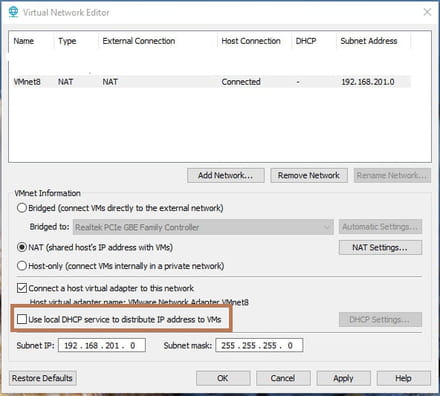
Please, I urgently need help. I’ll explain the situation clearly.
1- I am using the VMWare virtual machine, and I am using the NAT connection mode based on the VMNET8 network card. (I do not want to use Bridge mode because in that case my virtual machines will get an IP address assigned by the router, and I cannot disable the DHCP of the router because I am in an environment that requires it).
2- I have installed the DHCP role in Windows Server 2012, and I have configured my address pool. (I have set my server's IP address to: 192.168.201.100)
3- My Windows 7 client machine is obtaining an IP address dynamically
(example:
IP address : 192.168.201.140
subnet mask : 255.255.255.0
default gateway : 192.168.201.2 : this is given by default in VMnet 8
and the DHCP server is :192.168.201.254
4- I unchecked a box in VMNET8 to prevent it from distributing addresses via DHCP (See attached image)
5- I restart my DHCP service on the server, I restart my client machine but the IP address it gets is still not within my defined range and the DHCP is still enabled with the IP address 192.168.201.254.
In my case, my DHCP is not functional at all, and this does not allow me to know if it is properly configured and if I can distribute IP addresses through it.
I have tried to explain my situation from all angles because this may arise from the virtual machine or other reasons; please I urgently need help.
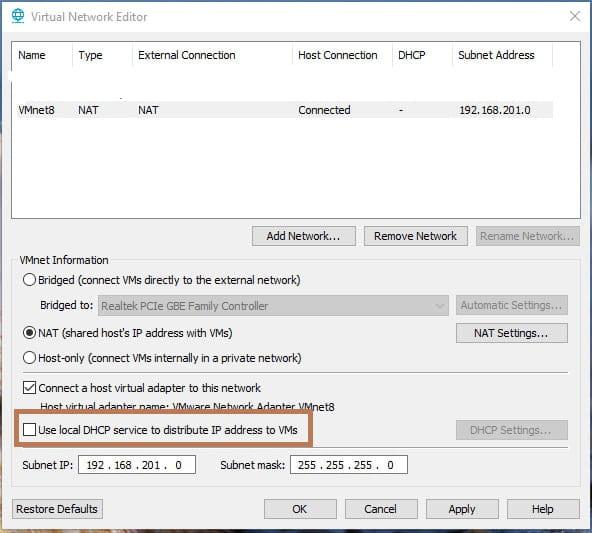
1 answer
-
Hi,
so the VMware DHCP server would continue to be active?
the bastard ...
otherwise, what if you configure a static IP on your VM?
-
Yes, indeed the DHCP server from VMWARE is active so the machines take the IP address from this server; however, I can't test the DHCP server that I configured myself.
I don't fully understand the concept of setting a fixed IP on my VM? -
Hi,
try this in a command prompt to force the client PC to request an IP address from your DHCP server again. It might simply be holding onto the old IP address it received from the VMware DHCP server.
Remove the IP address obtained by DHCP from the client PC's network card.
ipconfig /release
Then, request a new one by typing this:
ipconfig /renew -
@AliskoTry instead to connect the server and its machines in host only rather than nat.
-
Hello Brupala,
I tried connecting the machines in host-only mode but it's the same problem, there's still a VMWARE DHCP server assigning IP addresses to my virtual machines in the network they're connected to.
So I still have the problem. -
Hello InformatiWeb,
I executed the ipconfig/release command and it went well, however ipconfig/renew remains stuck for a long time, and my machine cannot obtain any IP address either from the VMWARE DHCP server or from the configured DHCP server, and when I ping, it tells me there is a general failure.
I restarted the PC, I disabled the Windows Server DHCP because I thought there was a conflict, but that is not the case. When I assign a static IP address using the one from the VMWARE DHCP server, it starts working again.
-

