
NB.SI.ENS result always 0,
Solved
Kotle
Posted messages
1
Status
Member
-
Vaucluse Posted messages 27336 Registration date Status Contributor Last intervention -
Vaucluse Posted messages 27336 Registration date Status Contributor Last intervention -
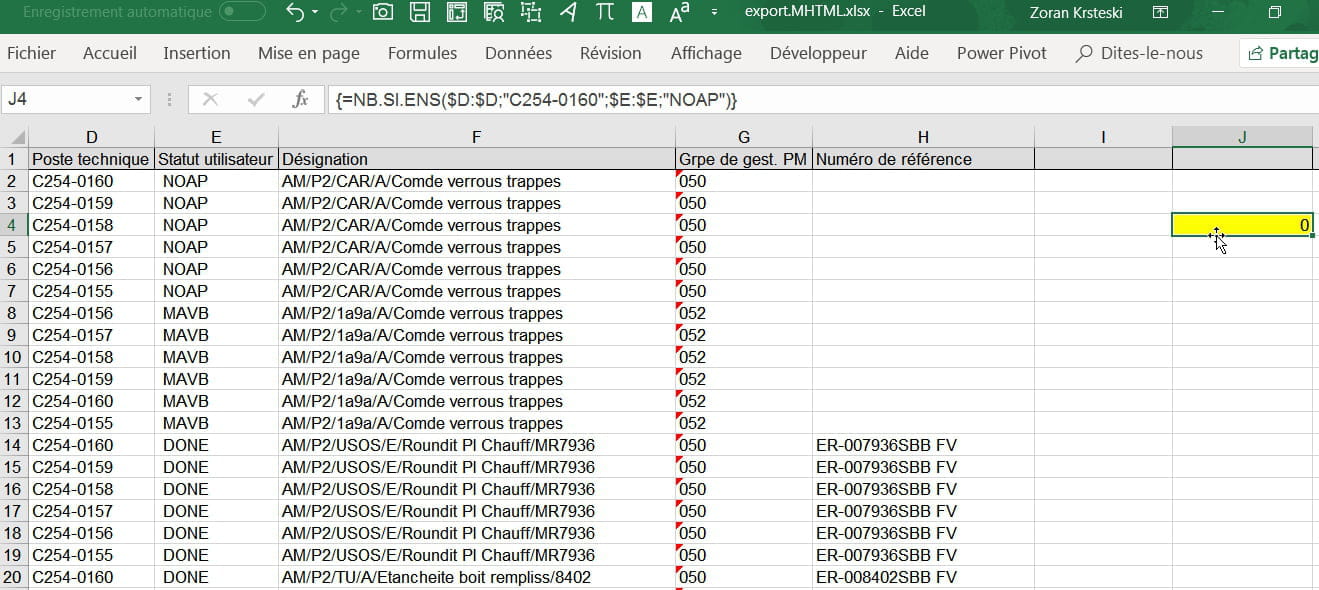
Please, why isn’t the NOAP cells being counted? The result is always 0.
=COUNTIFS($D:$D;"C254-0160";$E:$E;"NOAP")
Advice Upper Order Technical Post User Status
C2540225 3260961415 3261196475 C254-0160 NOAP
C2540225 3260961415 3261196476 C254-0159 NOAP
C2540225 3260961415 3261196477 C254-0158 NOAP
C2540225 3260961415 3261196478 C254-0157 NOAP
C2540225 3260961415 3261196479 C254-0156 NOAP
C2540225 3260961415 3261196480 C254-0155 NOAP
C2540225 3260961415 3261489487 C254-0156 MAVB
C2540225 3260961415 3261489488 C254-0157 MAVB
C2540225 3260961415 3261489489 C254-0158 MAVB
C2540225 3260961415 3261489490 C254-0159 MAVB
C2540225 3260961415 3261489491 C254-0160 MAVB
C2540225 3260961415 3261489492 C254-0155 MAVB
C2540320 3260983301 3261180635 C254-0160 DONE
C2540320 3260983301 3261180636 C254-0159 DONE
C2540320 3260983301 3261180637 C254-0158 DONE
C2540320 3260983301 3261180638 C254-0157 DONE
C2540320 3260983301 3261180639 C254-0156 DONE
C2540320 3260983301 3261180640 C254-0155 DONE
C2540376 3260987833 3261240321 C254-0160 DONE
C2540376 3260987833 3261240322 C254-0159 DONE
1 answer
-
Hello
Could you check columns "D" and "E"? The words must be written the same way as in the formula (without a space at the end, for example).
Best regards-
Hello
(and hi Grandpa Luc)
to complete your answer, I think you should try:
select D and E completely
replace tool
replace: type a blank
with: leave it empty
and "replace all"
or you can write the formula as follows, by surrounding the texts with asterisks (this way, it counts if the cell contains other characters in between)
=COUNTIFS(D:D;"*C254-160*";E:E;"*NOAP*")
best regards -
no problem
for your information
"*xxx*" > contains
"xxx*" >starts with
"*xxx" >ends with
can also be written referring to a text contained in a cell:
"*"'&cell address&"*" or "*"&cell address or cell address&"*"
have a good evening
best regards
-

