
Have to refresh the page 2/3 times for it to display correctly

Phexoe
Posted messages
29
Status
Membre
-
pistouri Posted messages 19008 Registration date Status Contributeur Last intervention -
pistouri Posted messages 19008 Registration date Status Contributeur Last intervention -
Good evening,
It has been 1 day now that I have to refresh a page about 3 times to get the correct display. I have already tried resetting Chrome, but nothing works. Could this be due to my session? If it is infected, can we "reset" it?
Thank you in advance.
It has been 1 day now that I have to refresh a page about 3 times to get the correct display. I have already tried resetting Chrome, but nothing works. Could this be due to my session? If it is infected, can we "reset" it?
Thank you in advance.
8 réponses


pistouri
Posted messages
19008
Registration date
Status
Contributeur
Last intervention
Ambassadeur
8 719
Hello,
1- Possible victim of an infection →
Run AdwCleaner
Delete any infections found
After restarting your PC, a log will appear as a report
Perform another test with Google Chrome
If no improvement, run Malwarebytes
you need to configure Malwarebytes
Open it:
Settings → Account Information → then Disable premium trial → then Yes
a window opens → Select → I do not need real-time protection then click OK
Settings → Protection? then configuring the Scan Options
Check or enable
- Search for rootkits
- Scan archives
- Use anomaly detection independent of signatures for enhanced protection
Protection against potential threats
Potentially unwanted programs (PUP)
- Always detect PUPs (recommended)
Potentially unwanted changes (PUP)
- Always detect PUPs (recommended)
Startup options
disable → Launch Malwarebytes at Windows startup
Go to the Scan tab then at the bottom of the window → Start the scan
if there are malware detections, check all of them (the small boxes) and click on "Quarantine selected".
If prompted to restart, accept
If everything is OK, uninstall Malwarebytes
2- Make sure you have the latest version of Google Chrome
Google Chrome 32
Google Chrome 64
32 or 64 bits here
3- Clean the cache and cookies as follows
4- Update Flash Player here
5- Run ResetBrowser
6- Check if your graphics card is up to date
- Go to the manufacturer’s website
- Check with My Drivers
Take the opportunity to provide the version of Windows installed in your next message
You can start with points 2 to 6
But it is advisable and recommended to do points 1 and 2
Looking forward to your upcoming comment, get started.
A+
--
pistouri
1- Possible victim of an infection →
I only have black text on a white background
Run AdwCleaner
Delete any infections found
After restarting your PC, a log will appear as a report
Perform another test with Google Chrome
If no improvement, run Malwarebytes
you need to configure Malwarebytes
Open it:
Settings → Account Information → then Disable premium trial → then Yes
a window opens → Select → I do not need real-time protection then click OK
Settings → Protection? then configuring the Scan Options
Check or enable
- Search for rootkits
- Scan archives
- Use anomaly detection independent of signatures for enhanced protection
Protection against potential threats
Potentially unwanted programs (PUP)
- Always detect PUPs (recommended)
Potentially unwanted changes (PUP)
- Always detect PUPs (recommended)
Startup options
disable → Launch Malwarebytes at Windows startup
Go to the Scan tab then at the bottom of the window → Start the scan
if there are malware detections, check all of them (the small boxes) and click on "Quarantine selected".
If prompted to restart, accept
If everything is OK, uninstall Malwarebytes
2- Make sure you have the latest version of Google Chrome
Google Chrome 32
Google Chrome 64
32 or 64 bits here
3- Clean the cache and cookies as follows
4- Update Flash Player here
5- Run ResetBrowser
6- Check if your graphics card is up to date
- Go to the manufacturer’s website
- Check with My Drivers
Take the opportunity to provide the version of Windows installed in your next message
You can start with points 2 to 6
But it is advisable and recommended to do points 1 and 2
Looking forward to your upcoming comment, get started.
A+
--
pistouri
pistouri
Posted messages
19008
Registration date
Status
Contributeur
Last intervention
Ambassadeur
8 719
Hello,
Strange bug you encountered on your PC.
What antivirus do you have?
What version of Windows do you have?
If it happens again, follow the procedures from message 6.
See you later
--
pistouri
Strange bug you encountered on your PC.
What antivirus do you have?
What version of Windows do you have?
If it happens again, follow the procedures from message 6.
See you later
--
pistouri
Good evening,
I have version 1803 of Windows 10.
Regarding antivirus, I haven't installed anything on this PC, so I only have the basic software if at least those are "antivirus," and I also have an application like Ccleaner to clean my computer (Advanced System Care Pro).
I had already encountered a problem with ads that open by themselves on startup even before I open Chrome myself, but for that, I restored my computer to a date prior to when I manually installed Windows 1809. From now on, I only have Adblock and a pop-up blocker.
I have version 1803 of Windows 10.
Regarding antivirus, I haven't installed anything on this PC, so I only have the basic software if at least those are "antivirus," and I also have an application like Ccleaner to clean my computer (Advanced System Care Pro).
I had already encountered a problem with ads that open by themselves on startup even before I open Chrome myself, but for that, I restored my computer to a date prior to when I manually installed Windows 1809. From now on, I only have Adblock and a pop-up blocker.
pistouri
Posted messages
19008
Registration date
Status
Contributeur
Last intervention
Ambassadeur
8 719
Windows Defender is the default antivirus with Windows 10
Even if you don’t see its icon in the taskbar, take a look in Settings → Update & Security → Windows Security
Then open Windows Security
It should be active and all sections checked in green:

Ccleaner and Advanced System Care Pro sometimes do more harm than good
Did you buy Advanced System Care Pro?
Did you perhaps go a bit too far with it regarding cleaning or driver installation?
Normally, it offers you a backup before taking action
Have you used the driver update search, that’s what interests me because if you updated drivers, especially audio ones, I’m not sure that’s a certified driver, hence the potential sound problem in Chrome, but that’s uncertain.
We’ll revisit that later to verify
The disk cleanup in W10 is sufficient and removes temporary files:
Settings → System → Storage
Then → Free up space
You have options to configure it.


I believe you didn’t know that if you haven’t seen it yet.
Have you searched for updates to switch back to W10 version 1809?
If not, take a look here for other procedures.
→
A cleanup could have sufficed with AdwCleaner + Malwarebytes (I suggested it to you).
Regarding the ad blocker Adblock, it seems to block less than it did in its early days for the simple reason that agreements with sites allow ads to pass (commercial agreements).
Install uBlock instead.
info:
With the latest version of Google Chrome 71 you can remove/uninstall an extension by right-clicking on the icon next to the address bar, quite handy

After removing Adblock, don’t install uBlock immediately.
Go try it out on YouTube.
Then install the uBlock extension.
Awaiting your feedback.
Have a good evening
See you later
--
pistouri
Even if you don’t see its icon in the taskbar, take a look in Settings → Update & Security → Windows Security
Then open Windows Security
It should be active and all sections checked in green:

Ccleaner and Advanced System Care Pro sometimes do more harm than good
Did you buy Advanced System Care Pro?
Did you perhaps go a bit too far with it regarding cleaning or driver installation?
Normally, it offers you a backup before taking action
Have you used the driver update search, that’s what interests me because if you updated drivers, especially audio ones, I’m not sure that’s a certified driver, hence the potential sound problem in Chrome, but that’s uncertain.
We’ll revisit that later to verify
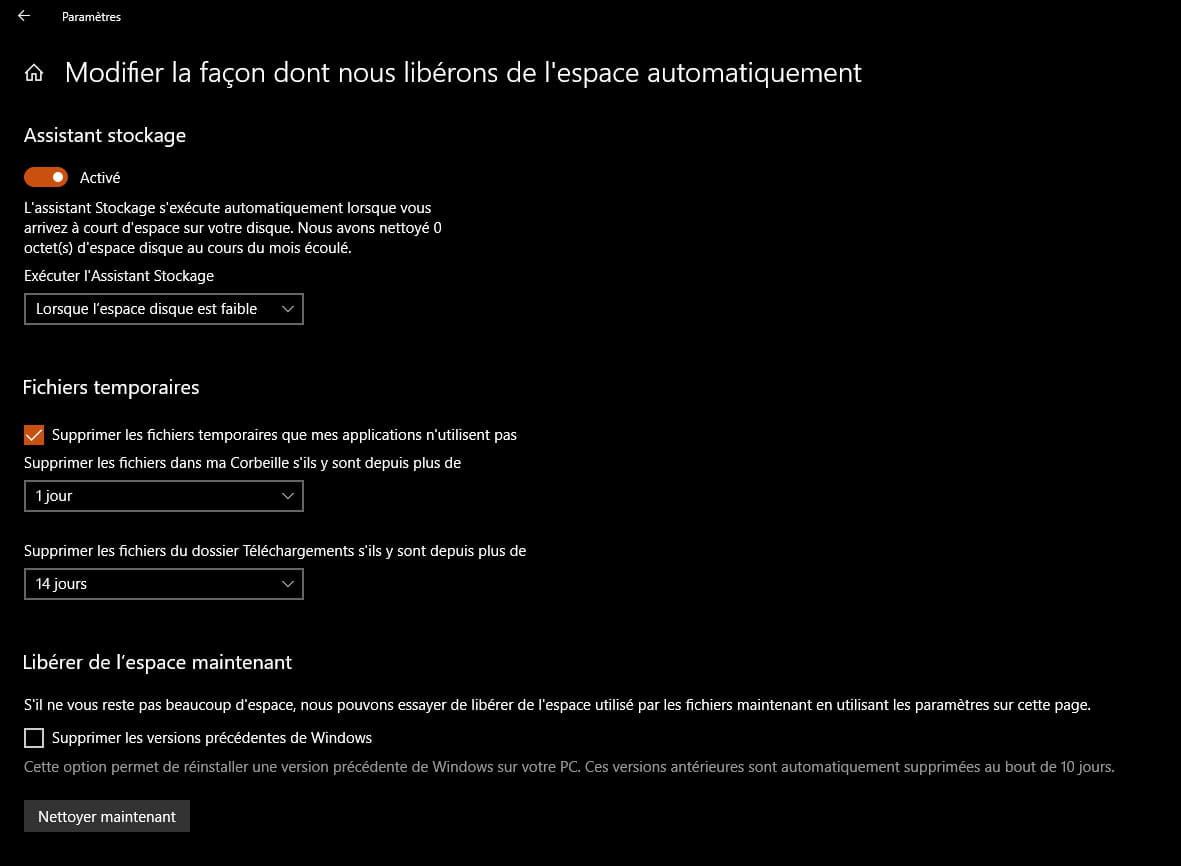
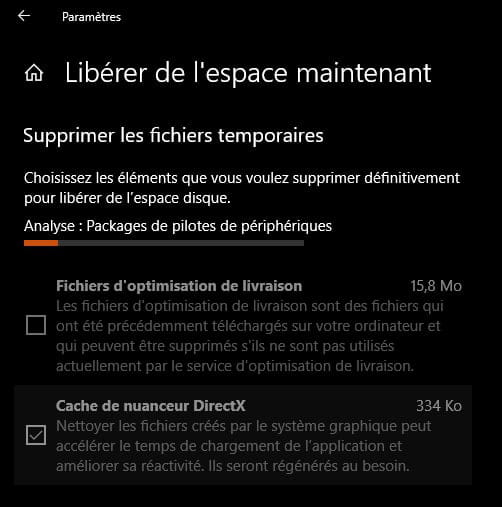
The disk cleanup in W10 is sufficient and removes temporary files:
Settings → System → Storage
Then → Free up space
You have options to configure it.
I believe you didn’t know that if you haven’t seen it yet.
Have you searched for updates to switch back to W10 version 1809?
If not, take a look here for other procedures.
→
I already had a problem with ads opening on startup before I even opened Chrome
A cleanup could have sufficed with AdwCleaner + Malwarebytes (I suggested it to you).
Regarding the ad blocker Adblock, it seems to block less than it did in its early days for the simple reason that agreements with sites allow ads to pass (commercial agreements).
Install uBlock instead.
info:
With the latest version of Google Chrome 71 you can remove/uninstall an extension by right-clicking on the icon next to the address bar, quite handy
After removing Adblock, don’t install uBlock immediately.
Go try it out on YouTube.
Then install the uBlock extension.
Awaiting your feedback.
Have a good evening
See you later
--
pistouri
Good evening again,
Aside from my graphics card, I haven't updated much for now if I remember correctly, and I'm updating my GPU via Nvidia GeForce Experience.
As for cleaning temporary files, I was using the disk cleanup option from the file explorer (via properties of the disk in question).
My Windows Defender dashboard is completely green, so nothing to report.
I'm going to try uBlock then, even though I haven't encountered any problems with AdBlock so far.
However, I just remembered that I share the same Microsoft account with my computer provided by the school and therefore the same Chrome session. On that one, I don’t pay much attention to what goes on since it's only used for taking classes and is rarely connected to the Internet (2-3 times a week). Nevertheless, that doesn't stop it from doing exactly the same as on my main computer, so I wonder if I didn't pick up something from the school computer and then through "synchronization between devices," it ended up on my main computer.
I hope I was clear, I don't know if the two computers are linked, but I suppose it could come from there.
Thank you
Aside from my graphics card, I haven't updated much for now if I remember correctly, and I'm updating my GPU via Nvidia GeForce Experience.
As for cleaning temporary files, I was using the disk cleanup option from the file explorer (via properties of the disk in question).
My Windows Defender dashboard is completely green, so nothing to report.
I'm going to try uBlock then, even though I haven't encountered any problems with AdBlock so far.
However, I just remembered that I share the same Microsoft account with my computer provided by the school and therefore the same Chrome session. On that one, I don’t pay much attention to what goes on since it's only used for taking classes and is rarely connected to the Internet (2-3 times a week). Nevertheless, that doesn't stop it from doing exactly the same as on my main computer, so I wonder if I didn't pick up something from the school computer and then through "synchronization between devices," it ended up on my main computer.
I hope I was clear, I don't know if the two computers are linked, but I suppose it could come from there.
Thank you
pistouri
Posted messages
19008
Registration date
Status
Contributeur
Last intervention
Ambassadeur
8 719
Hello,
Are you using GeForce Experience to update the graphics card?
Check if it offers you an Nvidia graphics driver with My Drivers
Check the box → certified drivers
Uncheck the box → Beta driver
Start the scan.
The graphics driver manages the display but also part of the audio.
Windows Defender is indeed your default antivirus.
For the ad blocker, uBlock is superior.
→
Disable synchronization if you temporarily enabled it
After that, back up your Google Chrome bookmarks
The procedure
Even if it’s synced, back them up on your 2 PCs.
Perform a clean uninstallation of Google Chrome on your 2 PCs
Download or save Revo
Show hidden folders and files like this
Uninstall Google Chrome in Revo
During the uninstallation, check or select scan → Advanced
Select and delete all registry entries
Restart the PC
Delete the Google folder in these 3 directories:
--> C : \ Users\ Username \ AppData \ Local \ Google
--> C : \ Users \ Username \ AppData \ Roaming \ Google
--> C : \ Program files (X86)
--> C: \ Programs (if present)
Delete the Google Chrome shortcuts on the desktop.
Perform a disk cleanup and restart the PC
Hide the hidden files and folders
Reinstall Google Chrome
Chrome 32 bits
Chrome 64 bits
Import your bookmarks
Run a test
Question:
Did you run Malwarebytes on your school PC?
If needed for your school PC
- Revo portable
A+
--
pistouri
Are you using GeForce Experience to update the graphics card?
Check if it offers you an Nvidia graphics driver with My Drivers
Check the box → certified drivers
Uncheck the box → Beta driver
Start the scan.
The graphics driver manages the display but also part of the audio.
Windows Defender is indeed your default antivirus.
For the ad blocker, uBlock is superior.
→
I just remembered that I share the same Microsoft account
Disable synchronization if you temporarily enabled it
After that, back up your Google Chrome bookmarks
The procedure
Even if it’s synced, back them up on your 2 PCs.
Perform a clean uninstallation of Google Chrome on your 2 PCs
Download or save Revo
Show hidden folders and files like this
Uninstall Google Chrome in Revo
During the uninstallation, check or select scan → Advanced
Select and delete all registry entries
Restart the PC
Delete the Google folder in these 3 directories:
--> C : \ Users\ Username \ AppData \ Local \ Google
--> C : \ Users \ Username \ AppData \ Roaming \ Google
--> C : \ Program files (X86)
--> C: \ Programs (if present)
Delete the Google Chrome shortcuts on the desktop.
Perform a disk cleanup and restart the PC
Hide the hidden files and folders
Reinstall Google Chrome
Chrome 32 bits
Chrome 64 bits
Import your bookmarks
Run a test
Question:
Did you run Malwarebytes on your school PC?
If needed for your school PC
- Revo portable
A+
--
pistouri
So I just used my computer in class all day and this time connected to the internet to take the test and right now I'm writing on my "main" computer, so I deduce that the problem must have been resolved, even though I still don't really know how, I know what to do to fix it.
Thank you very much for your help and the time you've given! ^^
Thank you very much for your help and the time you've given! ^^
pistouri
Posted messages
19008
Registration date
Status
Contributeur
Last intervention
Ambassadeur
8 719
I just used my computer in class all day... I assume the problem must have been resolved
Connection with your school's Wifi server maybe
Not enough range?
Did you check the number of Wifi bars?
Checking or updating your network card driver might be a solution
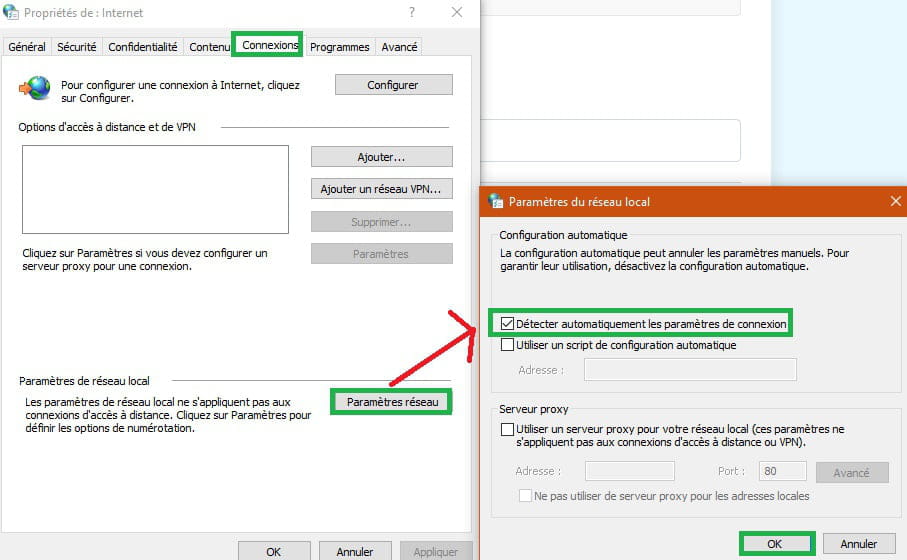
Check if you are not connecting via proxy
Go to Chrome settings then Advanced settings
In the "System" section, click on Open proxy settings. This will open the Internet Properties window.
Go to the Connection tab then Network settings → Automatically detect connection settings.
Did it happen on one site or several?
A+
--
pistouri
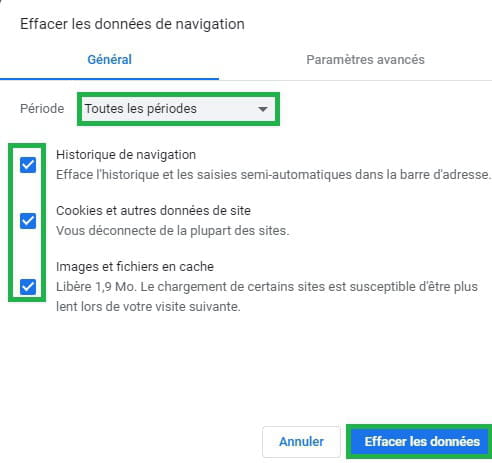
I add that you can regularly clean the cache, cookies, and history in Chrome, and even after each use to start with a clean Chrome session.
Clear everything in the address bar and copy/paste
chrome://settings/clearBrowserData
Then press Enter
Check → All time
Check the 3 boxes → History, cache, and cached images

If you prefer to use Speedyfox....
Clear everything in the address bar and copy/paste
chrome://settings/clearBrowserData
Then press Enter
Check → All time
Check the 3 boxes → History, cache, and cached images
If you prefer to use Speedyfox....
On other sites, I'm not too familiar, but the visual appearance is lacking, I don't know if that's it but I have the impression that everything related to CSS isn't loading, I only have black text on a white background with the different sections of the sites.