
Default photo viewer Windows 10.
Solved
Flo
-
dommage2000 Posted messages 18 Registration date Status Member Last intervention -
dommage2000 Posted messages 18 Registration date Status Member Last intervention -
Hello everyone,
I have a new PC with Windows 10, just like my previous one. I've installed the Windows Photo Viewer that I'm attached to. I opened an image file with it, went to find it in the "Open with" menu, clicked on "Always open with" ... and it doesn’t work. Indeed, every time, Windows 10 opens the next image with its default Photos application.
So I went into the app settings to configure the default program. However, when I click on images, Windows Photo Viewer does not appear in the choices. I only have a few programs (Gimp, Paint) and otherwise it’s the Windows Store, which is useless. In short, it's impossible to set the viewer as default.
I’ve tried several registry modification methods with no change. I’m not sure what else to do, then. I haven’t found anyone else on the internet encountering this problem... Any ideas?
I have a new PC with Windows 10, just like my previous one. I've installed the Windows Photo Viewer that I'm attached to. I opened an image file with it, went to find it in the "Open with" menu, clicked on "Always open with" ... and it doesn’t work. Indeed, every time, Windows 10 opens the next image with its default Photos application.
So I went into the app settings to configure the default program. However, when I click on images, Windows Photo Viewer does not appear in the choices. I only have a few programs (Gimp, Paint) and otherwise it’s the Windows Store, which is useless. In short, it's impossible to set the viewer as default.
I’ve tried several registry modification methods with no change. I’m not sure what else to do, then. I haven’t found anyone else on the internet encountering this problem... Any ideas?
14 answers
-
pistouri Posted messages 19010 Registration date Status Contributor Last intervention Ambassador 8 732
Hello Flo,
I found a method for the Windows Photo Viewer here
With a REG file over here
If you have a unzipper, unzip the archive; otherwise, double click on it
Run → w10-wpv-restore
Click OK to confirm each time (2 times)
No need to restart the PC
You can check it by opening an image
Right-click on an image → Open with → Windows Photo Viewer
Go to Settings → Apps → Default apps
Under photo viewer, click in the box to show the possible choices
Select → Windows Photo Viewer
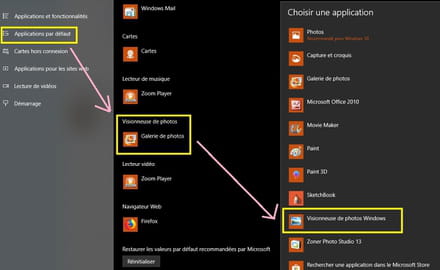
However, I couldn't find how to create the shortcut, even though the installation path is:
This PC\Local Disk C\Program Files\Windows Photo Viewer
or
This PC\Local Disk C\Program Files (x86)\Windows Photo Viewer
We only see .DLL files
REG file information.
This registers the Windows Photo Viewer with the default programs and adds file association settings for the types BMP, DIF, JFIF, JPE, JPEG, JPG, PNG, TIF, TIFF, WDP.
P.S: This is not the same REG file proposed in message 1.
It won't prevent you from having multiple photo viewers, just setting one as default.
Please give us feedback PLS to know if it worked in your next message.
Talk to you soon
-
-
Hi,
you should indeed bypass the error message, I hadn't mentioned it.
Explanation:If you get this error when running the REG file, no problem. Most of the settings would have been written correctly. Perhaps the file got stuck while writing the TIF / TIFF association settings, as the association for TIF / TIFF already exists even after upgrading to Windows 10. You can ignore the error message and move on
Source here
Story of TIF / TIFF, go figure!
Good luck. -
Of course it works!! But with every update or almost, you have to start over, but for just a few seconds lost! It's my favorite viewer unlike W11 or Edge which I hate! For its spying on my company...Good luck! (it works very well!) thank you for reminding me!
-



