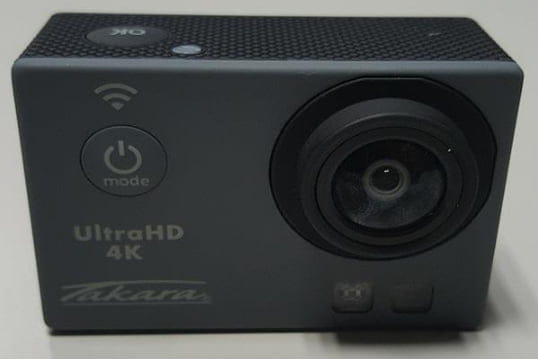
Takara CAM
Solved
Hello,
We bought a Takara CAM but we can't take any photos/videos with it.
It's a small camera that looks like a GoPro, with 2 buttons on the top: MODE to change modes and OK. There are 2 buttons on the side for zooming.
All the buttons work.
The manual doesn't say how to take a photo or a video.
I thought that pressing OK (the most logical thing) would trigger a photo/video depending on the current mode, but there is no reaction. However, this OK button works in the menus when selecting an option.
My question is therefore: how do you take a photo/video with the Takara CAM Mv137?
Thank you very much
Theo
We bought a Takara CAM but we can't take any photos/videos with it.
It's a small camera that looks like a GoPro, with 2 buttons on the top: MODE to change modes and OK. There are 2 buttons on the side for zooming.
All the buttons work.
The manual doesn't say how to take a photo or a video.
I thought that pressing OK (the most logical thing) would trigger a photo/video depending on the current mode, but there is no reaction. However, this OK button works in the menus when selecting an option.
My question is therefore: how do you take a photo/video with the Takara CAM Mv137?
Thank you very much
Theo
9 answers
-
The use of the camera is also very simple, with an On/Off button on the front, which also serves as a mode selector in the general menu of the Takara CS17
EDIT: Please check that the SD card is formatted beforehand.
User manual here: https://www.produktinfo.conrad.com/datenblaetter/1500000-1599999/001577043-an-01-fr-RENKFORCE_4K_ACTION_CAM_RF_AC_4K.pdf

Here. -
Thank you, me too. No way to launch a video/photo after formatting. But for the app, I still don't know how it works.
-
Hello,
After formatting, I was able to take photos. But I can't connect the camera to the app. Does anyone have a solution? -
Same thing with the MV137, you need to format the SD for it to work.
Thanks for the advice.-
-
Hello,
I formatted my camera (MV137) and there's still nothing happening with the "OK" button. :-(
So, I have inserted a micro SD card (a good Class 10 one), I formatted the micro SD card, I tried using the remote control buttons, I read the user manual 2348 times, and I have looked online. And I still can't take photos/videos. :-(
I think I'm going to return it or exchange it.
Thank you very much for your advice!
-
-
After formatting the SD card directly in the camera settings, I can finally take videos and photos. Thanks for the tip!
-
Good evening, having had the same problem, I formatted the SD card directly with the camera and not with the computer.
-
Hi,
And where is the manual?
--
The words in blue are clickable links. -
Hello,
I have the same problem, but even after formatting, I can't get it to work.
I'm not a whiz with computers, maybe I'm messing up a step.
Can you help me?
Thank you -
thank you internet !!!!!!!!!!!!!!!!!!!!!!!!!!!!!!!!!!!!!!!!!!!!!!