Installing Wine on macOS High Sierra
fredrid1973
Posted messages
7
Status
Member
-
Anonymous user -
Anonymous user -
Hello, I followed "Francis"'s instructions for installing Wine and Captvty… unfortunately, when launching, the installation reports an error. It was working fine under an older version of Mac. Is there a way to uninstall the Windows elements installed by Wine and start the installation cleanly?
Thank you for your reply.
Thank you for your reply.
10 answers
-
Good evening,
you throw the entire "captvty-2" folder in the trash, you empty the trash
then, you use AppCleaner to remove the Wine application.
https://freemacsoft.net/appcleaner/
PS: I just completely reinstalled my OS X system and also captvty, and as usual, everything went well - but you need to be very attentive and very careful when downloading Wine, because before going to the download page, you go through an intermediate ad page that imposes a wait of a few seconds, and during the presence of this page, malware often gets installed or tries to install. Each time, my antivirus has eliminated the stuff right away. That's the only drawback I occasionally encounter.
Best regards.
--
Always indicate your system configuration completely - exact model of the computer, exact version of OS. -

Hello and thank you for this quick response. I have deleted the software using CleanMyMac and then reinstalled everything. Here is the screenshot of the indicated errors. I am on macOS 10.13.4, MacBook Pro 15-inch mid-2012 I7 2.6GHz
Best regards.
Fred-
I deleted the software with clean my mac and then reinstalled everything.
Have you used CleanMyMac??
I was talking about the AppCleaner application and not CleanMyMac. I am wary of CleanMyMac as this application tends to quickly delete useful things.
In any case, I don't see where the issue comes from. I don't see the connection with VisualBasic.
I am also on OS X 10.13.4 (on an iMac, not a Macbook, but that doesn't matter).
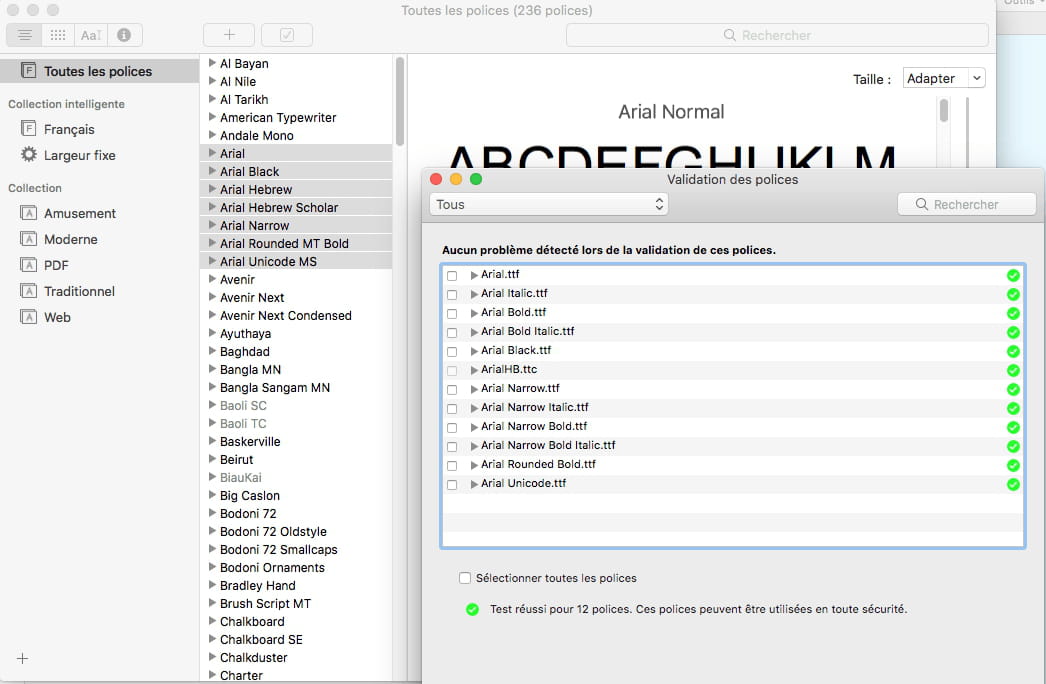
Since the error message mentions a problem with the Arial Font, just in case, try checking, validating the fonts with the Font Book application, and more specifically the Arial fonts,

-
-
And why not validate them all:

--
Always provide your system configuration in full - exact computer model, exact OS version. -
When I restart the installation of wine, another error appears now indicating that the installation has failed; attached is the screenshot file. This seems a bit complicated now, I checked the typography and nothing seems to be wrong on that side.

-
Hello,
The report mentions Bottler....? In my tip under "Install Wine," I indicate to install only Wine and not WineBottler.... Is the issue perhaps coming from that?
--
Always provide your system configuration completely - exact computer model, exact OS version. -
Yet I have only installed Wine and not Bottler as indicated... and since nothing installs anymore... is there a way to delete the Windows installations (from Wine) on the Mac... in order to start from scratch?
-
In my response #1, I indicated how to remove what was installed. There should only be the Winetricks left in a hidden folder here:

but that shouldn't be a problem.
That said, I don't know what else has been done on this Mac, and especially where this "Microsoft Visual Basic" comes from... I don't know the exact history of the Mac.
--
Always provide your complete system configuration - exact computer model, exact OS version. -
I managed to reinstall the elements of wine one by one, but when launching captvty, the same error appears with the screenshot already sent. I don't know what to do anymore; I think I'm going to abandon the installation. However, I did a clean installation of High Sierra 15 days ago, and all my properly installed software works without any issues... I'm going to have to resign myself to using a PC... argh.
-
I don't know what could have happened. Maybe it's possible to bypass this error message...?
A clue:
Microsoft Visual Basic refers to the installation of MS Office. Which was installed on my machine, in the MS Office 2011 version, before my recent reinstallation of High Sierra. And which, moreover, did not trigger an error message. But it is no longer installed at this point. Also knowing that when I install the MS Office suite, I do so, for quite some time, without installing the Microsoft fonts. (too many fonts and a lot of unnecessary duplicates). The source of the problem may be there.
When, in a distant past, I used to install the Microsoft fonts during the installation of MS Office, I saw that they were installed in a separate folder. If MS Office was installed with its own fonts, we should run a test after removing or deactivating the Microsoft fonts that come with MS Office. This can be done from the Font Book.
--
Always provide your complete system configuration - exact computer model, exact OS version. -
Thank you for your response. I checked and I indeed installed MS Office, but I had already done so on my previous OS X version and captvty was working fine. I have an Arial font in the Font Book and it appears in the "web" collection. Since it's a font that I hardly use, I disabled it and tried captvty again...without success. Could there be a missing font needed for the software to launch? However, I don't see an MS Office or Windows collection in the Font Book...
-
The fact that a font belongs to the Fonts folder of macOS or that of Microsoft is not immediately obvious, but by right-clicking on a font, you can choose to show it in the Finder... if I remember correctly, the Microsoft Fonts were then found in a folder right next to the normal Fonts folder of one's own library.
-