
AOL redirected to YAHOO APRIL 18 [Grouped topic]
BREAUJC
Posted messages
47
Status
Member
-
Dan -
Dan -
Hello*
What does this change mean for messaging users?
Thank you in advance*
(* Elements of politeness added by the moderation of CCM.....)
What does this change mean for messaging users?
Thank you in advance*
(* Elements of politeness added by the moderation of CCM.....)
62 answers
- 1
- 2
- 3
- 4
Next
-
The Aol help should provide useful information. Not tested, I don't use Aol
But it says:
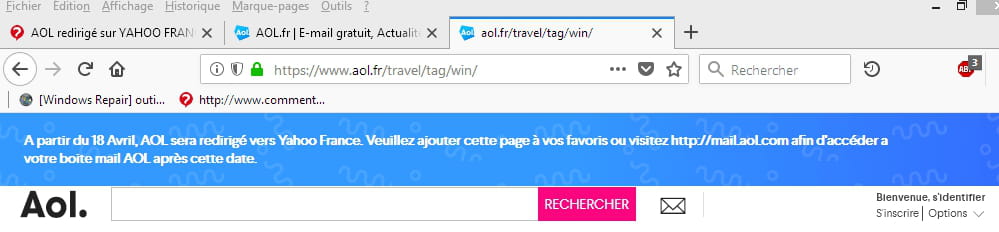
"Starting April 18, 2008, aol.fr will be redirected to Yahoo France. Please visit mail.aol.fr to access your AOL mailbox after this date."
Seen here:
https://assistance.aol.fr/
@+
ADDITIONAL: https://assistance.aol.fr/search/?q=+&s_it=aolfr-help&product=aol-mail
and also:
https://www.verizonmedia.com/policies/ie/fr/verizonmedia/terms/otos/index.html
https://www.verizonmedia.com/policies/ie/fr/verizonmedia/privacy/index.html
-
-
Hello everyone
By opening the AOL address via the Chrome browser, I managed to update the T&Cs. I pasted the regular address into Chrome (https://login.aol.com/?done=https%3A%2F%2Fapi.login.aol.com%2Foauth2%2Frequest_auth%3Fclient_id%3Ddj0yJmk9VlN3cDhpNm1Id0szJmQ9WVdrOVdtRm1aMVU1Tm1zbWNHbzlNQS0tJnM9Y29uc3VtZXJzZWNyZXQmeD1mYQ--%26redirect_uri%3Dhttps%253A%252F%252Foidc.mail.aol.com%252Fcallback%26response_type%3Dcode%26scope%3Dmail-r%2520ycal-w%2520openid%2520openid2%2520mail-w%2520mail-x%2520sdps-r%2520msgr-w%26src%3Dmail%26language%3Dfr-FR%26state%3DeyJhbGciOiJSUzI1NiIsImtpZCI6IjZmZjk0Y2RhZDExZTdjM2FjMDhkYzllYzNjNDQ4NDRiODdlMzY0ZjcifQ.eyJyZWRpcmVjdFVyaSI6Imh0dHBzOi8vbWFpbC5hb2wuY29tL19jcXIvbG9naW5TdWNjZXNzPyZzaXRlU3RhdGU9dXYlM0FBT0wlM0JydCUzQVNURCUzQmF0JTNBU05TJTNCbGMlM0Fmcl9GUiUzQmxkJTNBbWFpbC5hb2wuY29tJTNCc250JTNBU2NyZWVuTmFtZSUzQnJwJTNBJTJGc3VpdGUuYXNweCUzQnNpZCUzQTFhNDI4OWI5LWM5YWQtNDJhZC1iNTg5LTQxM2MwNGQ3ZjczYiUzQnFwJTNBJTNCJmxhbmc9ZnImbG9jYWxlPUZSIn0.Ef6tLIocep1tuhhu8y1_WSCly27xJA0Fw4xwSzsl317A7oOr4iiOcrbwxXNAT_5m647mIwsyybYfE1CGV_tAQnww97fHnlYOasAThet8wgXnCzJF-C6-8fVrVhvUJlclMNU9e2Od9skQNXRrsn0kRAO_C66ynezFGFEmH7uhEEo%26nonce%3Dfiv3vVge I was then asked to re-enter my login and password (just like to access my emails) and I then had the screen where it asks to validate the new T&Cs, also providing access to the list of all the advertising agencies to deactivate manually (for those who want, be prepared for a few minutes). I had the same thing on Yahoo a few days ago.
So there you go, I think we reach the same result by clicking on the line "click here to get started" in the email they send.
Personally, nothing worked on Internet Explorer, I had to switch to Chrome for all the buttons and that intermediate screen to appear after entering my login and password. If this can help some...
They really get on my nerves... I've been using AOL mail for over 15 years, it's not easy to stop using it with all the contacts that use that address and the more time goes on, the more features they cut (the web version is already much less efficient than the AOL Desktop one...) =/
-
-
Hi, here's how I manage to log in this morning!
I go to https://login.aol.com/?done=https%3A%2F%2Fapi.login.aol.com%2Foauth2%2Frequest_auth%3Fclient_id%3Ddj0yJmk9VlN3cDhpNm1Id0szJmQ9WVdrOVdtRm1aMVU1Tm1zbWNHbzlNQS0tJnM9Y29uc3VtZXJzZWNyZXQmeD1mYQ--%26redirect_uri%3Dhttps%253A%252F%252Foidc.mail.aol.com%252Fcallback%26response_type%3Dcode%26scope%3Dmail-r%2520ycal-w%2520openid%2520openid2%2520mail-w%2520mail-x%2520sdps-r%2520msgr-w%26src%3Dmail%26language%3Den-US%26state%3DeyJhbGciOiJSUzI1NiIsImtpZCI6IjZmZjk0Y2RhZDExZTdjM2FjMDhkYzllYzNjNDQ4NDRiODdlMzY0ZjcifQ.eyJyZWRpcmVjdFVyaSI6Imh0dHBzOi8vbWFpbC5hb2wuY29tL19jcXIvbG9naW5TdWNjZXNzPyZzaXRlU3RhdGU9dXYlM0FBT0wlM0JydCUzQVNURCUzQmF0JTNBU05TJTNCbGMlM0Flbl9VUyUzQmxkJTNBbWFpbC5hb2wuY29tJTNCc250JTNBU2NyZWVuTmFtZSUzQnNpZCUzQWI1YzM5MDdhLTMzYjQtNGQxNi1iZTVjLWQwNDg4ZTk1ODEwMiUzQnFwJTNBJTNCJmxhbmc9ZW4mbG9jYWxlPVVTIn0.B2uOfhZik5192KarD17m0FtKhrXlUrSHw04aYpb5kFyif2lY-ZnEBXTM2nxQHdyAW7hHX3u0xSxr1ThhCUlL4MAR8qfJHZad86oICRF0TOE8WVKDya9LI4_aVIK7_AXSoiJidBfiqAgCIXxH8uzOYHNVhpj0Q4DJUELUvjy0Rpk%26nonce%3DjtCEAACVmBNecQm2kUQhEd7F1WUAPQQf&src
I enter my username and then my password... then I land on the Yahoo site
and I re-enter the address https://login.aol.com/?done=https%3A%2F%2Fapi.login.aol.com%2Foauth2%2Frequest_auth%3Fclient_id%3Ddj0yJmk9VlN3cDhpNm1Id0szJmQ9WVdrOVdtRm1aMVU1Tm1zbWNHbzlNQS0tJnM9Y29uc3VtZXJzZWNyZXQmeD1mYQ--%26redirect_uri%3Dhttps%253A%252F%252Foidc.mail.aol.com%252Fcallback%26response_type%3Dcode%26scope%3Dmail-r%2520ycal-w%2520openid%2520openid2%2520mail-w%2520mail-x%2520sdps-r%2520msgr-w%26src%3Dmail%26language%3Den-US%26state%3DeyJhbGciOiJSUzI1NiIsImtpZCI6IjZmZjk0Y2RhZDExZTdjM2FjMDhkYzllYzNjNDQ4NDRiODdlMzY0ZjcifQ.eyJyZWRpcmVjdFVyaSI6Imh0dHBzOi8vbWFpbC5hb2wuY29tL19jcXIvbG9naW5TdWNjZXNzPyZzaXRlU3RhdGU9dXYlM0FBT0wlM0JydCUzQVNURCUzQmF0JTNBU05TJTNCbGMlM0Flbl9VUyUzQmxkJTNBbWFpbC5hb2wuY29tJTNCc250JTNBU2NyZWVuTmFtZSUzQnNpZCUzQWI1YzM5MDdhLTMzYjQtNGQxNi1iZTVjLWQwNDg4ZTk1ODEwMiUzQnFwJTNBJTNCJmxhbmc9ZW4mbG9jYWxlPVVTIn0.B2uOfhZik5192KarD17m0FtKhrXlUrSHw04aYpb5kFyif2lY-ZnEBXTM2nxQHdyAW7hHX3u0xSxr1ThhCUlL4MAR8qfJHZad86oICRF0TOE8WVKDya9LI4_aVIK7_AXSoiJidBfiqAgCIXxH8uzOYHNVhpj0Q4DJUELUvjy0Rpk%26nonce%3DjtCEAACVmBNecQm2kUQhEd7F1WUAPQQf&src
Yay!!!!
Don't forget to log out for those who have multiple AOL addresses, and repeat the same tactic each time :/
The ideal afterwards is to group everything on Thunderbird ] on PC or mobile, it's simpler and automatic. -
I have been on AOL since 1998 and I really hope that the AOL mail service in France will continue to exist; I don’t want to change my email as it would complicate many things (including my business cards).
I have nothing against Yahoo, but I prefer AOL as an email service. However, the Yahoo page for information is still better than the old one from AOL France, which was rarely updated and had outdated information.
In any case, as long as AOL in the USA exists, I don’t think our email accounts will be deleted. If AOL France disappears, there is still a way to connect through AOL US via this link:
https://www.aol.com/news/?icid=gnavbar_rootnews_maing16-entertainment
(at the top right of the page: LOGIN / JOIN for non-English speakers)
long life and prosperity to AOL! The US version is great!!! -
We received the email from AOL this evening regarding the acceptance of the new terms and conditions.
In the middle of this email, it says 'Click here to get started.': we click on it, enter our AOL email credentials, and then we are redirected to Yahoo.fr, and nothing happens there. Does it happen the same way for you? If so, what should we do? Thank you for your help.-
-
-
yes, same here. Nothing works. EVERYTHING is redirected to a Yahoo page. And there, the AOL credentials do not work.
It seems that we need to accept the new terms and conditions.
If someone has managed to validate, could they explain to us how and especially which link they clicked on because I’ve tried everything and nothing works. -
-
-
-
Good evening,
I received today the letter from AOL to accept the new Terms of Service before May 25.
But it's impossible for me because, unlike others, there was no validation button at the bottom of the letter.
What should I do?
And what about those who will be away for a week in a dead zone or a corner of the world without internet?-
Hello, same thoughts for me: we have to accept and validate the TOU: but how?? the links take me to Yahoo where I'm not registered and I don't want to be (but we might be forced to)
See you! -
-
-
same situation here.
I found this to contact AOL: http://assistance.aol.fr/form/contact/
No reply yet...
So, fearing the worst, I saved all my contacts, and I'm holding my breath until Friday...
Hoping that by then they'll send us the magic button to validate these new terms and conditions...
It's a big mess, after all... -
-
-
Good evening,
Here is a message from Yahoo:
Dear user,
In June 2017, Yahoo and AOL joined forces to become a single company called Oath. We have now unified and updated our Terms of Service and our Privacy Policy that govern our relationship with you.
These documents explain how Oath and its brands, including Yahoo Mail, securely protect and manage your data and provide you with high-quality experiences and content.
In accordance with the new General Data Protection Regulation, we have made changes to our site to help you better understand how we collect and manage your data. We will soon provide you with more information and give you the ability to easily control your data. You can find additional information here.
The new Terms of Service and the new Privacy Policy will take effect on May 25, 2018. If you continue to use our products and services starting May 25, 2018, you accept the new Terms of Service and how we use your data as described in our Privacy Policy. If you do not wish to be bound by the new Terms of Service and the new Privacy Policy, you can choose to delete your account and stop using our services before May 25, 2018.
Please consult our FAQ for additional information regarding the new Terms of Service and the new Privacy Policy and their respective changes.
If you have any questions or need further assistance, please visit our help pages.
Thank you for your continued loyalty and support.
Sincerely,
Oath
@+
--
Always provide your complete system configuration - exact computer model, exact OS version.-
Hi
Thanks for the info for users (personally, I don't use either Yahoo or AOL)
It mainly seems to provide guidelines for privacy rules (which alone would be enough to switch providers....) but doesn't give much indication for those who originally had AOL addresses and seem to struggle to recover them....
They will have to use the contact form hoping that with an AOL address they will be recognized
https://io.help.yahoo.com/contact/index?page=home&locale=fr_FR&y=PROD_ACCT
To be continued.... -
-
-
-
-
-
You need to open a Yahoo account; it's mandatory. Then, go to the Yahoo mail box and import your AOL emails. They will ask for a mobile number to authenticate you. After that, you'll enter your old AOL address and your old password, and you'll be able to import your emails and archives. However, I couldn't import my contacts; it keeps bugging. That's it.
-
Thank you for the info for users
AOL could have sent an email to all users outlining the procedure (unless they did and it went unnoticed by some...?)
If you have a link to "this user manual," please share it... it would "reassure" those who might (rightfully) hesitate to create a Yahoo account in addition.....
The contact import bug you mentioned might be a hassle.... AOL users should save their contacts one way or another before transferring....- Thank you all for these tips, I was able to open my AOL mailbox with the link https://login.aol.com
I then opened a Yahoo account and I will try to add an email address!
For my contacts, if that doesn't work, I'll get to work with the list I had taken care to print! Have a good day and I'll get back to you if there's a problem.
-
-
-
-
Hello,
From what I understood by reading the US press on the subject
No need to "read the press", just go to the source:
 Dear user,

In June 2017, Yahoo and AOL joined forces to become a single company called Oath. We have now unified and updated our Terms of Service and our Privacy Policy that govern our relationship with you.

These documents explain how Oath and its brands, including Yahoo Mail, protect and manage your data securely and provide you with high-quality experiences and content.

In accordance with the new General Data Protection Regulation, we have made changes to our website to help you better understand how we collect and manage your data. We will soon provide you with more information and give you the opportunity to easily control your data. You can find additional information here.

The new Terms of Service and the new Privacy Policy will take effect from May 25, 2018. If you continue to use our products and services from May 25, 2018, you accept the new Terms of Service and the way we use your data as described in our Privacy Policy. If you do not wish to be subject to the new Terms of Service and the new Privacy Policy, you can choose to delete your account and stop using our services before May 25, 2018.

Please refer to our FAQs for additional information about the new Terms of Service and the new Privacy Policy and their respective changes.

If you have any questions or need further assistance, please refer to our help pages.

Thank you for your continued loyalty and support.

Best regards,
Oath
Then,
https://www.verizonmedia.com/policies/ie/en/verizonmedia/terms/otos/index.html
https://www.verizonmedia.com/policies/ie/en/verizonmedia/privacy/index.html
etc...
Best regards.
-
Hello,
indeed you can continue to read your AOL webmail via the address: http://mail.aol.fr
or also https://mail.aol.com/webmail-std/fr-fr/suite
But indeed, we can additionally, if we wish, view our AOL inbox inside a Yahoo account, as mentioned above, but that is not mandatory.
And besides, there's always the AOL USA site just in case: https://www.aol.com/news/tag/united-states/
Otherwise, I find that the Yahoo page contains a lot of info. I hope they will also integrate information from the Huffington Post in the future.
In any case, even though my AOL email address is old, I will continue to use it because it works well, and I don't want to change everything, I'll get used to it like this. However, I think a little link to the AOL webmail on the Yahoo site could have been helpful for some.-
Yes, indeed, as long as AOL.com (USA) exists and is not dissolved, we will always have the opportunity to access our mailbox.
However, if you check the FAQ of the Oath newsletter, you will read this:
"AOL Mail is free, but we reserve the right to make our services paid at a later date. Of course, we will notify you before any changes."
Change is on the horizon!
We’ll see what AOL has in store for us on May 25, 2018! -
There is already a paid version of AOL through the AOL DESKTOP GOLD software at $4.99 per month:
https://checkout.aol.com/?ncid=mbr_comacqlnk00000001
Unless I'm mistaken, I don't think AOL Mail on its own will become paid because there are thousands of free email offers and many people would leave AOL.
The business model of OATH is precisely to build a very large customer base through its free email service (Yahoo + AOL), and then use the data from this base to generate advertising revenue. If they restrict access to the email services by making them paid, they will earn less advertising revenue because they will have fewer page views.
The hypothesis of making AOL Mail paid (and probably Yahoo Mail as well, because otherwise it wouldn't make sense) can be conceived to the extent that they wouldn't be able to generate sufficient advertising revenue while having a large and very loyal customer base. However, it is a significant risk to lose many customers who would not want to pay for a service they can get for free elsewhere.
-
-
Hello,
All this chatter is fine, but in the end, on a phone, the email retrieval no longer works! And nobody indicates the procedure to get it working like before Yahoo messed things up.
I get a message saying, "unable to retrieve mail, the password for <<aol>> is incorrect." It has been programmed for years and was working!
If someone from Yahoo could indicate the procedure, it would be appreciated; otherwise, I will have to file a complaint with the gendarmerie because it's simply theft and diversion of mail. And I can guarantee you that the law is very clear on this issue.
Looking forward to a response
Thank you
***@*** -
This change is really useless and frustrating. The news is not updated and in the AOL support, we can hardly find anything to help us... The support page is almost empty.
-
it's a complete mess, I'm going to delete my AOL address and switch to Orange, it will be a bit long and complicated to inform my contacts, but I'm fed up!
-
-
Hello,
Where is the difficulty? This sentence is easy to understand!
This sentence means that the address will change starting April 18...
AOL will be redirected to YAHOO FRANCE on that date for users...
---
-
-
Hello,
Only one of my three AOL email addresses is recognized by Yahoo. Why this one and not the others?
Is there no assistance from YAHOO?
I am losing my mailboxes, including my professional one. No help?
Even going through aol.com or aol.us doesn't work.
If the goal is to drive us away, it has worked! -
-
the link from *francis* in the message a little higher allows you to reopen your mail box....THANK YOU again below is the excerpt....
Log in to AOL Mail
AOL Mail Account and password Assistance
Hide graphics | View graphics | Print
As of April 18, 2008, aol.fr will redirect to Yahoo France. Please visit mail.aol.fr to access your AOL mail box after this date.
-
-
Hello,
I encountered the same problem. When you go to the site www.aol.com, you end up on the yahoo.com page, and logging in with the AOL address does not work on that site.
I managed to find the link to AOL webmail:
https://login.aol.com/
Good evening -
Hello
Since several people are creating similar topics, I am changing the title of this one to transform it into a "grouped topic" so that the information (if any) can be shared more easily.
Cya
--
My mission is to kill time and hers is to kill me in turn.
We are quite comfortable among assassins (E.Cioran) -
To migrate these emails and archives once you have opened your Yahoo account, you need to add an account and then you'll be offered Hotmail, Facebook, Gmail, and AOL. Choose AOL and enter your old AOL email address along with the corresponding password for that old AOL address, and it will migrate. The same applies for contacts; select "import new contact," and then choose AOL again, and it should normally import. It bugged for me, so I entered them manually. So, you end up with two mailboxes, one Yahoo and one AOL; all the AOL archives and emails are located in the saved folder of your AOL account. On Yahoo.
-
Hi Alann,
your method doesn't work. When I created my Yahoo account and I go to add or manage accounts, it shows me a page with my Yahoo account + my AOL account and an "add an account" tab. When I click on my AOL account, it asks me for my password, and when I enter it, I end up on a page that says "Please switch accounts; you are logged in as .....@aol.com. You need a Yahoo email address to use Yahoo Mail; create a Yahoo email address or I already have a Yahoo email address." And when I go to this latter option, it shows me the page asking if I really want to disconnect your account, with two choices: no, stay or yes, disconnect me. And no matter what I do... I can't find my AOL emails.
-
-
According to what I understand from reading the US press on the subject, the merger of Yahoo and AOL under the new name Oath will subject Yahoo and AOL emails to the same regime.
With Yahoo, they already have the right to dip into your emails, personal data, etc. to extract information for targeting you for marketing campaigns and sending you personalized ads via email, instant messaging, etc. (a common practice)
With AOL, the terms of use did not include this option, so to level everything up, they will send an email to all AOL users to approve the terms of use that will be similar to Yahoo's.
Therefore, I don't think it's necessary to open a Yahoo account to continue reading your AOL emails since it seems, unless I'm mistaken, that both accounts will continue to exist.
OATH includes: AOL, Yahoo, Tumblr, and Verizon Digital Media Services among others, and I think each will keep its original name; they have just harmonized similar terms of use for everyone, which is to fight against competition from Google and Facebook for digital advertising.
https://marketrealist.com/2018/04/why-verizon-may-close-some-components-of-oath -
Thanks for all this information. For my part, when I type "aol" in my search bar, I have been getting the link "Aol - Yahoo" for a few days now (and now I understand the reasons), but immediately below, there's the link: mail.aol.com /webmail-std/fr-fr/suite which gives me direct access to my emails.
...If that can be helpful?-
Personally, the last information email I received indicates that I will receive an email asking me to accept Yahoo's T&Cs before May 25th so that my account does not get closed. I have not received this email. I continue to access my AOL mailbox through aol.fr. Yahoo does not recognize my AOL email address or my phone number. I am still concerned about what will happen on May 25th. It is unfortunate to have received so little information, especially one stating that our accounts would be closed on May 25th if we did not accept the T&Cs without having received an email to accept them.
-
-
Hello,
I’m joining this forum. I was still able to normally check my emails, but since yesterday, after receiving a request to accept the general conditions in their so-called previous email (which I did not receive), I can no longer access it. In yesterday's email, it says at one point, "We need a few minutes of your attention, click here:
I click and... I END UP ON THE YAHOO PAGE WITH NO WAY TO LOG INTO MY AOL ACCOUNT.
Then:
In order to continue accessing your email account after the 25th, you must confirm that you accept the T&Cs. YES, okay, but when I click, oops, I end up back on the Yahoo page.
I thought I was being foolish, but I get the impression that I'm not the only one who doesn't understand.
So if someone is patient and has the kindness to gently but surely explain it to us, that would be really nice.
I’ve tried several options as some have explained, but I'm still at square one.
Thank you. -
-
-
-
Hello to the Aoliens,
If I understood correctly, you are unable to access your email on your phone "because the AOL password is incorrect." I also had these issues and after several attempts I succeeded. Go figure why!
As for me, this morning my "read" emails ended up in my "deleted" emails. Thankfully I hadn’t emptied that folder in the trash. How did that happen? Has it happened to any of you?
Thank you for your reply.




- 1
- 2
- 3
- 4
Next