Profil d'application OEM
Solved
Hello,
Wanting to uninstall software using Revo Uninstaller, I highlighted the OEM Application Profile. And it was uninstalled!
Since I'm not very knowledgeable, I wonder if this could affect the functioning of my PC? Given that I don't know what this software was that was also in "PROGRAMS & FEATURES".
I thank the person who can inform me about OEM... and let me know how to reinstall it if necessary.
Have a good evening
Best regards.
Configuration: Windows / Chrome 65.0.3325.181
Wanting to uninstall software using Revo Uninstaller, I highlighted the OEM Application Profile. And it was uninstalled!
Since I'm not very knowledgeable, I wonder if this could affect the functioning of my PC? Given that I don't know what this software was that was also in "PROGRAMS & FEATURES".
I thank the person who can inform me about OEM... and let me know how to reinstall it if necessary.
Have a good evening
Best regards.
Configuration: Windows / Chrome 65.0.3325.181
12 answers
-
ContributorHello;
After browsing the Web, this application would be downloaded along with the drivers for the AMD Radeon graphics card (Source)...., if your machine is still running very well after deleting this application, you can let it "run" otherwise do a system restore putting it back to a date before deletion but in my opinion, it is not necessary
Looking forward to your comments, but if none >> Resolved!
SincerelyAging well: It's preferring the time that remains to the time that passes
-
Hello Jmarion3,
Thank you for your response.
I don't know if it has anything to do with this uninstallation, but I find that my PC has become slower
when I turn it on, AVAST takes a long time to load, when I click on G.Chrome the same, and then on my email: everything is happening more slowly?
Is there a link that would allow me to download it? Because you mentioned restoration, but I wouldn't know how to do that!
Thank you in advance for any help you can provide.
Best regards -
ContributorHello mimolette31;
The slowness or other issues of the machine certainly has nothing to do with the removal of this program (subject to ??) but to be sure, I suggest you do a system restore ...
Please communicate the version of Windows >> 7-8 or 10?
See you soon
--
Best regardsAging well: It's to prefer the time that remains to the time that passes
-
Thank you
I have Windows 10
Is that enough information? -
ContributorHello;
To perform a system restore in Windows 10, you need to follow these steps
1-Settings
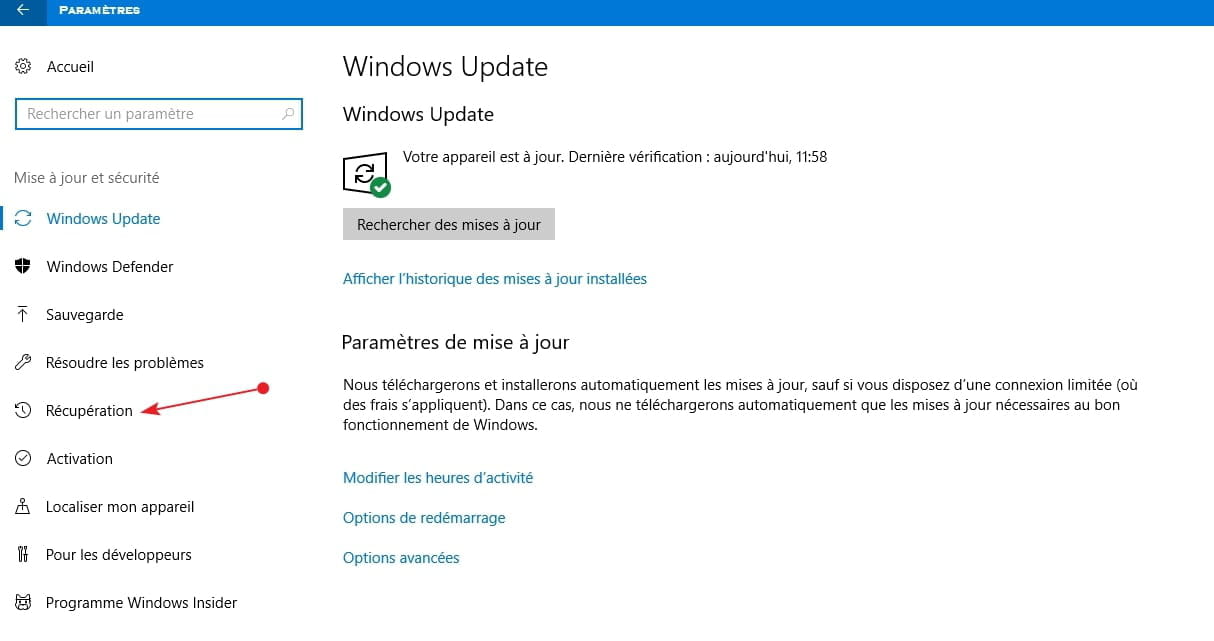
2-Update -Windows Update - Backup Recovery
3-Click on Recovery on the left
4-Restart Now
5-Troubleshoot
6-Advanced Options
7-System Restore >> The machine will restart ... Wait
8-Enter your password
9-In the window that will open >> Click Next
10-Check the small box on the left to have all available restore points
11-Set a date when you had not yet uninstalled the application in question and let the machine do its job so that the system is restored to the chosen date
See you if there are any issues
SincerelyAging well : It's to prefer the time that remains to the time that passes
-
Please excuse me for replying so late to your advice: I managed to follow it and restart the machine.
Following that, AVAST asked me to do a scan and there were several issues. I had to update 2 outdated software and restart... But other things were not working, I am attaching the screenshots:
https://www.cjoint.com/c/HDcn3tAHmxD
https://www.cjoint.com/c/HDcn3YMZSVD
https://www.cjoint.com/c/HDcn4rCDZWD
https://www.cjoint.com/c/HDcn5jfT7hD
I don't know what to do with all this?
After the restart, when I left-clicked on the G. Chrome icon, nothing worked; when I right-clicked, a window opened and the famous OEM Application Profiler appeared (which did not show up in the "Programs and Features"). Here is the screenshot: https://www.cjoint.com/c/HDcoc1XLZqD
I admit I don't know what to do with all these problems?
Thank you if you can help me resolve all or part of this.
Best regards -
ContributorHello;
No worries at all about the delay >> We all have time....
As mentioned above, I don’t think that the deleted program is the cause of the machine's slowdown as it is probably infected or something else???
Strange that the deleted software did not reinstall itself if the system restore went correctly??
Personally, I don’t have the required capabilities to perform a complete analysis of this machine, but I suggest you have it examined by a security contributor whom I will alert via private message so that they can handle the problem. I would ask you to perhaps be a little patient as it’s a holiday today, but most importantly, I would ask you to please stay and follow the upcoming advice until the end!
If that’s okay, I will take the necessary steps right away.
See you later
Best regardsAging well: It’s to prefer the time that remains over the time that passes
-
Thank you very much for everything
If I understood correctly, you are forwarding the issue and I believe that in this case I will receive an email to consult the response.
Thanks again.
Have a great end of the weekend and a good week
Best regards. -
Hello,
A small hiccup has arisen: during the restoration, the PC reverted to winter time.
In the restoration panel under "date and time", I have a window that tells me I do not have access, what should I do?
Thank you in advance.
Have a nice day. -
ContributorHello mimolette31;
1-Malekal_morte (Security Contributor Moderator) replied to my message last night and confirmed, based on your screenshots, that your machine apparently does not have a virus! >> Perhaps he will confirm it to you?
2-Question > The program you accidentally uninstalled should have returned after the restore >> Is it there?
3-To set the time >> Right-click at the bottom right on the time >> At the top >> Adjust Date/Time
4-In the window that opens, disable set time automatically >> Then you will have access to Modify >> You set the time and to finish, you turn it back on .....(above)
See you later
--
Best regardsAging well: It's preferring the time that remains over the time that passes
-
Hello jmarion3,
Thank you for your response.
Regarding the time: it's done, it's OK.
I checked on Revo Uninstaller and it's also OK for OEM Application Profile: it has been re-integrated.
In the Control Panel "Programs & Features", as well as on the CCleaner "Tools", it does not appear....?
I ran a Malwarebytes scan: there were quarantines. I deleted everything. I might have made a mistake?
But my PC has been very slow for a few days now, that's why I was worried about this hasty deletion I performed. But you tell me that it doesn't "affect" anything.
See you later.
Thank you. -
ContributorHello mimolette31;
Thank you for the feedback ...
1-Okay for the time adjustment
2-Free version of Avast always finds issues to get you to buy the paid version, which doesn’t find any issues??
3-If you think your machine has been running slowly for some time, why not post a new topic in the Virus/Security section so that a security contributor can "take a look" just in case??
See you later
--
Best regardsAging well: It's to prefer the time that remains to the time that passes