How to block Firefox updates?
Solved
Marcelo
-
MPMP10 Posted messages 47607 Registration date Status Member Last intervention -
MPMP10 Posted messages 47607 Registration date Status Member Last intervention -
Hello,
My laptop is particularly finicky when it comes to the latest versions of Mozilla Firefox; they simply don’t work. That said, version 56.0.2 is more than enough for what I use it for. However, I’ve always had an issue where every time I close Firefox, it resets the update options (allow Firefox to... install updates...) and each time I restart, it tries to install the latest version, which doesn’t work for me. What I would like is to find a way to block the automatic update of Firefox permanently, without using the software's options menu (perhaps with my firewall, my antivirus, by configuring Windows...)
I have already tried deleting the folder C:\Program Files (x86)\Mozilla Maintenance Service, but without success.
Thank you in advance for your informed opinions.
My config:
Asus X751L series laptop
Windows 8.1
intel Core i3-4030 CPU @ 1.90GHz
64-bit operating system, x64 processor
4.00 GB RAM
Configuration: Windows / Firefox 56.0
My laptop is particularly finicky when it comes to the latest versions of Mozilla Firefox; they simply don’t work. That said, version 56.0.2 is more than enough for what I use it for. However, I’ve always had an issue where every time I close Firefox, it resets the update options (allow Firefox to... install updates...) and each time I restart, it tries to install the latest version, which doesn’t work for me. What I would like is to find a way to block the automatic update of Firefox permanently, without using the software's options menu (perhaps with my firewall, my antivirus, by configuring Windows...)
I have already tried deleting the folder C:\Program Files (x86)\Mozilla Maintenance Service, but without success.
Thank you in advance for your informed opinions.
My config:
Asus X751L series laptop
Windows 8.1
intel Core i3-4030 CPU @ 1.90GHz
64-bit operating system, x64 processor
4.00 GB RAM
Configuration: Windows / Firefox 56.0
1 answer
-
Hello,
Well, in principle, using an outdated browser carries risks of infections or other issues...
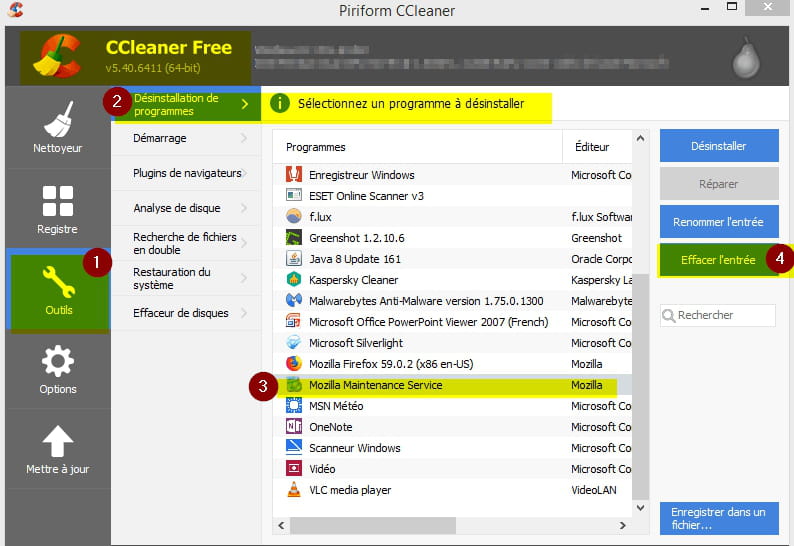
Otherwise, download CCleaner® Free here:
https://www.ccleaner.com/ccleaner/download
Then see the screenshot:
However, once installed, you will need to disable CCleaner® at Windows startup by unchecking the highlighted yellow boxes in the screenshot:
--