
Realtek RTL8723BE WiFi Issues Wireless LAN 802.11n PCI-E NIC
Solved
Seve50
Posted messages
6
Status
Member
-
billmaxime Posted messages 50523 Registration date Status Contributor Last intervention -
billmaxime Posted messages 50523 Registration date Status Contributor Last intervention -
Hello,
No issues so far, and this morning, for no reason, I lost my Wi-Fi connection (it works with an Ethernet cable, but I don't have access to that from my office, which is why I need the Wi-Fi, especially since I have a laptop).
My network card is Realtek RTL8723BE Wireless LAN 802.11n PCI-E NIC.
I'm running Windows 10.
My laptop is an Acer.
Can someone please help me?
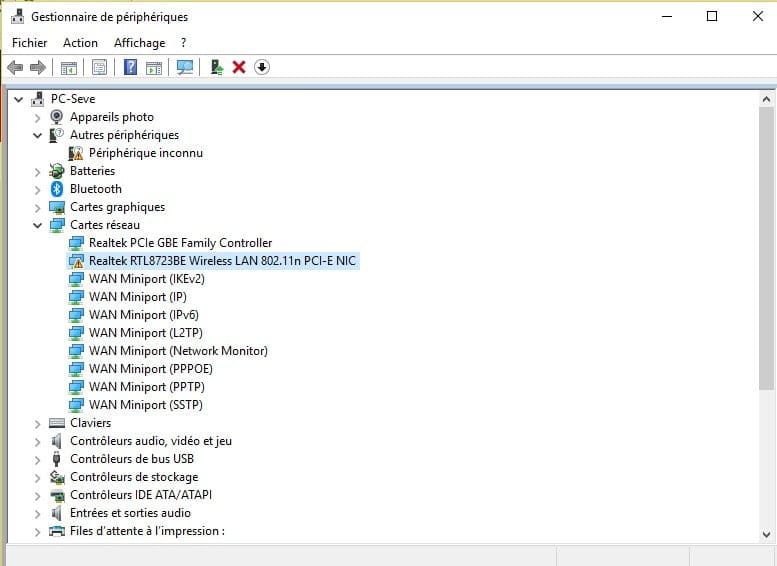
I will try to upload the screenshots from my device manager and the Windows troubleshooting utility.


No issues so far, and this morning, for no reason, I lost my Wi-Fi connection (it works with an Ethernet cable, but I don't have access to that from my office, which is why I need the Wi-Fi, especially since I have a laptop).
My network card is Realtek RTL8723BE Wireless LAN 802.11n PCI-E NIC.
I'm running Windows 10.
My laptop is an Acer.
Can someone please help me?
I will try to upload the screenshots from my device manager and the Windows troubleshooting utility.

3 answers
-
Thank you again for taking the time to respond to me (even if summarizing, and I had already looked it up on Google ????).
I'm talking about this "attention" triangle:
If this is the case, then there is a problem. Except that I don't know how to identify it (perhaps when I started to try to solve my problem on my own I made a mistake?). But if this doesn't belong here, let me know. I'm already relieved that I was able to recover my Wi-Fi connection so I can work (and play, I admit).-
-
Well, while testing my SD card reader and USB ports, I don't see anything unusual... But I’ll eventually find out what’s wrong (not knowing and not understanding really annoys me!) and I’ll come back for help here.
In any case, thank you again for your help, that's nice.
Have a good evening.
(I had already marked the discussion as "resolved" ;-) ).- Your problem may also be related to the Lan driver, try this one and then restart the PC, Lan_Realtek_10.1.505.2015_W10x64_A.zip.
At this hour, it's rather good night!
@+
-


