
Move AppData & Default Drive.
Solved
HanoRobelthon
Posted messages
9
Registration date
Status
Member
Last intervention
-
Malekal_morte- Posted messages 178136 Registration date Status Moderator, Security Contributor Last intervention -
Malekal_morte- Posted messages 178136 Registration date Status Moderator, Security Contributor Last intervention -
Hello,
I'll try to be as clear as possible, and excuse me for any potential spelling mistakes..
Here's my problem:
I recently received a new gaming PC that I assembled myself.. I have an SSD (name: C: - space: 128Go) and an HDD (name: A: - space: 1To) both internal. To start my computer faster, I installed Windows 10 on the SSD.. But now all the game folders and other software that can be placed in AppData are crowding my SSD, which I want to keep exclusively for Windows (and other small software that I frequently use, which I would have selected)
Therefore, I would like to know how I can move the AppData folder so that in the future programs will select it directly and by default in A:, and if possible to move its contents as well.. I'm ready to delete everything (except Windows for that matter) because I don't have much, and my internet speed allows me to quickly re-download everything.
Note:
I have already, by reading help on forums, rummaged through regedit and disk management, and my drive A: was not the default one and was named D:, so I renamed it and set it as the default drive.

I also started to replace in Regedit:
HKEY_LOCAL_MACHINE\SOFTWARE\Microsoft\Windows\CurrentVersion
-> CommonFilesDir
-> CommonFilesDir (x86)
-> CommonW6432Dir
-> ProgramFilesDir
-> ProgramFilesDir (x86)
-> ProgramW6432Dir
I replaced the letters C: with A: in these entries (if there are any I shouldn't have, please let me know)
There you go, I think I said everything, if you need additional information, I try to log in every day.
I'll try to be as clear as possible, and excuse me for any potential spelling mistakes..
Here's my problem:
I recently received a new gaming PC that I assembled myself.. I have an SSD (name: C: - space: 128Go) and an HDD (name: A: - space: 1To) both internal. To start my computer faster, I installed Windows 10 on the SSD.. But now all the game folders and other software that can be placed in AppData are crowding my SSD, which I want to keep exclusively for Windows (and other small software that I frequently use, which I would have selected)
Therefore, I would like to know how I can move the AppData folder so that in the future programs will select it directly and by default in A:, and if possible to move its contents as well.. I'm ready to delete everything (except Windows for that matter) because I don't have much, and my internet speed allows me to quickly re-download everything.
Note:
I have already, by reading help on forums, rummaged through regedit and disk management, and my drive A: was not the default one and was named D:, so I renamed it and set it as the default drive.
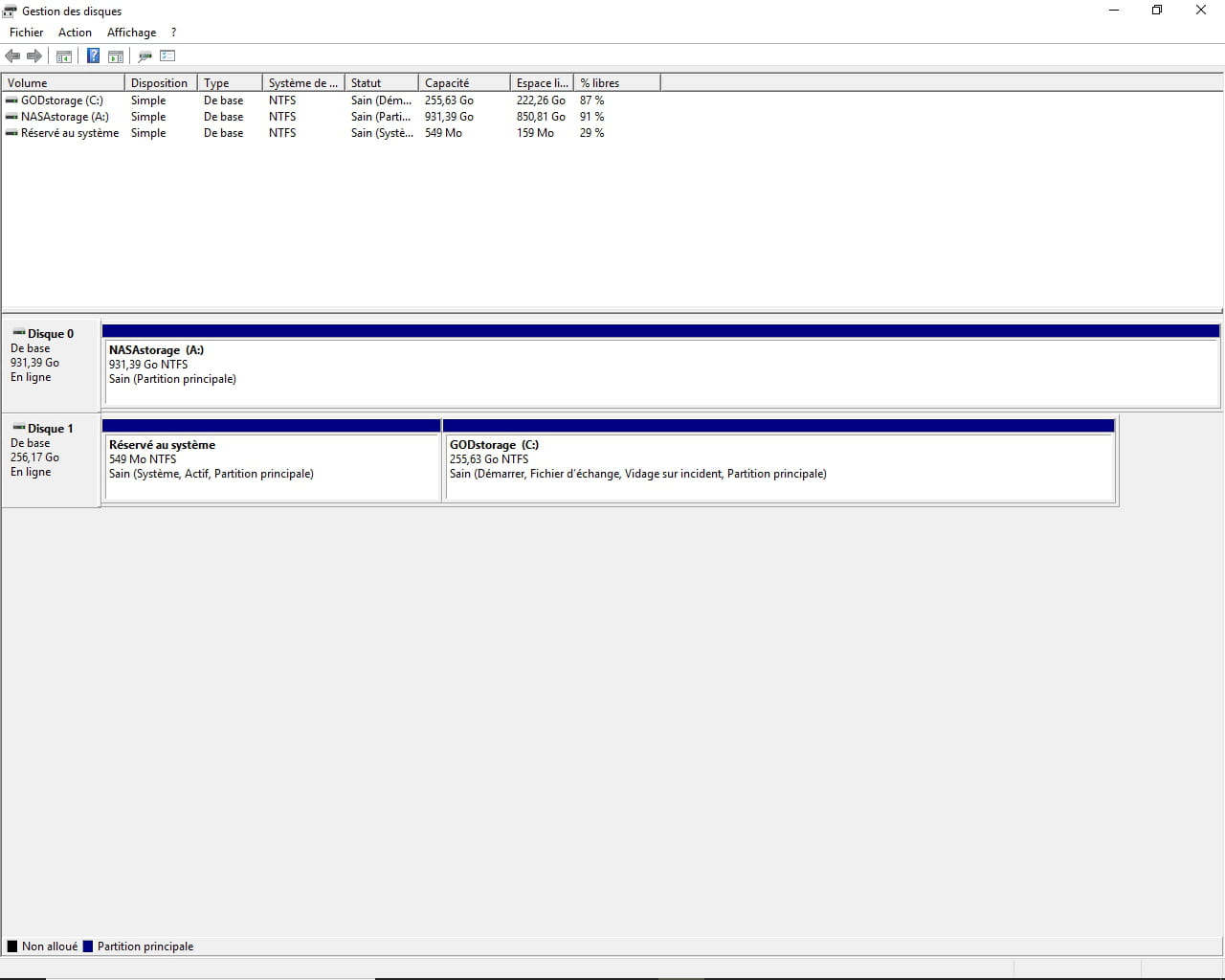
I also started to replace in Regedit:
HKEY_LOCAL_MACHINE\SOFTWARE\Microsoft\Windows\CurrentVersion
-> CommonFilesDir
-> CommonFilesDir (x86)
-> CommonW6432Dir
-> ProgramFilesDir
-> ProgramFilesDir (x86)
-> ProgramW6432Dir
I replaced the letters C: with A: in these entries (if there are any I shouldn't have, please let me know)
There you go, I think I said everything, if you need additional information, I try to log in every day.
1 answer
-
Hello,
See this tutorial: https://www.malekal.com/deplacer-dossier-utilisateur-windows/
For changing the letter of Program Files which is also mentioned on this page: https://www.malekal.com/deplacer-dossier-program-files-windows/
As indicated there, it is not recommended; Microsoft does not support this change.
You risk encountering problems with Windows update installations afterward.
--
Please press a key to continue the disinfection...-
Thank you for your reply,
Regarding the change of letter, I did it when nothing was installed on it yet... I don't think it should cause too many problems... and if it still does, will renaming the disk to its initial letter help prevent any issues? Or will it make things worse??
I will test the tutorial you sent me, let's hope it works. -
I tested the tutorial.. everything went well until 3. Delete the old profile.. When I execute the command ren maill maill.old it shows me an error (of course I replaced maill with the name of my old profile)
ren: Access to the path 'C:\users\noahb' is denied.
At Line:1 char:1
+ ren noahb noahb.old
+ ~~~~~~~~~~~~~~
+ CategoryInfo : WriteError: (C:\users\noahb:String) [Rename-Item], IOException
+ FullyQualifiedErrorId : RenameItemIOError,Microsoft.PowerShell.Commands.RenameItemCommand
If you know why this is happening to me.. you would be a great help..
And also I wanted to test, going to C:\Users\ and renaming my profile (right-click rename) but it didn't even appear.. -
-
