Uninstall 360 antivirus

bazfile Posted messages 58537 Registration date Status Moderator Last intervention -
I'm reaching out to you because I can't uninstall 360 Total Security
With IObit and Revo Uninstaller I can't find the program but it is still on the PC since if I go to run> regedit> programs I can see it but I can't delete it.
With Control Panel > This PC > Program Files > delete it tells me that I need administrator permission.
I followed this tutorial = Unable to uninstall 360 Total Security [Closed] = but AdwCleaner doesn't finish the cleaning, it gets stuck halfway.
I run RogueKiller, Malwarebytes, SuperAntiSpy but it still remains.
I'm asking you if using the Norton remover will delete it? Or is 360 reliable, can I leave it?
Thank you for your help.
5 answers
-
Hello,
If you have really installed 360 Total Security (Chinese Antivirus), it is very easy to uninstall it.
But you must first click on its icon in the taskbar and disable it before uninstalling.
I run it on some of my PCs, and there are no issues with the uninstallation process, which is the same as with any antivirus or other software.
Best regards/ -
Hello,
Try this:
https://support.eset.com/fr/kb146-desinstallateurs-outils-de-suppression-pour-les-logiciels-dantivirus-communs-pour-windows
However, by the way, the software from the publisher "iobit" has a very bad reputation...
--
The idol of the youth is gone, it will leave a big void in my life... -
OK
360 Total Security is not listed
appwiz.cpl does not find 360
Is 360 reliable? Can I keep it? There are some who say it's good, while others say it's a fake antivirus.
What is your opinion, please?-
My opinion is that this is a bad product: Many false positives, overcomplicated, reluctant to uninstall... But it still provides some protection on the device. You can look for another alternative (WD, Avast, Kaspersky, etc.) or stick with 360 Total Security; it's up to you to choose!
Best regards,
-Kragenskul- Well, try to remove it with Revo:
https://www.commentcamarche.net/telecharger/utilitaires/19405-revo-uninstaller/
https://www.360totalsecurity.com/fr/support/how-to/uninstall/
-
-
Hi,
We can remove it with FRST:
Follow the FRST tutorial. ( take the time to read carefully - everything is well explained ).
Download and run the FRST scan,
Wait for the scan to finish, a message will indicate that the analysis is complete.
Three FRST reports will be generated:- FRST.txt
- Shortcut.txt
- Additional.txt
Send these 3 reports to the site https://pjjoint.malekal.com/ to share them.
In return, provide the 3 pjjoint links that lead to the reports here in a new response so that we can consult them.
--
Please press a key to continue the disinfection... -
Hello everyone
Regarding the Chinese Total Security 360 antivirus, I mistakenly deleted the icon from the list of installed software in the control panel via CCleaner. Therefore, I can't see it to uninstall it. However, the shortcut icon is on my desktop and is working. But when I go to the control panel to select the software to uninstall, it doesn't exist. What should I do?
-
Hello.
Download FRST.
Once downloaded, save FRST on the desktop, then right-click on FRST and choose Run as administrator, which should look like this:

 Wait for the message the tool is ready to run to appear, then click on Analyze.
For your information:
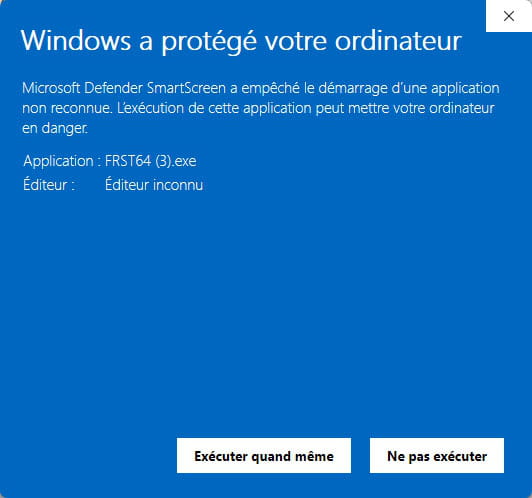
 If you get a Microsoft Defender alert, disregard it, click on More info, then Run anyway, see below.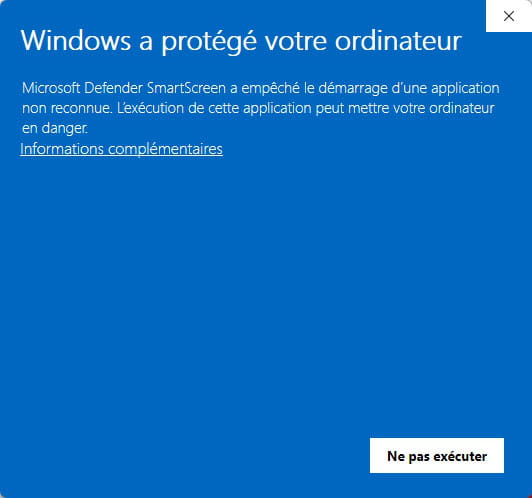

Warning, wait for the messages saying that the analysis is complete to appear.


At the end of the analysis, the two reports FRST and Addition will be on the desktop.


Send the FRST and ADDITION reports to https://pjjoint.malekal.com/ or https://www.catupload.com/.
Then include the two links generated by https://pjjoint.malekal.com/ or https://www.catupload.com/ in your reply.
-