
Excel Rows/Columns that don't go to infinity
Agathe
-
Agathe -
Agathe -
Hello,
I opened an Excel file in which, on one sheet, the rows stop at number 19 and the columns at letter H.
The document does not contain any macros. The rows and columns are not hidden; everything is displayed. Additionally, I haven't set up any custom display.
I also want to point out that depending on the sheets of the file, the display varies, showing either infinite rows or infinite columns at times.
I would like to standardize the display to show infinite rows and columns and no longer limit the display of a sheet to certain columns and rows.
Thank you very much for your help, because I'm struggling quite a bit... :)
Configuration: Windows / Internet Explorer 11.0
I opened an Excel file in which, on one sheet, the rows stop at number 19 and the columns at letter H.
The document does not contain any macros. The rows and columns are not hidden; everything is displayed. Additionally, I haven't set up any custom display.
I also want to point out that depending on the sheets of the file, the display varies, showing either infinite rows or infinite columns at times.
I would like to standardize the display to show infinite rows and columns and no longer limit the display of a sheet to certain columns and rows.
Thank you very much for your help, because I'm struggling quite a bit... :)
Configuration: Windows / Internet Explorer 11.0
6 answers
-
Hello,
Infinity is a mathematical concept but does not exist in computing, which always has measurable limits, even if they are large.
In the latest versions of Excel, the maximum number of rows for a sheet is about 1 million, and the maximum number of columns is about 55,000.
The display of rows/columns on the sheets varies depending on the number of rows or columns used. On a blank sheet, the display of rows/columns is adjusted to the screen resolution. -
Thank you very much thev for this answer. However, do you know how I can make the lines that do not appear appear? Typically in my example, how can I make the lines between number 19 and one million show up?
-
Could you send the file that contains your mysterious sheet?
 1) Go to https://www.cjoint.com/
 2) Click on [Browse] to select your file (max 15 MB)
 3) Scroll down to click on the blue button [Create Cjoint link]
 4) After a few seconds, the second page appears, with the link in bold; right-click on it and choose "Copy link"
 5) Return to your discussion on CCM, and in your message, click "Paste".
=>See the guide https://www.commentcamarche.net/faq/29493-utiliser-cjoint-pour-heberger-des-fichiers -
-
-
Hello
...and of course you have checked that these pages are not in "page break" display mode,
cheers
--
The quality of the answer mainly depends on the clarity of the question, thank you! -
-
Hello,
the workbook may not have a macro, but still check in VBE if the ScrollArea property of your sheet is restricted to a range.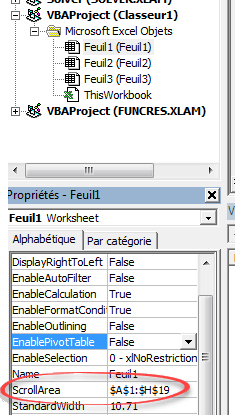
eric
--
By continuously trying, we eventually succeed.
So the more it fails, the more chances we have that it works. (the Shadoks)
In addition to the thank you (yes, yes, it happens!!!), remember to mark it as resolved. Thank you -



