PC portable écrit chiffre à la place des lettres
Solved
Avlondom
Posted messages
13
Status
Membre
-
adrienjaune -
adrienjaune -
Bonjour,
Depuis l'achat de mon ordinateur asus, je constate qu'il écrit des chiffres à la place de certaines lettres( je précise qu'il possède aussi un clavier tactile ,qui lui n'a aucun soucis).
Par exemple: à la place du" o "apparaît un 6 , le "L" en "3"....
J'arrive tout de même à écrire normalement en appuyant sur la touche "fn" en même temps que j'écris, or, cette solution ne me conviens pas, ...c'est pénible de devoir systématiquement appuyer sur cette touche pour pouvoir espérer écrire quelque chose ou être obligé d'utiliser le clavier numérique.
Je cherche une solution durable à ce problème , pouvez vous m'aider?

Depuis l'achat de mon ordinateur asus, je constate qu'il écrit des chiffres à la place de certaines lettres( je précise qu'il possède aussi un clavier tactile ,qui lui n'a aucun soucis).
Par exemple: à la place du" o "apparaît un 6 , le "L" en "3"....
J'arrive tout de même à écrire normalement en appuyant sur la touche "fn" en même temps que j'écris, or, cette solution ne me conviens pas, ...c'est pénible de devoir systématiquement appuyer sur cette touche pour pouvoir espérer écrire quelque chose ou être obligé d'utiliser le clavier numérique.
Je cherche une solution durable à ce problème , pouvez vous m'aider?

12 answers
jeannets
Posted messages
28484
Registration date
Status
Contributor
Last intervention
Ambassadeur
6 591
Good evening,
These are the keys of the Numeric Pad, look closely, they are written on the keys.
You just need to hold down the Fn key and press the "Num Lock" key which is at the top of the keyboard with the function keys, it's often F11, and then release it.
Now your keyboard is entirely alphabetical...
It's written in your manual.. and in that of all PCs of this kind.

These are the keys of the Numeric Pad, look closely, they are written on the keys.
You just need to hold down the Fn key and press the "Num Lock" key which is at the top of the keyboard with the function keys, it's often F11, and then release it.
Now your keyboard is entirely alphabetical...
It's written in your manual.. and in that of all PCs of this kind.

jeannets
Posted messages
28484
Registration date
Status
Contributor
Last intervention
Ambassadeur
6 591
The keyboard in the photos doesn’t look like what’s indicated…
Here’s what I found.
Obviously, I don’t understand how to remove the numeric keypad..?? Surely not with F11… maybe Fn+CapLock but still, there must be at least a manual provided with this PC…. or maybe a help file that’s already in the files on the hard drive… one should also look a bit..
Here’s what I found.
Obviously, I don’t understand how to remove the numeric keypad..?? Surely not with F11… maybe Fn+CapLock but still, there must be at least a manual provided with this PC…. or maybe a help file that’s already in the files on the hard drive… one should also look a bit..
Hello....
Which keys have an inscription the same color as the Fn key?
Best regards,
See you later
--
"He who wants to climb a mountain starts from the bottom!"
Signed: "Gillette" aka "nobody"! ;) (°!°)
Which keys have an inscription the same color as the Fn key?
Best regards,
See you later
--
"He who wants to climb a mountain starts from the bottom!"
Signed: "Gillette" aka "nobody"! ;) (°!°)
jeannets
Posted messages
28484
Registration date
Status
Contributor
Last intervention
Ambassadeur
6 591
Yes, indeed, I read the same thing…
But they also say that this keyboard is an optional feature that varies with the supplied keyboards, depending on production and country… so it’s not always the same…
I would add that this keyboard can certainly also change with the drivers included in Windows 10… And later with updates…
When I talk about the manual, I’m not talking about the downloadable one, I’m referring to the one that came with the device… which should be adapted.
Because it is obvious, according to the user photo, that the engravings on the keys are different… but maybe not the function..??
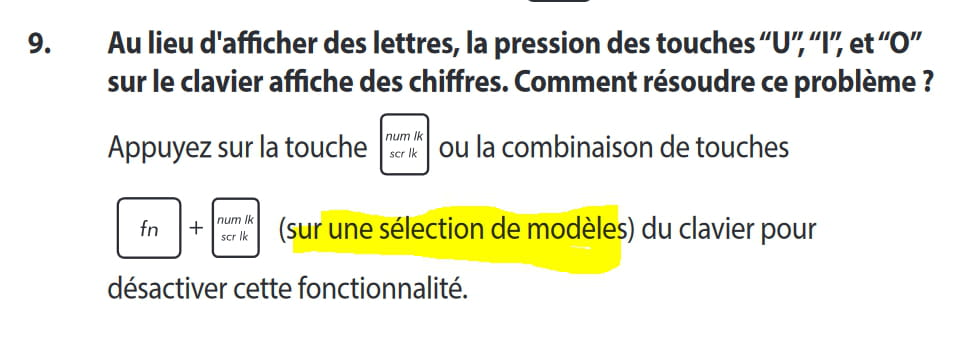
I think it’s simply a press on the "Num Lk" key that activates the numeric keys…
AND (Fn+Num Lk) to deactivate it
In my opinion, there are two functions… one to activate (Num Lk) and another to deactivate (Fn+Num Lk) this is what I understand from an ambiguous text.
But they also say that this keyboard is an optional feature that varies with the supplied keyboards, depending on production and country… so it’s not always the same…
I would add that this keyboard can certainly also change with the drivers included in Windows 10… And later with updates…
When I talk about the manual, I’m not talking about the downloadable one, I’m referring to the one that came with the device… which should be adapted.
Because it is obvious, according to the user photo, that the engravings on the keys are different… but maybe not the function..??
I think it’s simply a press on the "Num Lk" key that activates the numeric keys…
AND (Fn+Num Lk) to deactivate it
In my opinion, there are two functions… one to activate (Num Lk) and another to deactivate (Fn+Num Lk) this is what I understand from an ambiguous text.
Good evening,
See https://www.commentcamarche.net/faq/6767-touche-fn-bloquee-clavier-numerique
--
See https://www.commentcamarche.net/faq/6767-touche-fn-bloquee-clavier-numerique
--
Very difficult to catch a black cat in a dark room.
Especially when it's not there...
OK ASUS Transformer T101HA
Indeed, there is no Num Lk or numbers printed under the keys u i o k l. This laptop does not seem to have a numeric keypad provided.
Here is the keyboard extracted from page 16 of the manual
(Click on the image to open it enlarged in a new tab)
However, this function exists for certain models
Extract from manual page 77
The manual: https://dlcdnwebsites.asus.com/maintain/web/500.html
When did the problem appear? After an update, or some installation?
--
Indeed, there is no Num Lk or numbers printed under the keys u i o k l. This laptop does not seem to have a numeric keypad provided.
Here is the keyboard extracted from page 16 of the manual
However, this function exists for certain models
Extract from manual page 77
The manual: https://dlcdnwebsites.asus.com/maintain/web/500.html
When did the problem appear? After an update, or some installation?
--
Very hard to catch a black cat in a dark room.
Especially when it's not there...
jeannets
Posted messages
28484
Registration date
Status
Contributor
Last intervention
Ambassadeur
6 591
OK, I mistook it for your photo... so back to square one.
In this case, I give up... even if he doesn't want it.
If we were in front of the keyboard, we could try... Even try all the keys... but from a distance, it's not easy.
But anyway, it's not clear; and the images from the DOC are not like reality..
In this case, I give up... even if he doesn't want it.
If we were in front of the keyboard, we could try... Even try all the keys... but from a distance, it's not easy.
But anyway, it's not clear; and the images from the DOC are not like reality..
Is this PC under warranty?
--
--
It's very hard to catch a black cat in a dark room.
Especially when it's not there...
I invite you to ask the question by email to ASUS
https://www.asus.com/support/Product/ContactUs/Services/questionform/?lang=fr-fr
Specify to them that the numeric keypad keys are activated even though your model does not have a Num LK key, and that you therefore have no way to revert this, and to obtain letters you have to use the Fn key.
There is certainly a way to fix this problem by editing the registry... but that exceeds my skills.
https://www.asus.com/support/Product/ContactUs/Services/questionform/?lang=fr-fr
Specify to them that the numeric keypad keys are activated even though your model does not have a Num LK key, and that you therefore have no way to revert this, and to obtain letters you have to use the Fn key.
There is certainly a way to fix this problem by editing the registry... but that exceeds my skills.
Could it be that by opening the "on-screen keyboard," the Num Lk key might just happen to show up?
--
--
Very difficult to catch a black cat in a dark room.
Especially when it’s not there...
Good evening,
I have an Acer Swift SF 114 32 and I'm facing the same problem...
I downloaded the manual but cannot find the solution in it.
I tried all the keyboard shortcuts, without success...
If someone can help me?
Thank you

If I understand correctly, I need to press the keys: "num lock", "FN", and "F11" simultaneously?
I don't have the "num lock" key, neither on the numeric keypad nor on the other keyboard.
Another name for this key is Num lock or Num Lk
At the top right above the backspace (second to last key)
You just need to press Fn and Num Lock at the same time.