
My wireless button isn't working anymore!
FadiBehnam
Posted messages
18
Status
Member
-
billmaxime Posted messages 50526 Registration date Status Contributor Last intervention -
billmaxime Posted messages 50526 Registration date Status Contributor Last intervention -
Hello, I just opened my Sony Vaio laptop to clean the dust, but when I turned it on, my Wireless button stopped working. Because of this, I can no longer use the internet. And my connection source doesn't have an ethernet cable... But I can go to an internet café if I need to install something, I need help please!
19 answers
-
Hi
What OS is your PC running (W7/W8.1 etc...)
If your Wi-Fi connection works in a café, it should work at home
Right-click on the connection icon in the taskbar
Choose to open the Network and Sharing Center
Check what you have on the home network
Example from my PC via Ethernet

Catch you later
--
The radiation level is higher at the unemployment office than at Chernobyl. -
I am using W7 and for the cyber café I had taken an Ethernet cable.
-
re
I am on W7 and for the cybercafé I took an Ethernet cable
ok, but you are not telling me what you have in local network connection
in the device manager, do you have any ? or /!\ yellow?
what do you have in network adapter in the device manager?
And my connection source does not have an Ethernet cable... But I can go to a cybercafé if I need to install something
what are you connecting to at home?
@+
--
the radiation level is higher at the employment center than in Chernobyl-
No, I don't have any yellow signs. In network adapters, I have: Microsoft Virtual WIFI Miniport; Intel(R) Centrino(R) Advanced-N 6200 AGN; Marvell Yukon 88E8057 PCI-E Gigabit Ethernet Controller.
I have a 4G box, but before my button stopped working, my PC's connection was working. Therefore, I deduce that I broke something when I opened it, but is there any way to use an application to turn this button ON since it is broken?
-
-
re
I have a 4G box, but before my button stopped working, my PC connection was fine. So I deduce that I broke something when I opened it.
Are you sure you didn't reconnect something incorrectly?
No, I don't have any yellow signs; in network adapters, I have: Microsoft Virtual WiFi Miniport Adapter.
Is your PC a laptop or a desktop?
See you later
--
The radiation level is higher at the unemployment office than at Chernobyl. -
re
to connect/activate the Wifi, you must click on FN+1 key at the top of the keyboard
is it the combination/or the key that is no longer working?
@+
--
the radiation level is higher at the employment center than at Chernobyl -
Actually, at Sony, we have a button on the front of the computer called "wireless," and this button is used to turn the Wi-Fi on or off, and the problem is that it no longer works.
-
No, actually at Sony, we have a button on the front of the computer called ''wireless'' and this button is used to turn the wifi on or off and the problem is that it no longer works.
Can you/check if it's still "enabled" in the BIOS
@+
--
the radiation level is higher at the unemployment office than at Chernobyl -
-
How to do it, please?
Sorry, I forgot to send you the link to the procedure
https://lecrabeinfo.net/demarrer-windows-10-en-mode-sans-echec.html
PS: I'm going to sleep
@+
--
The radiation level is higher at the unemployment office than at Chernobyl -
hi
to access the BIOS, start the PC by pressing the ASSIST button
see you
--
the radiation level is higher at the unemployment office than at Chernobyl -
Hi
When I go into the BIOS, I have 4 programs: VAIO hardware diagnostics, reinstall disk C:, reinstall the complete system, and data recovery. Which one should I choose? -
When I go into the BIOS, I have 4 programs
Don't you have several "buttons" with different options?
For example, images of different BIOS
https://www.google.fr/search?q=image+bios&tbm=isch&tbo=u&source=univ&sa=X&ved=0ahUKEwi7vtDpopbVAhVHAcAKHU0ZCAAQsAQILA&biw=1920&bih=888
@+
--
The radiation level is higher at the employment office than at Chernobyl. -
re
No, I don’t have that at all, I just have 4 options (the options I mentioned just before)
Do you have any data to save on your PC?
@+
--
The radiation level is higher at the unemployment office than in Chernobyl. -
Re
No, I don't have anything important, but I don't think formatting my PC will solve the problem. -
re
No, I don't have anything important, but I don't think formatting my PC will solve the problem
check this page to repair your PC without data loss
https://www.malekal.com/reparer-windows10-sans-perte-donnees/
@+
--
the radiation level is higher at the employment center than at Chernobyl -
I think the solutions for my problems are either to buy a WiFi USB key or to change my modem to get Ethernet.
-
re
But the problem is a material problem because the button to activate the wifi no longer works, it is not a system issue.
Disassemble the PC again to see if anything is unplugged.
I think the solutions to my problem are either to buy a USB wifi key or to change my modem to acquire Ethernet.
Indeed, that is one solution.
My source of connection does not have an Ethernet cable.
What is your source of connection?
@+
--
The radiation level is higher at the employment office than at Chernobyl. -
re
ok, you know that there are some with an Ethernet connection?
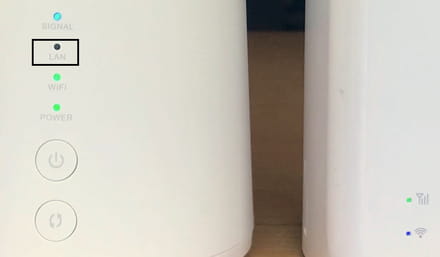
otherwise, it will be a USB WiFi key
@+
--
the radiation level is higher at the unemployment office than at Chernobyl -
hello
Unfortunately, I don't have that model, so I'm going to buy a Wi-Fi key...
ok
@+
--
the radiation level is higher at the unemployment office than at Chernobyl


